The name Yoast SEO comes at the top in the WordPress SEO space. But now people are switching away from Yoast SEO and looking for the best Yoast SEO alternatives.
But why? Well, I see the two top 2 reasons behind it.
The number one reason is limited features. Many Yoast SEO competitors even offer more SEO features in their free version. On top of that, most of the other competitors often include new features to keep their SEO plugins aligned with Google Search updates.
The second reason is the high pricing. The Yoast Premium costs $97/year, but this premium plan does not even include all the premium features, such as WooCommerce SEO, Local SEO, News SEO, and Video SEO, as Yoast sells all these features separately.
In addition, the Yoast license can only be used for a single website. If you need it for multiple websites, you must pay additionally for each website’s license, which makes Yoast even more costly.
So, these are the most common reasons for switching away from Yoast.
But we need an SEO plugin to easily optimize our website for search engines. So, let’s dive into the top 3 Yoast SEO alternatives to find the best fit!
Let’s dive into it!
Top 3 Yoast SEO alternatives.
There are a lot of WordPress SEO plugins available in the market. But after researching and testing, I have finalized the list of only top 3 Yoast SEO alternatives.
I found these 3 alternatives to be more feature-rich and affordable than Yoast. That’s why I picked only 3 SEO plugins as the best Yoast SEO alternatives.
I installed and tested all of these plugins one by one on my testing website to see how they work and what features they do have and don’t. And, in this guide, I will share the key features, pros, cons, and pricing of each Yoast SEO alternative from my list.
Quick Overview of Best Yoast SEO Alternatives
| Yoast | Rank Math | AIOSEO | SEOPress | |
|---|---|---|---|---|
| Active Installations | 10 + Million | 3+ Million | 3+ Million | 300K |
| Ratings & Reviews as per WP Repository | 4.8 rating (out of 27K reviews) | 4.9 rating (out of 7K reviews) | 4.7 rating (out of 4.7K reviews) | 4.8 rating out of (1.1k reviews) |
| Free Version | ✅ | ✅ | ✅ | ✅ |
| Paid Pricing Starts from | $97/year for a single website. | $6.99/month (billed annually) for unlimited personal websites. | $49.60/year for a single website. | $49/year for 5 websites. |
| Money-back Guarantee | 30 days | 30 days | 14 days | 14 days |
| On-Page SEO Checklist | ✅ | ✅ | ✅ | ✅ |
| Reliability Analysis | ✅ (Separate) | ✅ (Combined with on-page SEO checklist) | ✅ (Combined with on-page SEO checklist) | ❌ Not available |
| Search Preview & Editor | ✅ | ✅ | ✅ | ✅ |
| Social Preview & Editor | ✅ Only paid | ✅ Even in Free | ✅ Even in Free | ✅ Even in Free |
| Multiple Keyword Targeting | ✅Only paid | ✅Even in free | ✅Only paid | ✅Even in free |
| Schema | Free schema templates, and no custom schema even in paid. | Free schema templates or create a custom schema with paid. | Only the Basic Schema, such as Article, is free; the rest are paid. | Only paid |
| Redirection Manager | ✅Only Paid | ✅ Free | ✅ Only Paid | ✅ Only Paid |
| 404 Manager | ❌ Not available even in pro | ✅ Free | ✅ Only Paid | ✅ Only Paid |
| Automatically Add Alt Tags to Images | ❌ Not available even in pro | ✅Free | ✅ Only Paid | ✅ Free |
| Local SEO | Separate paid plugin from Yoast, but not available even in Yoast Pro. | ✅ Free, but paid for advanced features. | ✅ Only Paid | ✅ Only Paid |
| W-Commerce SEO | Separate paid plugin from Yoast, but not available even in Yoast Pro. | ✅ Free, but paid for advanced features. | ✅ Only Paid | ✅ Only Paid |
| News & Video SEO | Separate paid plugin from Yoast, but not available even in Yoast Pro. | ✅ Only Paid | ✅ Only Paid | ✅ Only Paid |
| XML & HTML Sitemaps | ✅ | ✅ | ✅ | ✅ |
| Index Now | ✅Only Paid | ✅Free | ✅Only Paid | ✅Free |
| Role Manager | ❌ Not available even in pro | ✅Free | ✅Only Paid | ❌ Not available even in pro |
| Compatibility with Elementor | ✅ | ✅ | ✅ | ✅But not fully functional. |
| Customize Global Meta Settings | ✅ | ✅ | ✅ | ✅ |
| SEO Analyzer & Audit Checklist | ❌ Not available even in pro | ✅Free | ✅Free | ✅Only Paid |
| Competitor SEO Analysis | ❌ Not available even in pro | ❌ Not available even in pro | ✅Free | ❌ Separate plugin |
| Setup Wizard | ✅ Easy | ✅Easy | ✅Easy | ✅Easy |
| Migration from other SEO plugins | ✅Free | ✅Free | ✅Free | ✅Free |
| Try Rank Math | Try AIOSEO | Try SEOPress |
1) RankMath
RankMath is another popular WordPress SEO plugin, with over 3 million active installations and a 4.9 rating in the WordPress Repository. Rank Math is new compared to Yoast, but now it’s the biggest competitor of Yoast.
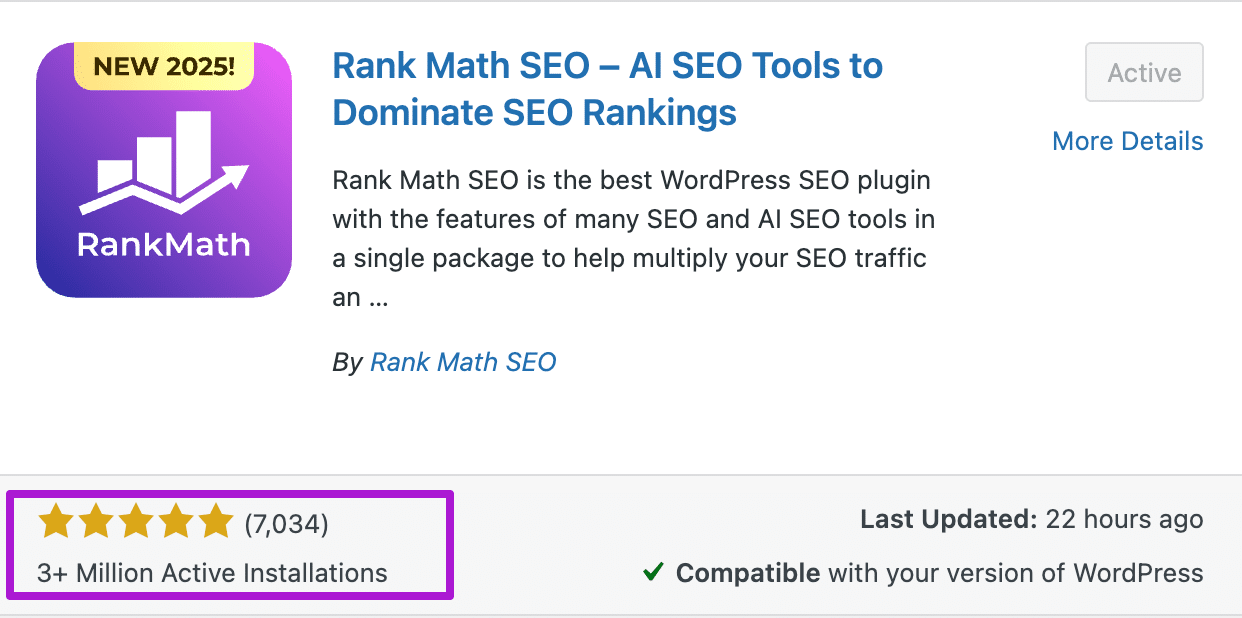
The key reason for choosing RankMath is the best alternative to Yoast, as it has more features, even in the free version, and is also more affordable.
The thing that I liked most about RankMath is that it uses a number-based scoring system instead of a light-based system and gives you a real-time score out of 100. The best thing is on-page SEO score automatically refreshes, and you can see the updated score while you’re optimizing your content for SEO.
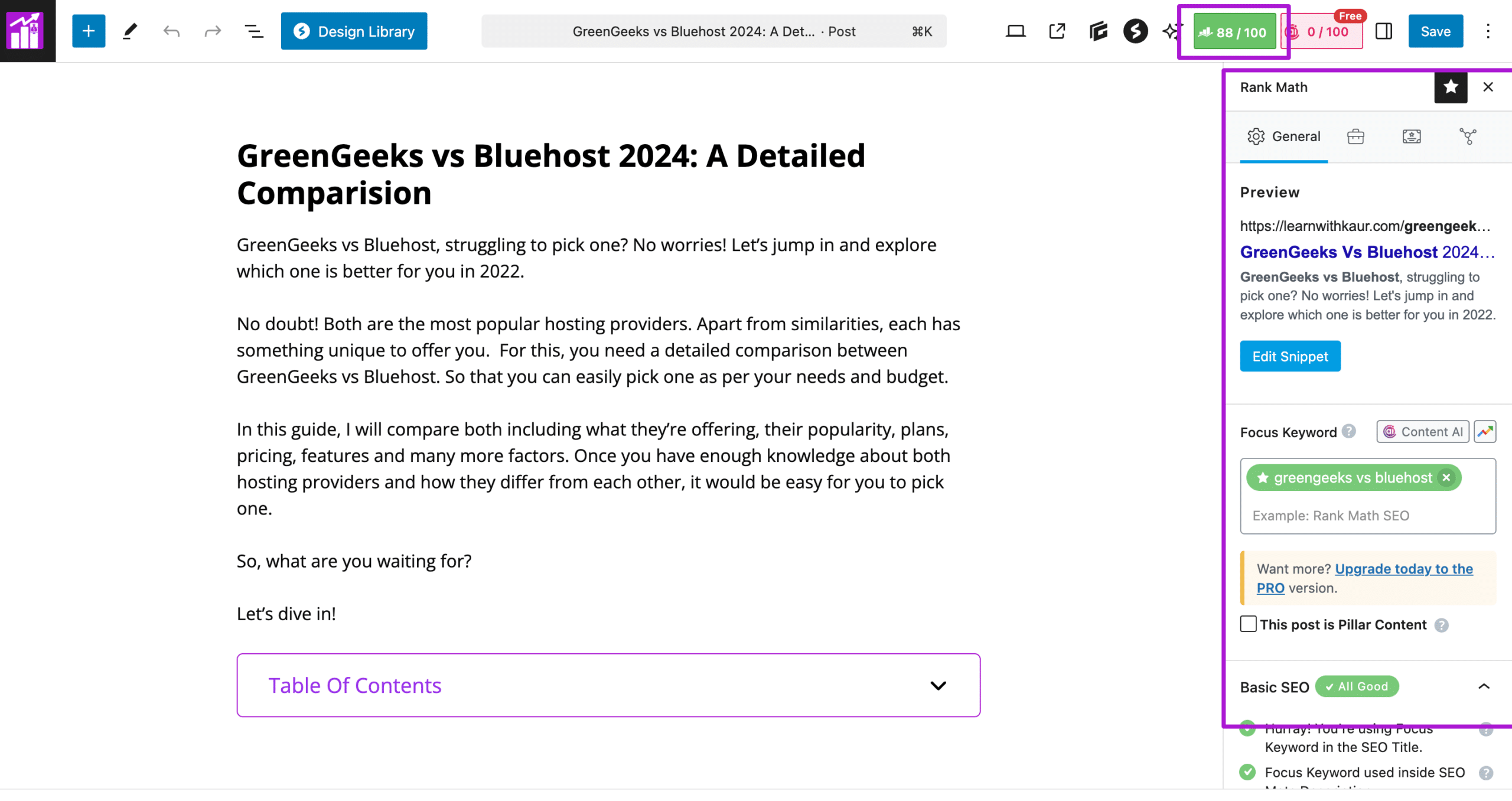
Unlike Yoast, RankMath allows you to optimize for multiple keywords even in its free version. And to start, you can enter your keyword for which you want to optimize your content for SEO.
Just like Yoast, RankMath also has a good On-page SEO checklist that contains all the SEO elements for Title, url, content, headings, and images to help you easily optimize your content for SEO.


But, RankMath doesn’t have a separate readability analysis; it’s just combined with the RankMath SEO checklist. But for your convenience, RankMath has divided its SEO checklist into four parts as you can see in the screenshots.


Key Free Features
- An easy-to-use setup wizard.
- Migrate from other SEO plugins such as Yoast SEO.
- It has a number-based scoring system with a good On-Page SEO Checklist.
- Multiple keyword targeting to optimize your content for up to 5 keywords.
- Preview & Edit Search & Social Snippet.
- A Redirection to easily track, set up, and manage redirections.
- A 404 manager to track and fix 404 errors on your website.
- A Role Manager to control the user’s access to Rank Math features,
- Fully compatible with page builders such as Elementor.
- Basic Local SEO and WooCommerce SEO features.
- A bunch of schema templates.
- Easily create and customize XML sitemaps.
- An Index now features to automatically ping search engines like Bing and Yandex whenever you publish, update, or delete a post.
- Automatically no-follow and open external links in a new tab/window
- Automatically add alt tags to images.
RankMath Pro Key Features
The RankMath Pro is even more powerful, it comes with more advanced features such as,
- Advanced local SEO & WooCommerce features.
- News, video & podcast SEO,
- Keyword rank tracker to track keyword performance and monitor position history.
- Track the index status of your posts/pages directly from Google in WordPress without going into the search console.
- Pro schema templates or create a custom schema.
- White-labelled reports to add your branding to send to clients.
- Client support and management based on your Pro plan.
- Track the top 5 winning & losing keywords.
- Track the top 5 winning and 7 losing posts.
- Advanced redirection module.
Rank Math Pricing
Just like Yoast, RankMath is also available in a free and a premium version. The RankMath free version costs nothing, you can just download it from their official website or install it from the WordPress repository to start using it.
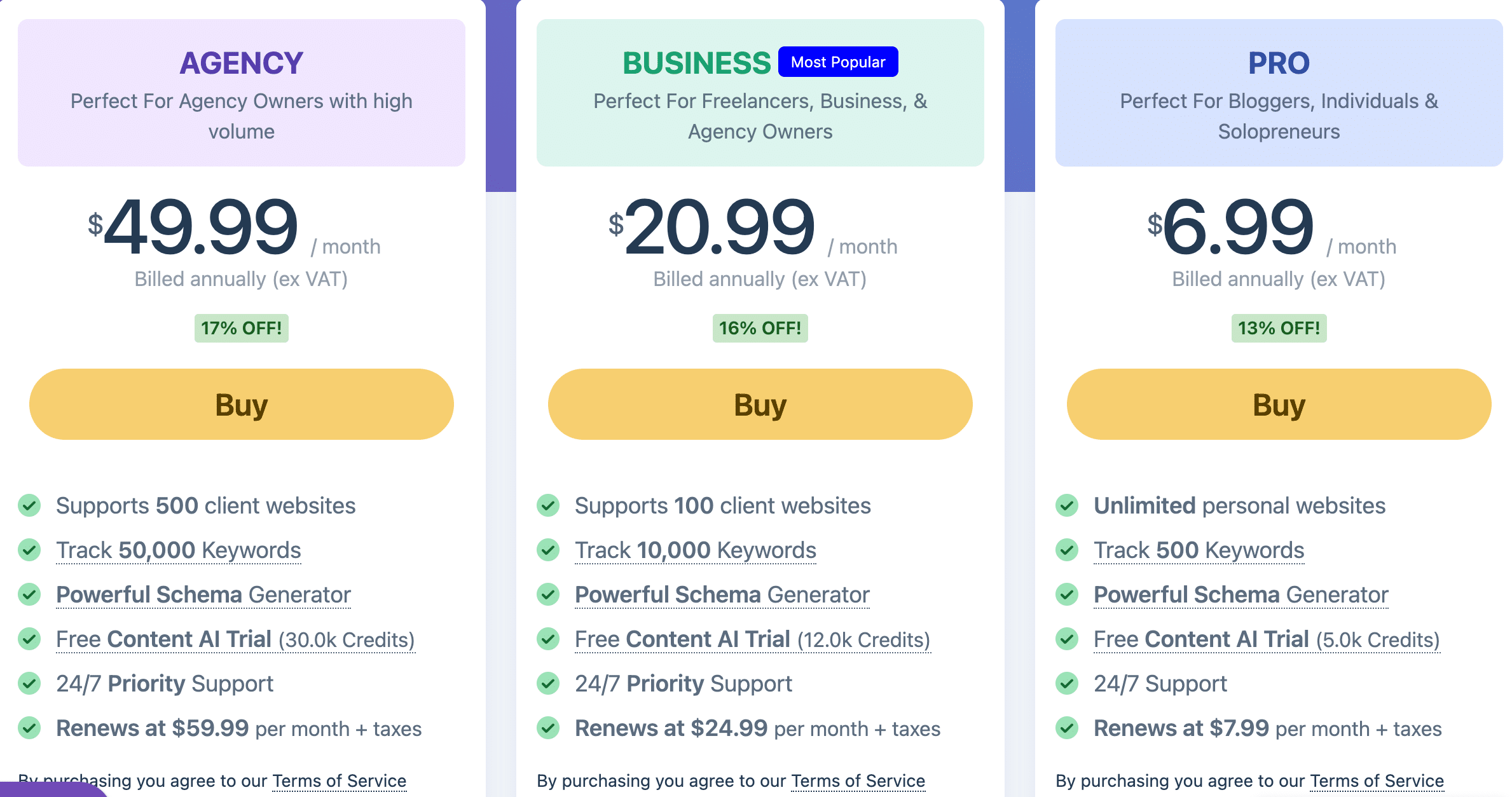
For RankMath Premium, you have to pay according to their subscription plans. Currently, RankMath offers 3 paid plans:
- Rank Math Pro: $6.99/month for unlimited personal websites (billed annually)
- Rank Math Business: $20.99/month for 100 client websites (billed annually)
- Rank Math Agency: $49.99/month for 500 client websites. (billed annually)
RankMath Pros & Cons
Let’s now discuss some pros and cons that I realized while researching, testing, and using RankMath so far.
RankMath Pros:
Beginner-friendly & Easy-to-use interface.
The RankMath plugin is quite easy to use, and when you first install it, just like Yoast, it also gives you a quick setup wizard. Unlike Yoast, it gives you three modes for the setup wizard: Basic, Advanced, and Custom.
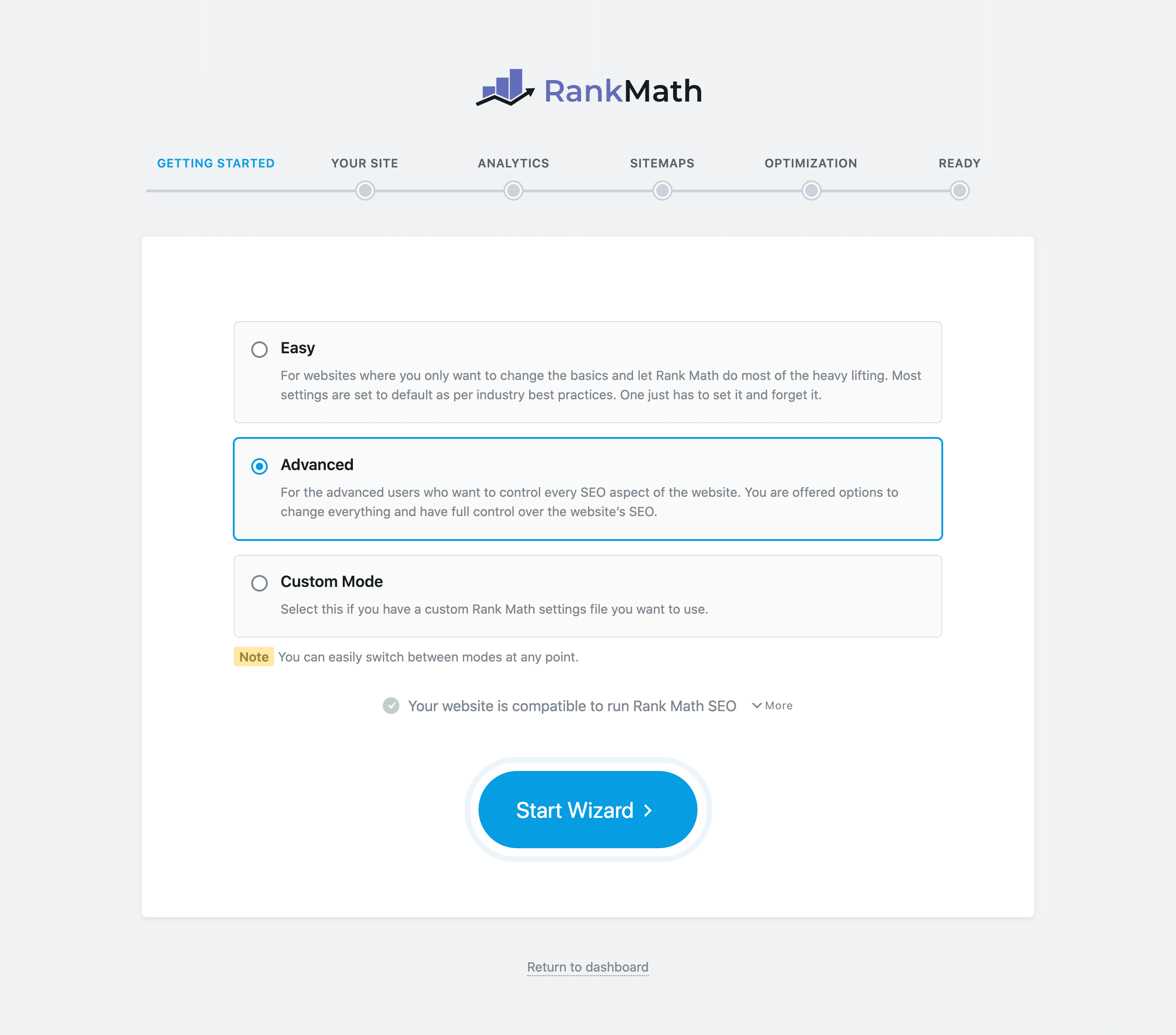
Based on how much SEO control you need, you can pick a mode for you. Also, you can switch the mode at any time from your RankMath Dashboard.
Additionally, the plugin dashboard is quite easy to navigate, and you can also Turn On/off the plugin features as per your needs. Plus, it easily integrates with both WordPress and page builder editors to optimize your content for on-page SEO.
More features, even in the free version.
The key reason behind RankMath’s popularity is that it has more features, even in its free version, as compared to Yoast. Even in its free version, it comes with a redirection manager, a 404 manager, Local SEO, and multiple keyword targeting features, which are paid in Yoast.
Unlike Yoast, with RankMath, you don’t need to pay separately for Local, WooCommerce, News, and Video SEO. Because everything is included in the RankMath Pro.
More Affordable.
The RankMath pricing is quite low compared to the Yoast Premium.
Firstly, the basic Pro plan of Rank Math can be used for Unlimited personal websites. And, with the RankMath business and agency plan, you can use it on 100 and 500 client websites, respectively, just paying for a single subscription. But in Yoast, you have to pay per website license, which makes Yoast very costly.
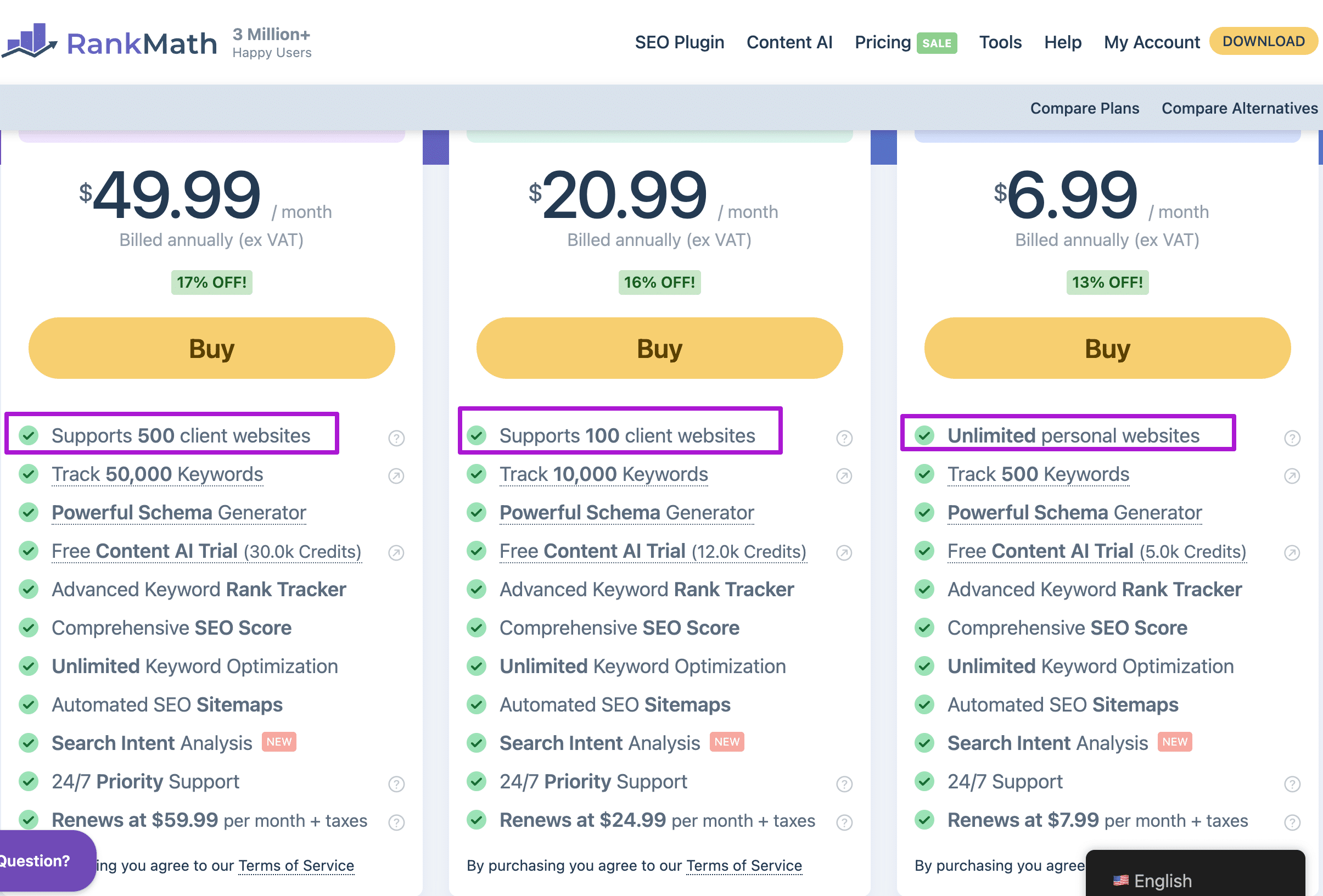
Additionally, with Rank Math, you don’t need to buy any add-ons for Local, WooCommerce, News, and Video SEO, as these features are included in the RankMath premium only.
Rank Math Cons
Content AI is mentioned as an SEO Factor in their On-Page SEO Checklist.
This is not exactly a drawback, but if you’re planning to use RankMath, then you need to know this thing to be clearer about SEO factors.
The RankMath on-page SEO checklist contains Content AI factor as well, and from an SEO perspective, there is no hard and fast rule that you need to use Content AI to better optimize your content for SEO.
By doing this, I think RankMath is just trying to market their Content AI within their SEO checklist, which might confuse SEO beginners.
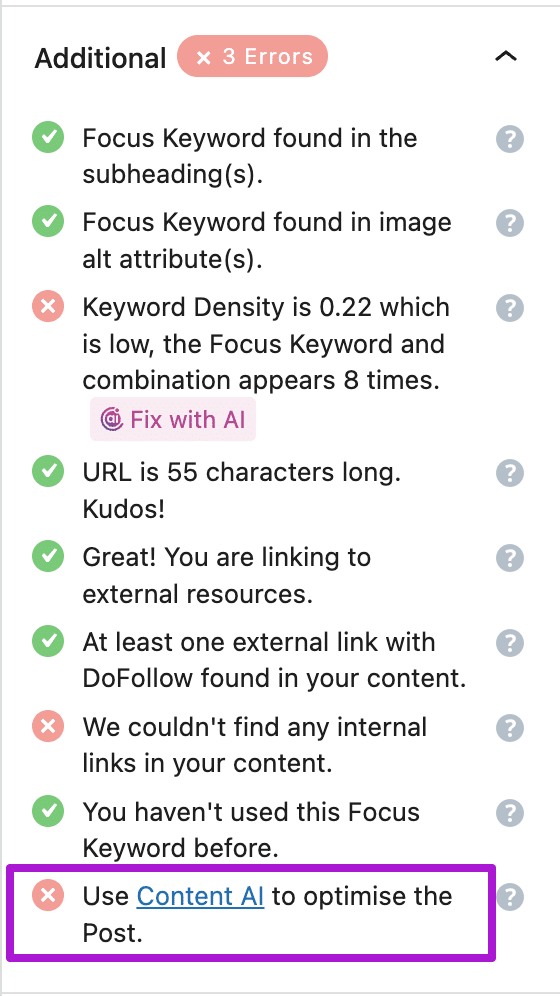
So, if you don’t want to use their Content AI feature like me, that’s completely okay.
RankMath can give you a little lower on-page SEO score because you’re not using their Content AI recommendation. But it will not affect the SEO of your site, because that is not a must-do from an SEO perspective.
2) AIOSEO
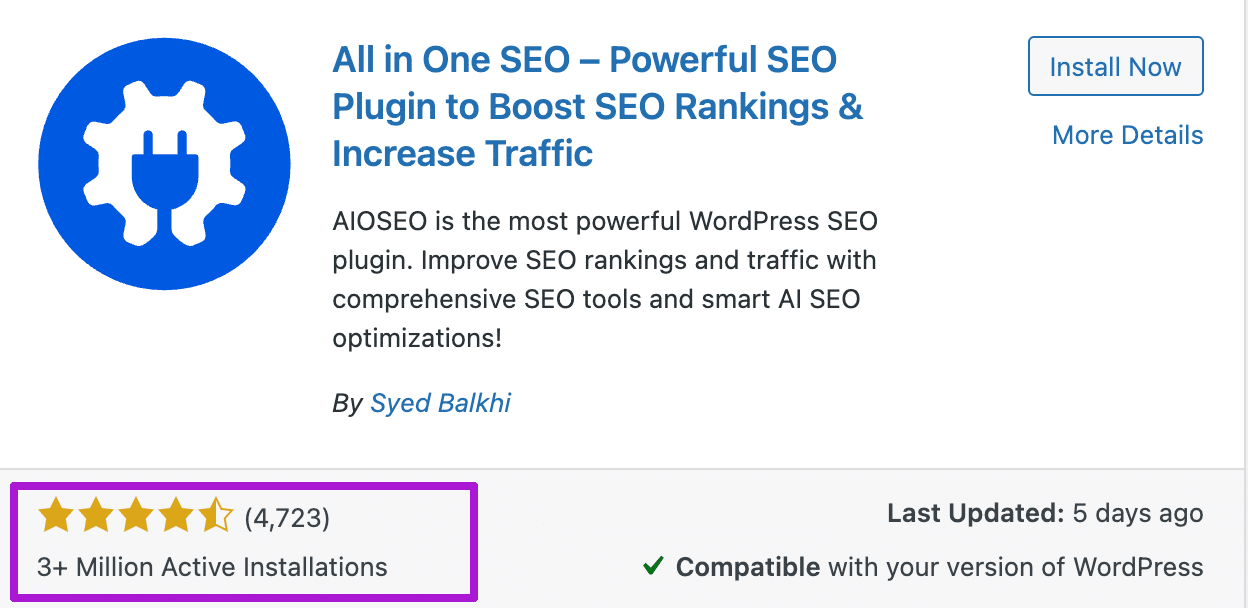
AIOSEO or All-in-One SEO is another popular WordPress plugin by Awesome Motive, the same company behind WPbeginner. AIOSEO is another great Yoast SEO alternative with over 3 million activations and a 4.7 rating out of 4.7k reviews as per the WordPress repository.
Just like Yoast, you can go through the setup wizard for first-time configuration after installing the AIOSEO plugin. Through the setup wizard, you can also migrate from Yoast, even in the free version.
Unlike Yoast, AIOSEO also uses a number-based score system, and you can easily check a score out of 100 for your on-page SEO analysis. To start, you can enter the focus keyword, but with the free version, you can only optimize for a single keyword, just like Yoast. And multiple focus keywords are only allowed in the pro version.
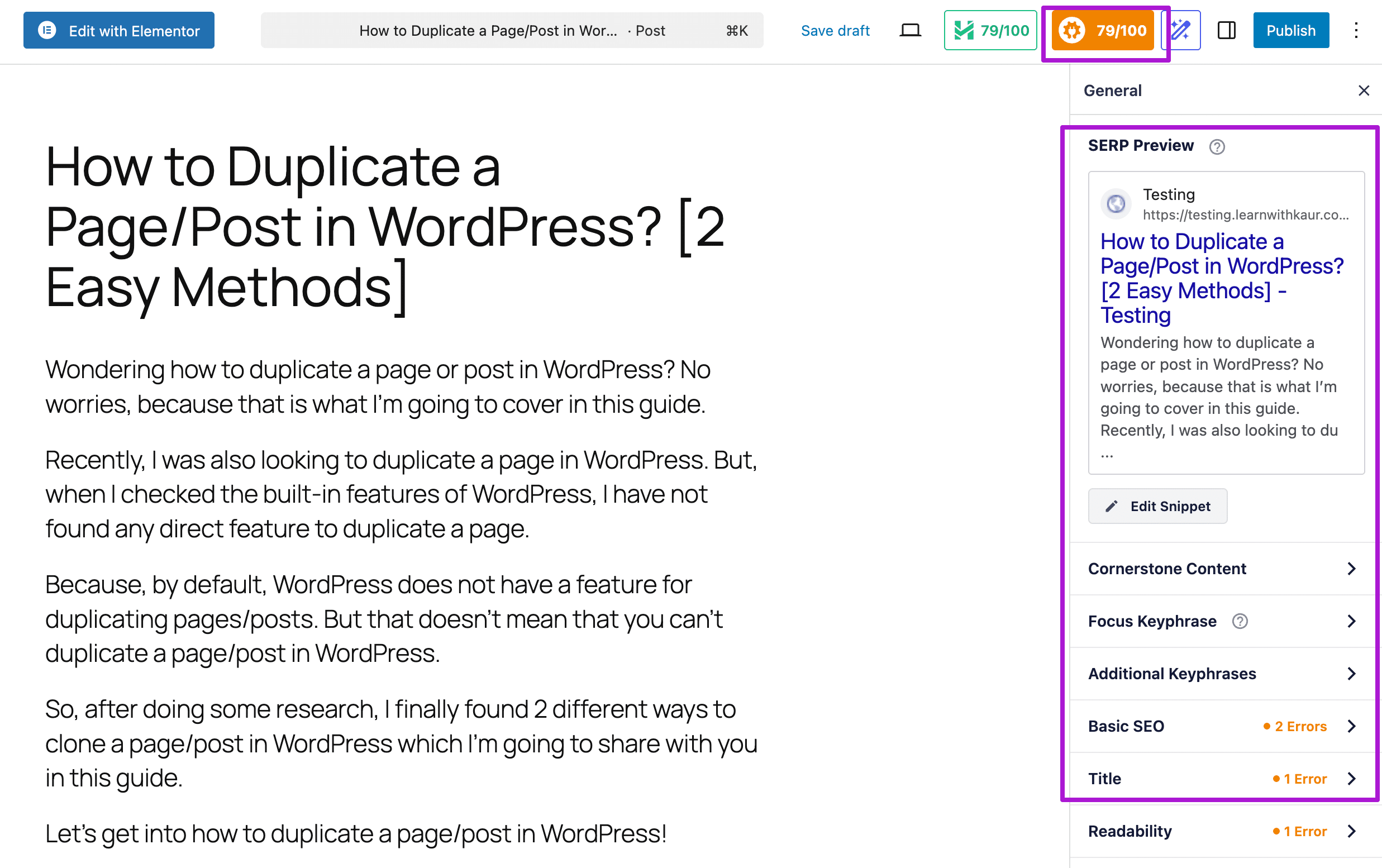
Once you add the focus keyword, it will provide you with a list of recommendations for both SEO and reliability to improve the on-page SEO.
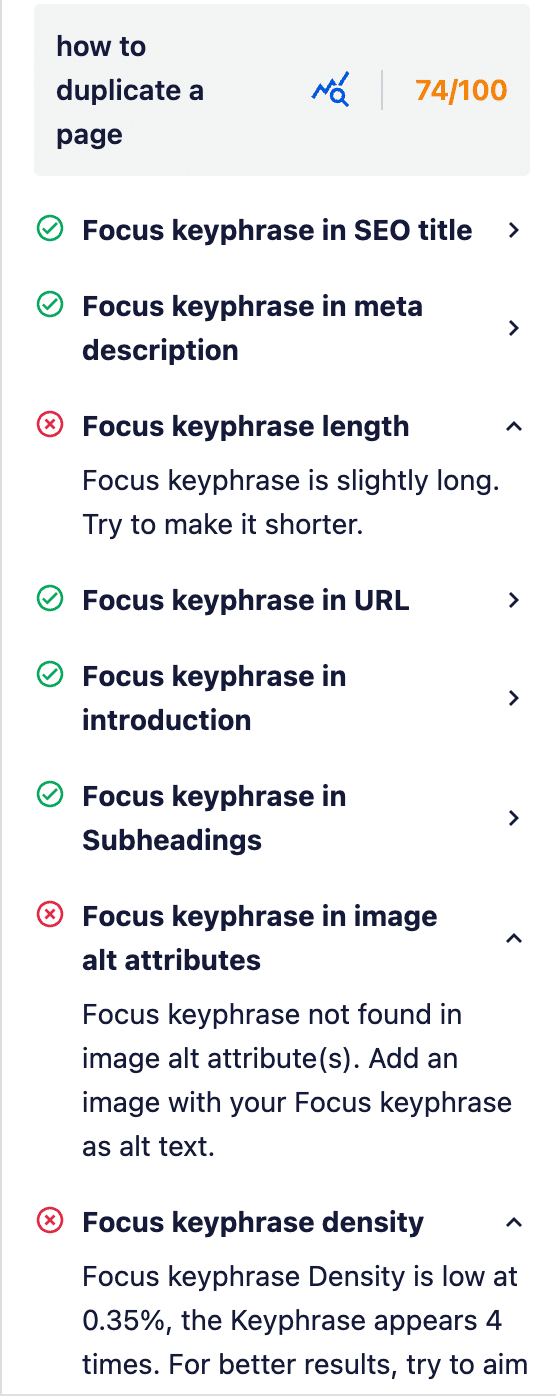
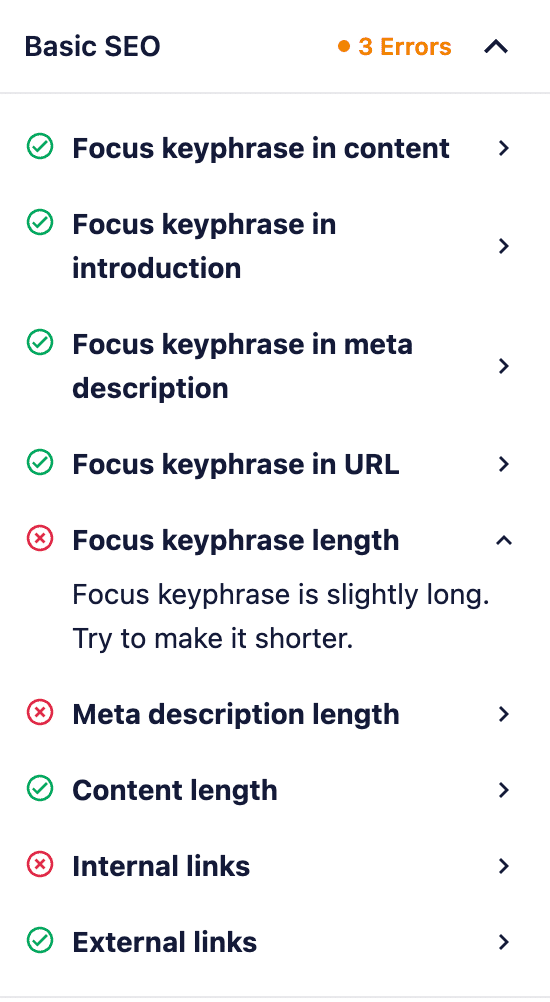
Their checklist contains most of the SEO factors for content, meta, URL, title, links, images, and headings to help even beginners easily optimize their content for SEO. And as well as readability factors.
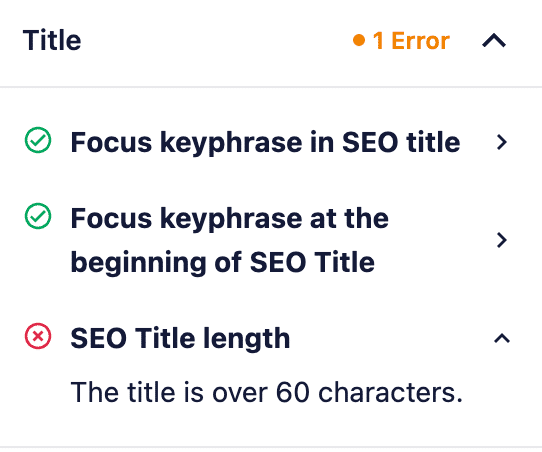
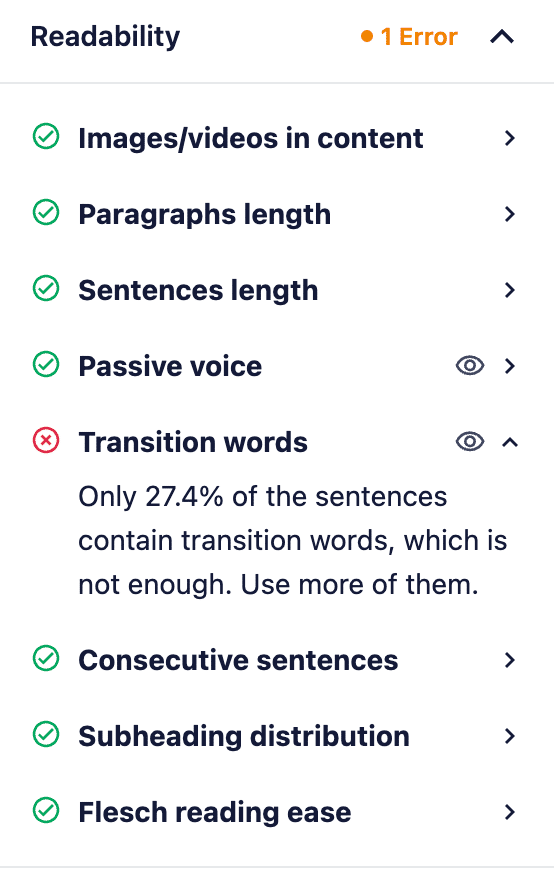
The good thing is their SEO checklist just contains the SEO factors, and there is not even a marketing/promotional factor, like Rank Math mentions content AI in their checklist.
AIOSEO Free Key Features
Here are the key features that All-in-ONE SEO comes with
- Easy-to-use setup wizard.
- Migrate from other SEO plugins such as Yoast SEO.
- Score-based On-page SEO analysis.
- On-page SEO checklist that includes both SEO and readability factors.
- Connect to Google Search Console while onboarding.
- XML, HTML, and RSS sitemap.
- Link assistance.
- Preview and edit the search & social snippet.
- Robot.txt and .htaccess editor.
- Import/export.
AIOSEO Pro Features
- Access control manager
- Image SEO.
- Author SEO.
- Video & News sitemap.
- Redirection manager.
- Local SEO.
- Multiple keyword targeting.
- Search statistics such as SEO statistics, keyword rank tracking, and content ranking.
AIOSEO Pricing
The free version for AIOSEO costs nothing, you can just download it from their official website or WordPress repository to start using it on your site.
Unlike Yoast, AIOSEO offers 4 different plans, and based on what features you need and for how many websites you want to use AIOSEO, you can pick a pro plan for you.
The following are the 4 AIOSEO Pro plans and their pricing:
- Basic: $49.60/year for a single website.
- Plus: $99.60/year for 3 websites.
- Pro: $199.60/year for 10 websites.
- Elite: $299.60/year for 100 websites.

AIOSEO Pros & Cons
Here are some pros and cons of the AIOSEO plugin, which I analyzed while testing out its free version.
AIOSEO Pro
Clean and easy-to-use Interface
The All-in-one SEO plugin dashboard is quite organized and has an easy-to-use interface. The on-page SEO analysis is also available at the sidebar and bottom of the WordPress editor, which makes it super easy for you to optimize your content for on-page SEO.
A Great On-Page SEO Checklist
Another thing that I liked most about AIOSEO is its on-page SEO checklist. The most common day-to-day usage of any SEO plugin is for On-page SEO optimization. And AIOSEO, a plugin, comes with good on-page SEO recommendations that help even beginners to easily optimize their content for SEO.
It has divided SEO factors into sub-parts to help you easily check SEO recommendations for different SEO factors. Additionally, its checklist contains most of the SEO factors for which we should optimize our content. More importantly, they have not included anything promotional in their checklist, which is pretty amazing. Because some plugins do this to market their pro features.
Cost-Friendly
The AIOSEO Pro plans are quite affordable if we compare them to the Yoast Premium. The basic plan of AIOSEO just costs $49.60, which you can use on a single website, which is almost half the price of Yoast Premium ($98/year). Additionally, if you have with AIOSEO plus plan that costs $99.60/year, you can use it on up to 3 websites.
AIOSEO Cons:
Multiple Keyword Targeting is only available in the Premium Version.
With the Free version of AIOSEO, you can only optimize your content for a single keyword. In case you have multiple keywords for a single post, for which you want to optimize your content using AIOSEO. Then that’s not possible with the free version, and for this, you have to get AIOSEO premium, which comes with a multi-keyword targeting feature.
For Some Features, You Need to Install Other Plugins
Another downside that I noticed while testing this plugin is, if you turn ON some of the plugin features, then it installs other plugins, which I don’t prefer very much. Because every plugin adds a line of code that affects the performance of a site.
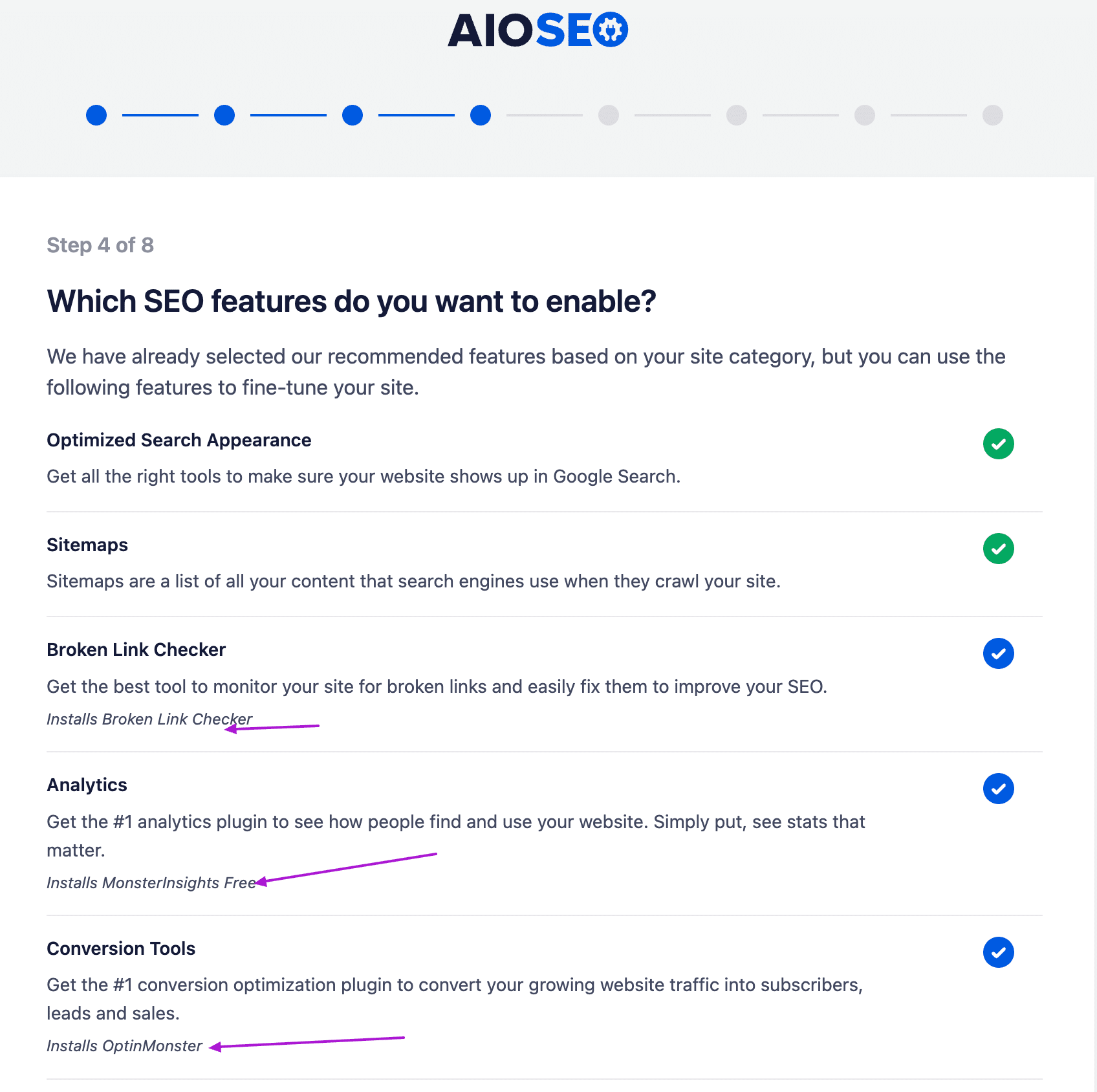
So, while going through the setup wizard, I was asked to choose which features I wanted to enable. And on this page, underneath the feature description, the plugin mentions which plugin will be installed. For eg.
- For Broker link checker, it installs the Broker link checker plugin
- For Analytics features, it installs MonsterInsights Free.
- For Conversion features, it installs OptinMonster.
And I think it installs separate plugins for some of the paid features as well, as you can see in the screenshot.
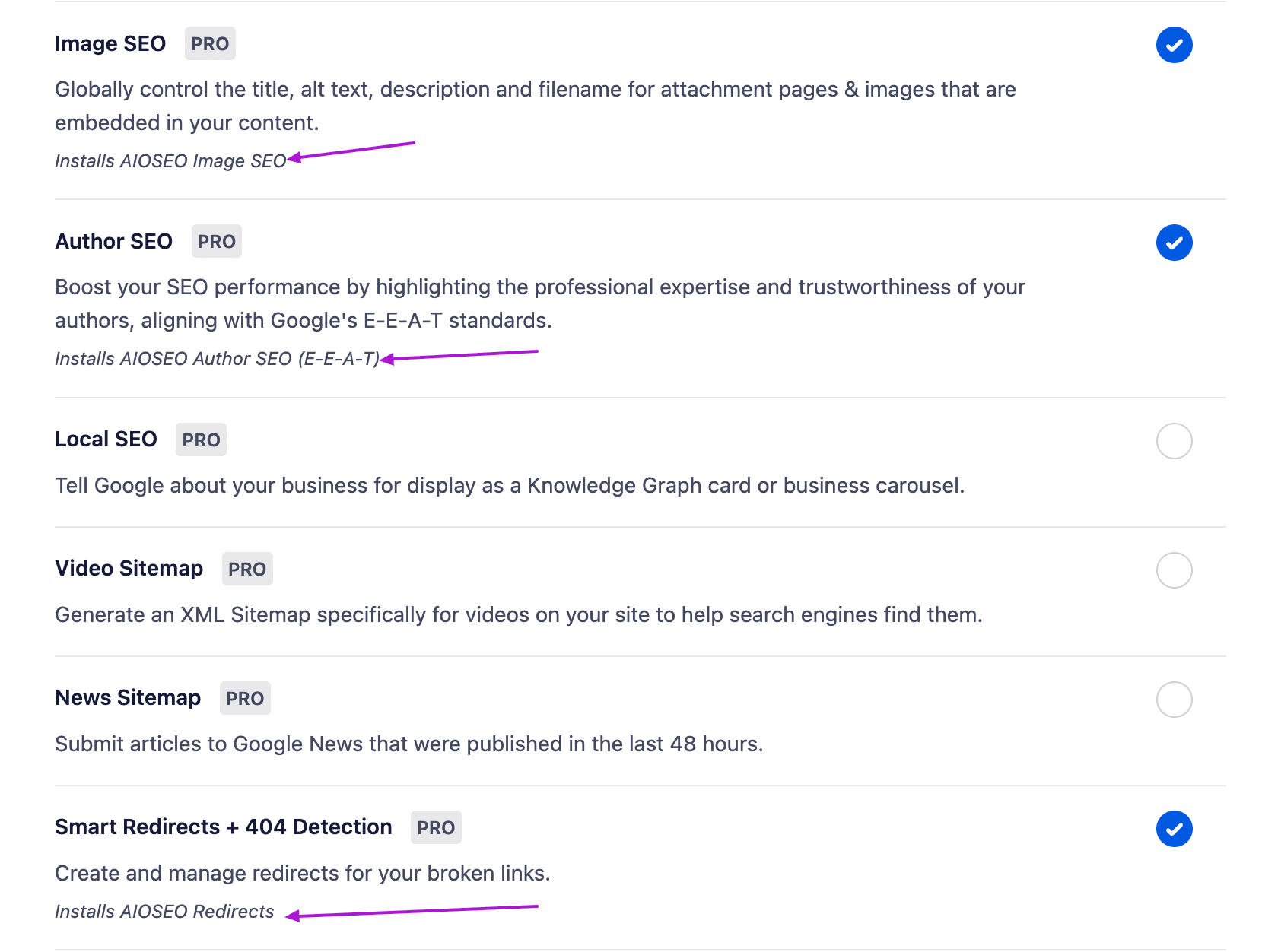
ALL Pro Plans do not include all premium features
When you get RankMath Premium, no matter which plan, you will get access to every pro feature. But in the All-in-one SEO plugin, not every pro feature is included in every pro plan.
For example, the Local SEO features are not included in the basic Pro plan of AIOSEO. If you need these features, you have to go for higher plans.
No Unlimited License Even for Personal Websites
With every AIOSEO plan, you have a limit on how many websites you can use the AIOSEO Pro plugin. E.g.
- Basic plan: 1 website
- Plus plan: up to 3 websites
- Pro plan: up to 10 websites
- Elite plan: up to 100 websites.
- Custom plan: Contact their support to get a custom plan based on how many sites you want to use the AIOSEO Pro plugin.
None of these plans allows you to use an AIOSEO premium plugin for unlimited websites. E.g., RankMath allows you to use the premium version on unlimited personal websites. But that’s not true with AIOSEO.
If you want to use it on more websites, then you have to buy the higher plans, even for personal websites.
3) SEOPress
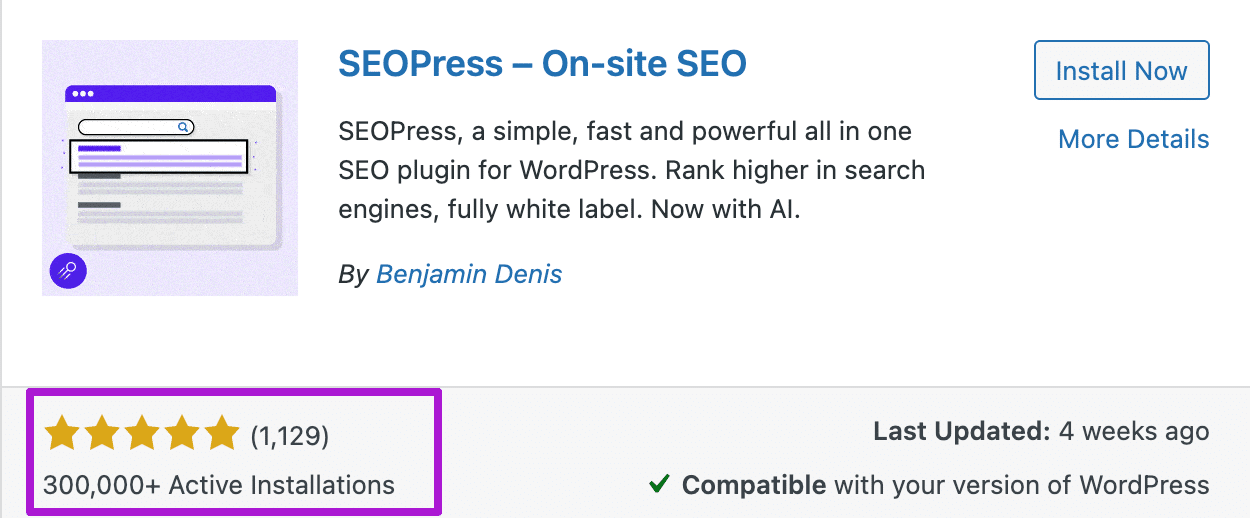
The SEOPress plugin is a simple SEO plugin with lots more features compared to Yoast, even in the free version. It has over 300k active installations and a 4.8 rating out of 1.1k reviews as per the WordPress repository.
Just like Yoast SEO, SEOPress also uses a light-based scoring system, but it does not show On-Page SEO lights at the Top or side bar and only at the bottom.
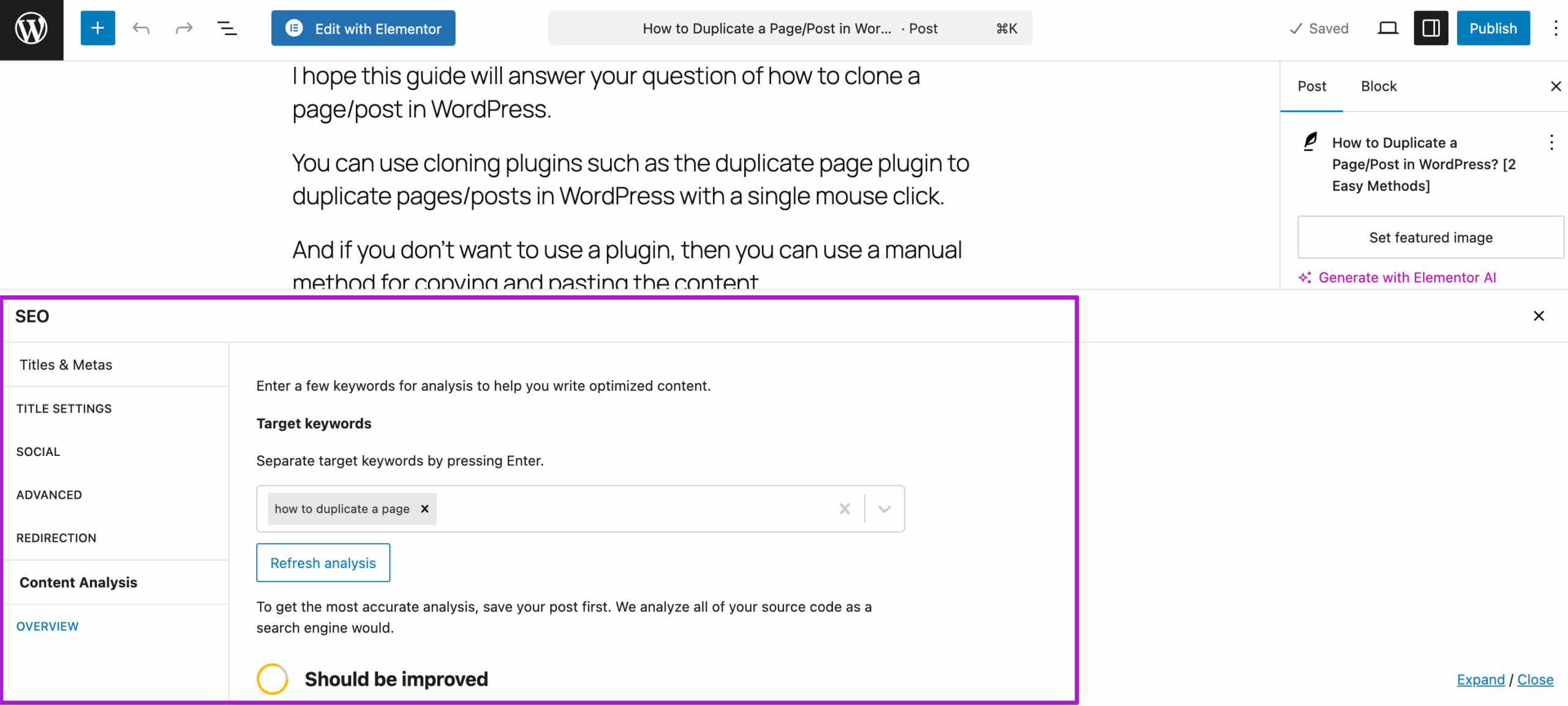
To start, you need to enter a focus keyword, and even in the free version, you can enter multiple keywords for optimization.
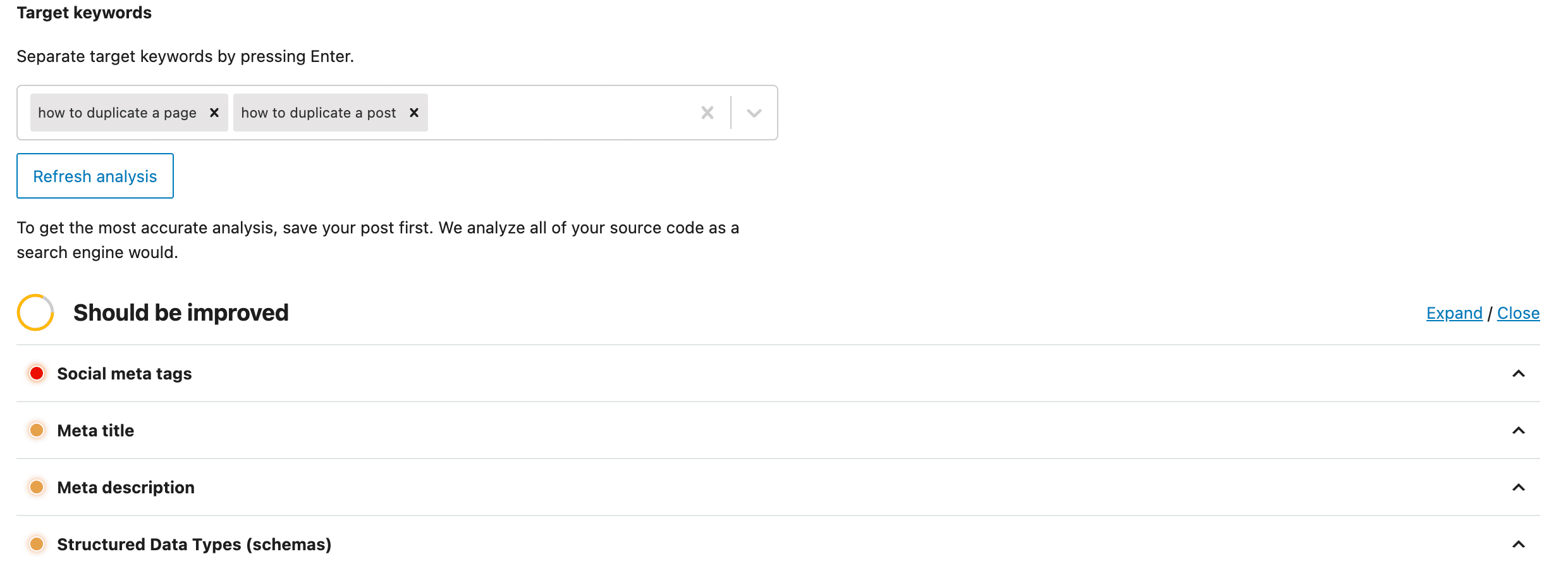
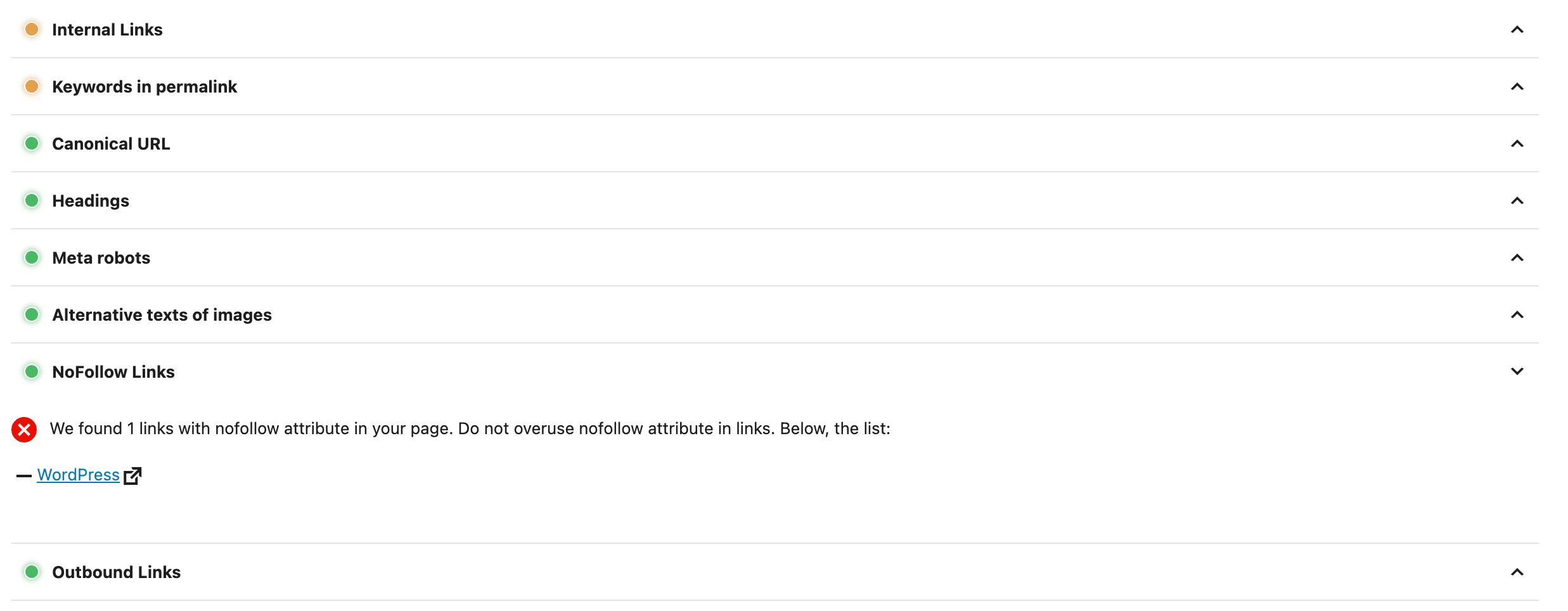
Once you enter the keyword, it will analyze the content for only SEO and provide you with a list of suggestions to further improve the on-page SEO score. But it’s on-page SEO analysis needs lot of improvement which we will discuss in the cons section.
SEOPress Key Free Features
- Migrate from existing Yoast Plugins, such as Yoast SEO.
- Light-based scoring system.
- XML, XML image, author, and HTML sitemap.
- Google analytics integration
- Instant indexing
- Image SEO
- User access control
- Import/export plugin settings
- Social and search snippet editor
- Multiple keyword targeting.
Paid Features
- WooCommerce SEO,
- Schemas,
- local SEO,
- Video and news sitemaps,
- Redirection manager
- 404 manager
- Site Audit.
SEOPress Pricing
Just like the other two SEO plugins, SEOPress also has a free version, which you can either download from their official website or install directly from the WordPress repository.
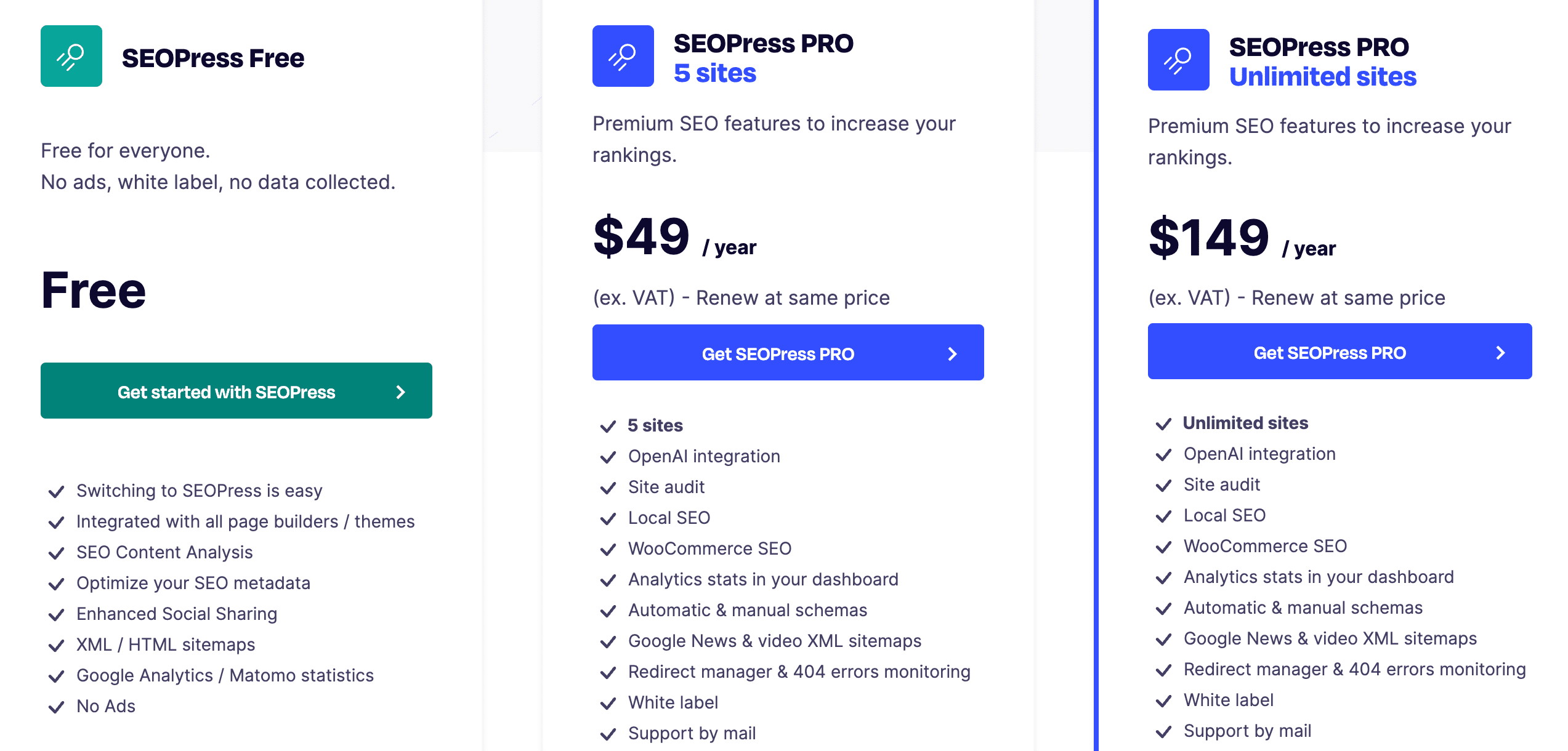
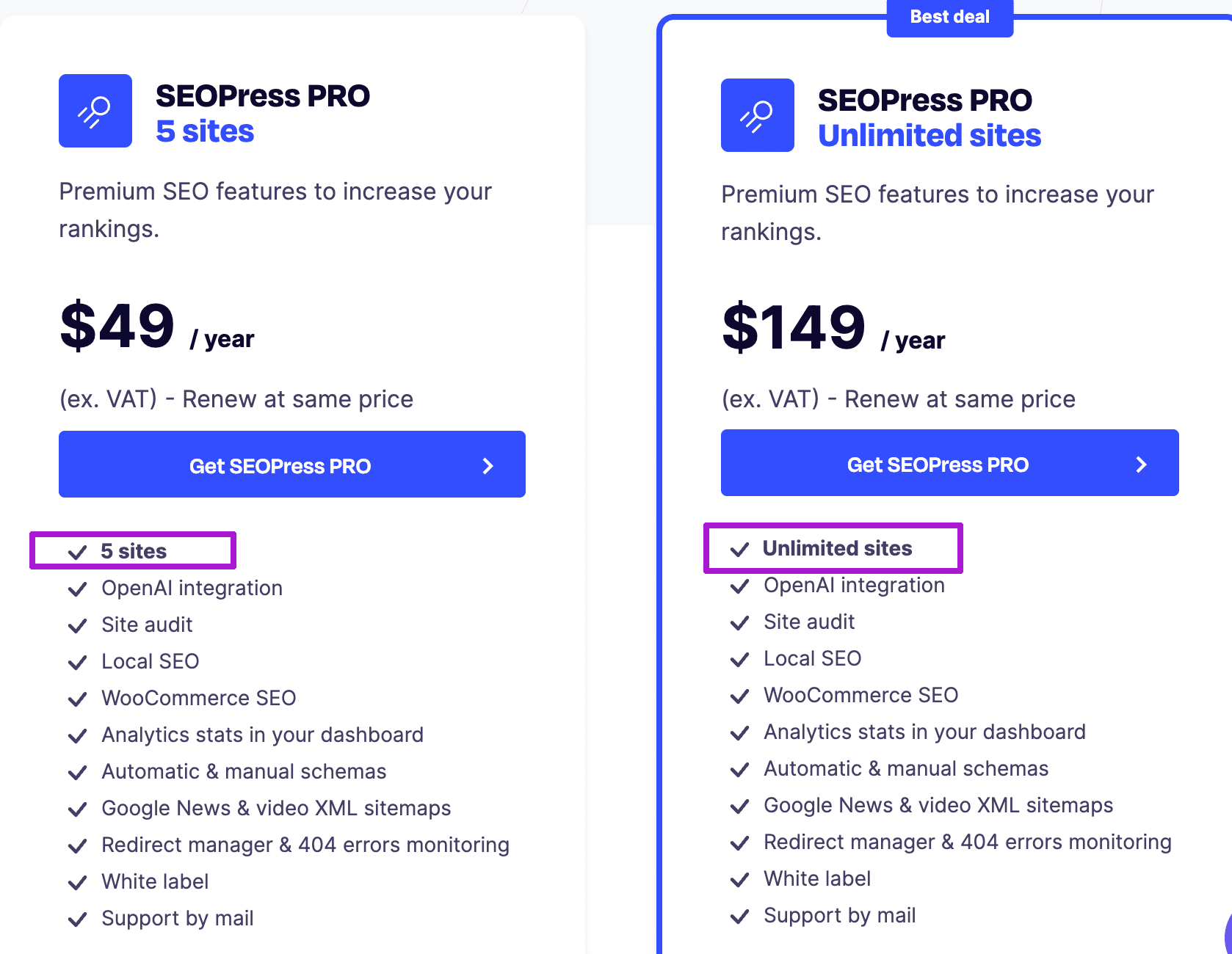
The SEOPress offers 2 premium plans, and both of the pro plans have the same features. The only difference is in how many websites you can use with that plan.
- SEOPress Pro: $49/year for 5 websites
- SEOPress Pro Unlimited: $149/year for unlimited websites.
SEOPress Pros and Cons
Here are some of the pros and cons of SEOPress, which I figured out while testing out its free version.
SEOPress Pros
Very Affordable
The pricing of SEOPress Pro is also quite affordable compared to the Yoast premium. The SEOPress basic plan just costs $49/year for 5 websites, and even for unlimited websites, it just costs $149/year, which is quite affordable.
Both plans of SEOPress cover most of the pro features, such as local seo, WooCommerce SEO, redirection & 404 manager.
Whereas the Yoast premium plan costs $99/year for a single website and does not even include features like Local, WooCommerce SEO, video, and news SEO, because Yoast sells them separately, as we discussed earlier.
More Features Even in the Free Version
The reason behind choosing this plugin as the best yoast seo alternative is that its free version comes with multiple keyword targeting, instant indexing, which are just paid for in the Yoast Premium.
The SEOPress premium also has more features, which Yoast sells separately, such as Local or WooCommerce SEO.
Supports Multiple and Unlimited Websites
Unlike Yoast, SEOPress supports multiple(up to 5 websites) even with its base plan. Additionally, it also has another plan that you can use on unlimited websites, which can save a lot of cost for purchasing additional plugins.
Cons:
On-Page SEO Analysis can be improved
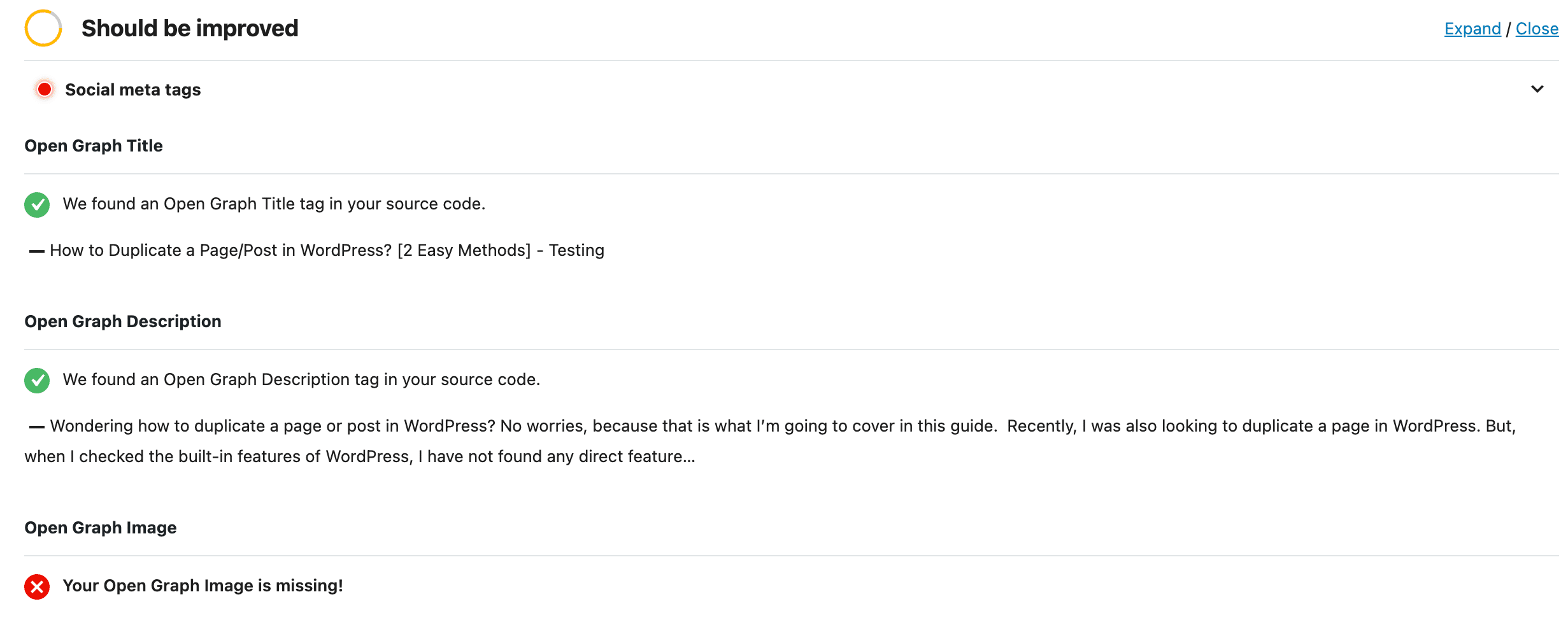
The SEOPress checklist contains a lot of factors, even related to social meta tags. So, it can be a little confusing for some beginners as other SEO plugins only contain a solid list of only main seo factors.
Another thing I realized while testing out the SEOPress free version is that there is a lot of text in their user interface, which makes it a little confusing compared to the UI of other plugins.
They give you a lot of written suggestions, which is great, but it affects their UI. They can hide information just behind icons, as other plugins do, and show it if somebody wants to know more, to have a better user experience.
No Readability Analysis
The SEOPress plugin comes with only an on-page SEO analysis checklist, but they don’t have a readability analysis feature available.
Well, the readability analysis is not a direct SEO feature, but it still plays a role in SEO, as making your content readable is also important for both users and search engines.
On-Page SEO Analysis is not auto-refreshed and is not fully functional with Elementor.
Usually, the on-page SEO score automatically refreshes, but this is not true for SEOPress. With SEOPress, you need to click on the “Refresh content analysis” button to check the most recent on-page seo analysis for your content, and it is not automatically updated in real time.
Additionally, SEOPress is compatible with Elementor, but it’s not fully functional with Elementor. When I entered my focus keyword in SEOPress from the Elementor editor, it was not giving me an On-page SEO analysis. So, it’s another downside that I faced while testing out the SEOPress SEO settings from my Elementor editor.
Final Thoughts on Best Yoast SEO Alternatives
Considering the two main drawbacks of Yoast: Limited features and high pricing. I mentioned the best 3 Yoast SEO alternatives: RankMath, AIOSEO, and SEOPress.
All of these plugins also have their pros and cons, as we discussed in this guide. But all three plugins have more features compared to Yoast, and their pricing is also quite affordable compared to Yoast Premium.
I hope this guide will help you choose the best Yoast SEO alternative for you.
Which SEO Plugin am I using on My Website?
When I did research for choosing my SEO plugin almost 4 years ago, I heard a lot about RankMath and Yoast only. At that time, I think I had not heard much about AIOSEO and SEOPress.
So, I selected RankMath as it has more features, even in the free version, compared to Yoast. Since then, I’ve only been using Rank Math and have no plans for switching to another SEO plugin yet, as I’m happy with RankMath right now.
Feel free to drop in comments, which SEO plugin are you planning to use, and why you liked that most.