GreenGeeks vs Bluehost, struggling to pick one? No worries! Let’s jump in and explore which one is better for hosting in 2025.
No doubt! Both are the most popular hosting providers. Apart from similarities, each has something unique to offer you. For this, you need a detailed comparison between GreenGeeks and Bluehost, so that you can easily pick one that suits your needs and budget.
In this guide, I will compare both, including what they’re offering, their popularity, plans, pricing, features, and many more factors. Once you have enough knowledge about both hosting providers and how they differ from each other, it will be easy for you to pick one.
So, what are you waiting for?
Let’s dive into GreenGeeks vs Bluehost!
- GreenGeeks vs Bluehost: Overview
- GreenGeeks vs Bluehost: Ease of Use
- GreenGeeks vs Bluehost: Hosting Types
- GreenGeeks vs Bluehost: Features and Starting Pricing
- GreenGeek vs Bluehost: Pricing
- GreenGeeks vs Bluehost: Performance
- GreenGeeks vs Bluehost: Security
- GreenGeeks V/s Bluehost: Help and Support
- GreenGeeks vs Bluehost: Money-back guarantee.
- GreenGeeks vs Bluehost: Which one I use?
- Final Thoughts
GreenGeeks vs Bluehost: Overview
GreenGeeks is best known for green web hosting as it is an eco-friendly web hosting provider. On the other hand, Bluehost is the most popular beginner-friendly hosting, which is recommended by the WordPress platform itself.
Key Points of GreenGeeks
- Foundation Year: 14 years ago
- Number of hosted websites: Over 0.6 million
- Popular for: Green web hosting
Key Points of Bluehost
- Foundation Year: 2003
- Number of hosted websites: Over 5 million
- Popular for: Beginner-friendly hosting
GreenGeeks vs Bluehost: Ease of Use
A hosting provider that offers the easiest set-up and dashboard can save lots of time and energy. Because you can easily get your website live and find things quickly.
If the hosting provider’s set-up and dashboard are hard, then it can consume lots of time and may become annoying for you.
That’s why you should consider ease of use as an important factor when choosing a hosting provider. Let’s see what type of setup process and dashboard both hosting providers provide you.
Bluehost
Bluehost is a beginner-friendly hosting provider, so it goes the extra mile to provide ease.
Bluehost Sign-up Process
The sign-up process of Bluehost is quite easy, as it provides step-by-step guidance. On each step, Bluehost will guide you properly, and with no external help, you can easily set up your hosting account and get your website live.
Another cool thing is that it also gives you an option to skip the steps of the setup process. It means you have an option to do things later.
For example, during the signup process, Bluehost asks you to get your free domain or add your existing domain.
f you want to do it later, Bluehost will not force you to do it immediately, as there’s an option to skip the steps.
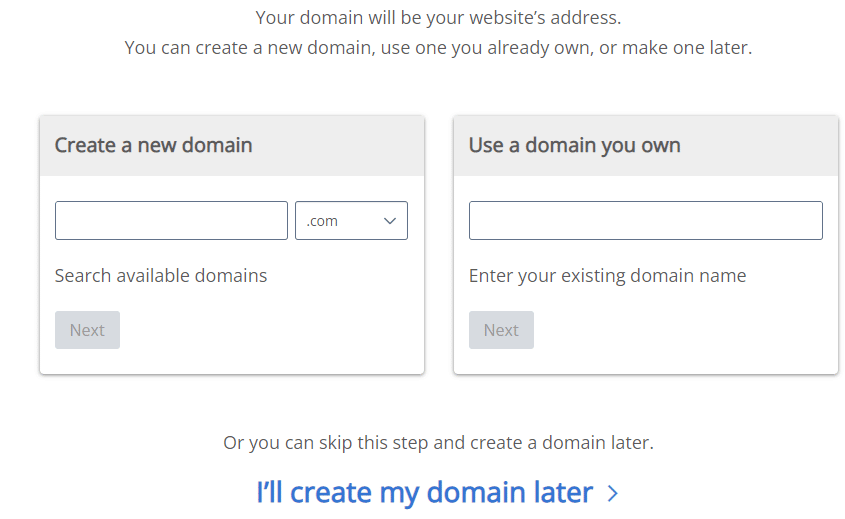
Bluehost dashboard: It is well-organized and easy to use. You can also easily find things from the Bluehost dashboard.
GreenGeeks
GreenGeek also has a cool setup process and dashboard, but it is not as easy as Bluehost. That’s why Bluehost’s best known for beginner-friendly hosting.
GreenGeeks set up a process
The setup process of GreenGeeks is also simple and quite easy. But there is one difficulty in the setup process.
For example, during a domain setup, you only have two options: either pick your free domain or add a new domain. And there is no option to skip the step and do it later.
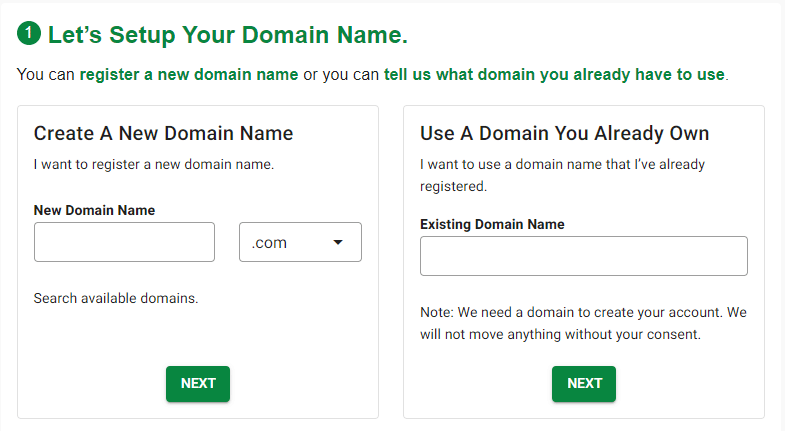
You have to immediately set up a domain for your website. So, this can be a complicated thing for you if you want to set up your domain later; otherwise, there is no issue.
The checkout process of GreenGeeks is easy. There are no complications. You can simply enter your personal information and make a payment.
GreenGeeks Dashboard: The dashboard of GreenGeeks is also quite simple, and you can easily navigate the dashboard.
GreenGeeks vs Bluehost: Hosting Types
There are lots of hosting types, such as shared hosting, WordPress hosting, VPS hosting, and dedicated hosting. If you don’t know what hosting means, here is a quick answer for you.
- Shared hosting: Shared among multiple users, and it is perfect for beginners. Because it is more affordable compared to other hosting types.
- WordPress hosting: Specifically designed for the WordPress platform to empower WordPress websites.
- VPS Hosting: Provides a virtual private server for your website and is perfect for high performance and security.
- Dedicated server hosting: Provides a dedicated server and is perfect for handling high traffic.
- Reseller hosting: Perfect for resellers who are in the reselling hosting business.
Both GreenGeeks and Bluehost provide you with almost every hosting type, so you can easily pick one as per your needs.
| Hosting Type | Bluehost | GreenGeeks |
|---|---|---|
| Shared web hosting | ✅ | ✅ |
| WordPress hosting | ✅ | ✅ |
| VPS hosting | ✅ | ✅ |
| Reseller hosting | ✅ | ✅ |
| Dedicated server hosting | ✅ | ✅ |
| E-commerce hosting | ✅ | ❌ |
| Go to Bluehost | Go to GreenGeeks |
Both GreenGeeks and Bluehost provide shared WordPress, VPS, dedicated, and reseller hosting. The only difference is E-commerce hosting. So, if you run an online store or e-commerce business, then Bluehost’s eCommerce hosting can be a perfect fit for you.
But it does not mean that you can’t run an online store or e-commerce business using other hosting types. The only thing you need to know is that e-commerce hosting is specially designed for e-commerce businesses.
If you’re a beginner, then shared hosting can be perfect for you. Because shared hosting provides the most needed features to get started, and it is more affordable as compared to other hosting types.
👉 Check Bluehost shared hosting
👉 Check GreenGeeks shared hosting
So, here you’ve only learned about the hosting types that both Bluehost and GreenGeeks offer you. But the most important thing is the features that you will get, so let’s explore further.
GreenGeeks vs Bluehost: Features and Starting Pricing
The next important thing is to make sure that the hosting you’re going to choose provides features that you need for your specific website or blog.
The exact features depend on the hosting type and plan.
Let’s suppose you selected shared hosting for your website. Then you have 3 to 4 plans for shared hosting from which you can pick one as per your needs. And each plan has its own features.
Here is a quick comparison of the basic shared hosting plan of both providers.
| Bluehost | GreenGeeks | |
| Starting Plan | Basic | Lite |
| Starting Price | $3.95/month for a 36-month term | $2.95/month |
| Renewal rate | $9.99/month | $12.95/month |
| No. of Websites. | 10 Websites | 1 Website |
| Free domain for 1 year | ✅ | ✅ |
| Disk Space. | 10 GB SSD Storage | 25 GB Web Space |
| Free SSL Certification | ✅ | ✅ |
| Free Profesional Email | ✅ | ✅ |
| 1-Click Installation of WordPress | ✅ | ✅ |
| Backups | Daily | Daily |
| CDN | Free CDN – Cloudflare | ✅ |
| Migration | Free site migration tool | ✅ |
| 300% Renewable Energy Match | ❌ | ✅ |
| 1 Tree Planted per Customer | ❌ | ✅ |
| Money-Back Guarantee | 30-day money-back guarantee. | 30-day money-back guarantee. |
GreenGeek vs Bluehost: Pricing
Pricing is another important factor because everyone has their budget. If you’re just starting, then your budget may be tight, and if you’re already generating solid income, your budget can be high.
But keep in mind that the price should be worth it. So, let’s compare the pricing rate of both Bluehost and GreenGeeks.
Web Hosting Pricing Rates:
Shared web hosting:
- Bluehost starts at $3.95/month(renews at $9.99/month)
- GreenGeeks starts at $2.95/month(renews at $12.95/month)
WordPress Hosting:
- Bluehost starts at $3.95/month (regular rate $9.99/month)
- GreenGeeks starts at $2.95/month (regular rate $12.95/month)
Dedicated Hosting
- Bluehost starts at $141.99/month (regular rate $188.79/month)
- GreenGeek starts at $169/per month.
VPS Hosting
- Bluehost starts at $46.99/month (regular rate $65.99/month)
- GreenGeek starts at $69.95/per month.
If you compare the prices, then Bluehost is slightly more affordable as compared to GreenGeeks. But again, a high price with more features is always worth it.
GreenGeeks vs Bluehost: Performance
Do you know hosting is also responsible for your website’s speed?
Yes! A performance-optimized hosting can load your website quickly. In other words, poorly optimized hosting can slow down the speed of your website because the initial server will take a lot of time.
You need a super-fast website because no one wants to stay on a website that takes lots of time.
If your website takes time to load, visitors may click back and visit others. And in a nutshell, it can affect the revenue of your website.
Apart from the user experience, website speed is also an important factor for SEO. So, if you’re optimizing your website for SEO to bring organic traffic, make sure that your website loads quickly.
You might have seen many blogs that will show you a speed test that X hosting is loading at this speed, and Y hosting is loading at this speed. I don’t think that this is the correct way to check the performance of hosting. Because they take two sample websites and host them on Bluehost and GreenGeeks.
We all know, initially, with a normal hosting provider, you can get a good speed. Because the website hasn’t had enough load yet.
Speed is affected when you have lots of content on your website, including high-quality images, videos, and other multimedia. Apart from content, when the website has a huge traffic volume. That is the point when the speed of a website can go down.
I’m not showing you any speed tests, because no two websites can have the same load at the same time. Instead, you can check the performance features that each hosting provider offers you.
Bluehost Key Performance Features
- FREE CDN
- Reduced server latency
- SSD hardware
- MySQL and PostgreSQL databases
- PHP 7.3
- HTTP/2
- NGINX+ cache
GreenGeeks Key Performance Features
- Litespeed speed technologies.
- LSCache,
- MariaDB,
- HTTP/2,
- PHP7
- Free CDN
- Solid State RAID-10 Storage
Both hosting providers are optimized for performance, but the actual speed of a hosting plan cannot be guaranteed. Because there are many factors involved in speed and performance.
For example,
Shared hosting is perfect for beginners, but if your website is getting huge amounts of traffic, then you may face downtime or speed issues.
Because multiple users are using the same server, in this case, you can either upgrade your plan, choose another hosting type, or you can change the hosting provider.
GreenGeeks vs Bluehost: Security
Security is also important as performance. The website is an online house for your business, so it should be secure.
Otherwise, hackers can steal your data and information. To keep your website safe from hackers and online threats, you need a hosting provider that provides enough security features.
So, let’s see what Bluehost and GreenGeek do to provide you with security.
Key Security Features of Bluehost
- Free SSL certificate
- Resource protection
- DDOS protection
Key Security Features of GreenGeeks:
- DDOS protection
- Free SSL certificate
- Immunity 360
SSL certificates enable a padlock to the URL of your website and load the HTTPS version. It shows the user that the website is secure and safe.
So, both are providing security for your website, which can be enough for beginners.
Simple security features can be enough for you if no financial transactions are going on your website.. Otherwise, to keep your website’s payments secure, you need highlevel security.
GreenGeeks V/s Bluehost: Help and Support
Where will you go if you face difficulties with your website?
You will reach your hosting provider first.
That’s why you need a hosting provider that can assist you in your hard times or anytime you have queries.
Both hosting providers offer phone, email, and chat support. In case you need help, you can reach out to their support in business hours, because most likely you will get a response within business hours, no matter if they 24 x 7.
GreenGeeks vs Bluehost: Money-back guarantee.
In case you don’t like the hosting services after purchasing, then you should have an option to get your money back.
So, that’s why choosing a hosting provider that offers a money-back guarantee is important. Both Bluehost and GreenGeeks offer you a money-back guarantee.
GreenGeeks’ Money-back guarantee: 30 days
Bluehost’s money-back guarantee: 30 days.
GreenGeeks vs Bluehost: Which one I use?
I’m using Bluehost hosting. When I started my first blog, I came across the Bluehost hosting provider, and I found it trustworthy, affordable, and beginner-friendly. So, that’s why I picked Bluehost.
At that time, I was not aware of GreenGeeks. But now I’m happy with Bluehost. Whenever I face any difficulties, I get in touch with the Bluehost support team, and they try to resolve queries on a priority basis. In the future, I may try GreenGeeks hosting. Because it’s eco-friendly hosting.
Final Thoughts
In a nutshell, both Bluehost and GreenGeeks are the best hosting providers. Here is a quick recap of GreenGeeks vs Bluehost,

Bluehost is the most beginner-friendly, affordable, and recommended by WordPress.

GreenGeeks is eco-friendly, fully featured, and the world’s best green energy web hosting provider
Next Helpful Guide 👉 How to start a Blog Step-By-Step Guide For You