The WordPress SEO plugin is a must-have for WordPress. Because it helps you easily optimize your website content for SEO. Rank Math is one of the top WordPress SEO plugins. And in this guide, I will share an in-depth review of Rank Math.
I’ve been using Rank Math for four years now, and I think it would be a great idea to share my experiences with the world. In my Rank Math review guide, I will dive deep into reviewing its features with real-world screenshots and its pros and cons, instead of just listing the Rank Math features, which are already available on its official website.
I will also briefly compare Rank Math Free vs Pro and which one is worth purchasing. Finally, I will cover Rank Math Pro pricing and plans if you’re interested in getting a paid version of Rank Math.
Let’s dive into the Rank Math review guide!
- What is Rank Math?
- Rank Math SEO Features Review:
- Score-based On-page SEO Analysis
- Target Multiple Keywords
- Preview & Edit Google & Social Snippet
- 1-click Site SEO Audit
- Migrate from Yoast SEO or All-in-One SEO Plugin.
- Role Manager
- Image and Media SEO Optimization Features
- Customize Global Meta Settings
- Globally No-index Empty Categories and Tags Archives Pages
- Choose Your Separator Character
- Capitalize the Titles of Your Pages/Posts
- Upload OpenGraph Thumbnails
- XML and HTML Sitemaps
- URL Redirections
- 404 Manager
- Directly Optimize SEO in Elementor, Divi, and Many More Page Builders.
- Setup Wizard to Set SEO Settings Without Much Hassle
- Rank Math Free v/s Pro
- Rank Math Pro Plans and Pricing
- Rank Math Pros and Cons
- Rank Math FAQ's
What is Rank Math?
If you’re new to the WordPress world, you might have only heard a little about Rank Math. If yes, you most likely need clarity about what rank math is. So, before diving into the Rank Math review, let’s briefly cover this.
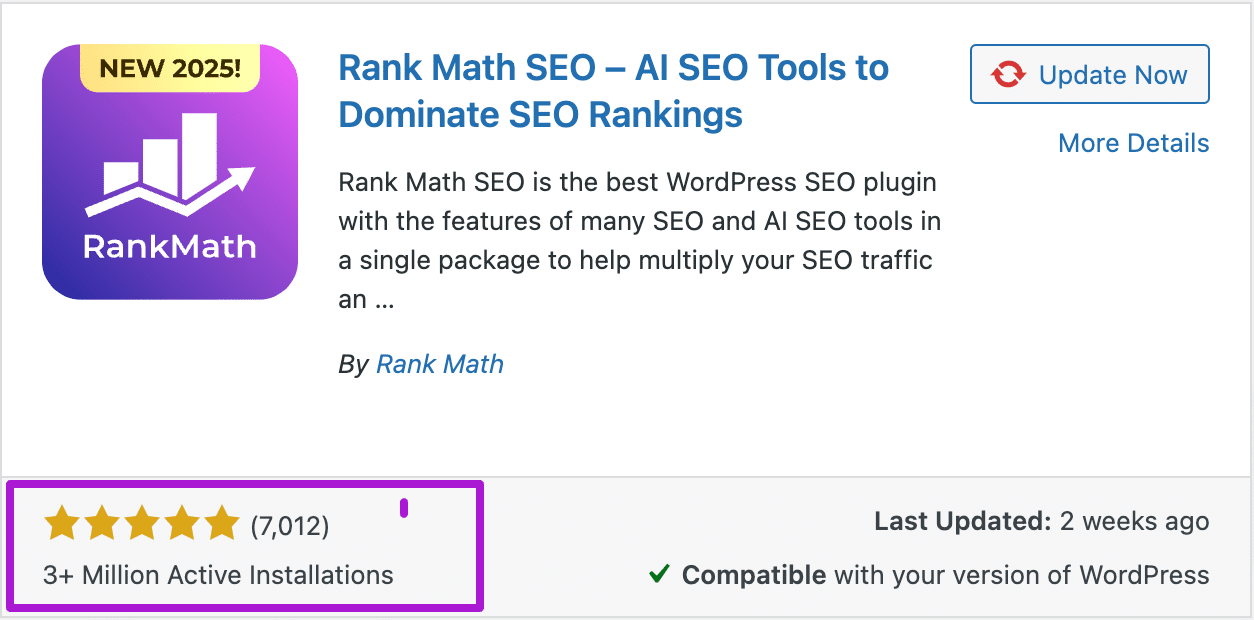
Rank Math is a WordPress SEO plugin that helps you to easily optimize your website for SEO. It is used by over 3 million users and has a 4.9-star rating based on 7,012 ratings in the WordPress repository.
Just like many other WP plugins, Rank Math also comes in two versions: Free and Premium.
Rank Math’s free version is free to use, and you can just install it from the WordPress repository. The free version of Rank Math is quite popular because it comes with features that are not even available in the premium versions of some SEO plugins.
Whereas Rank Math Premium is the paid version, which comes with more advanced SEO features. And to use the premium features, you have to pay as per Rank Math’s plans & pricing.
Rank Math SEO Features Review:
Rank Math offers many features even in its free version, and if I were to review all the features in-depth, this guide would become so long. Hence, in this guide, I will cover key Rank Math features.
Score-based On-page SEO Analysis
The most day-to-day used feature of any SEO plugin is for on-page SEO optimization. Just like other SEO plugins, Rank Math’s On-page SEO analysis feature is available in the WordPress editor.
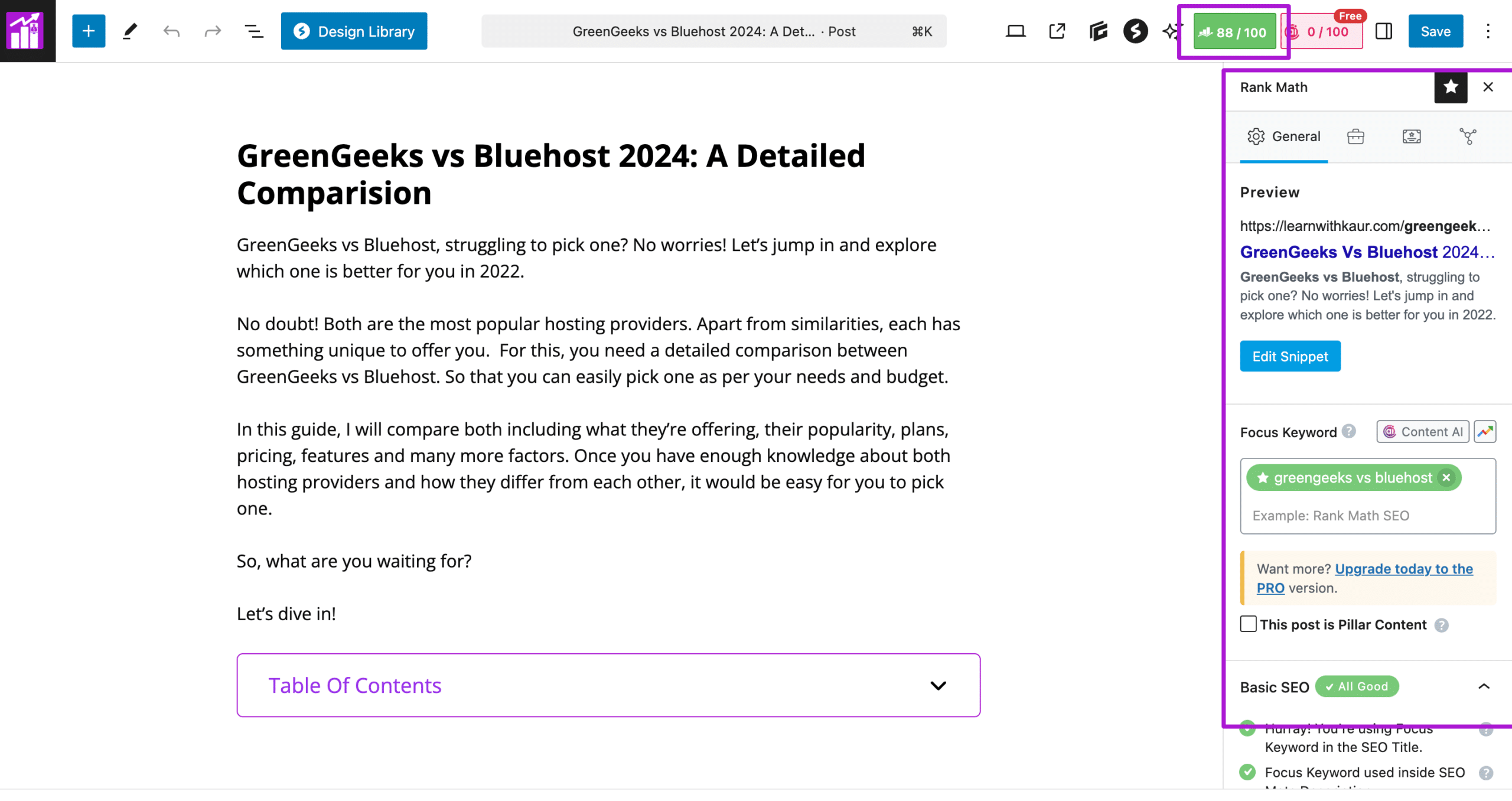
Rank Math uses a score-based system for On-Page analysis, and it gives you a score out of 100. At the top of the WordPress editor, you can easily see a score out of 100 to get an idea of how well you have optimized as per Rank Math’s on-page SEO guidelines.
To improve your on-page SEO, simply click on the Rank Math Logo, and it will open up Rank Math’s On-Page SEO checklist. Firstly, you can add focus keywords for which you want to optimize your content for SEO. E.g., I entered “green geeks vs Bluehost”.
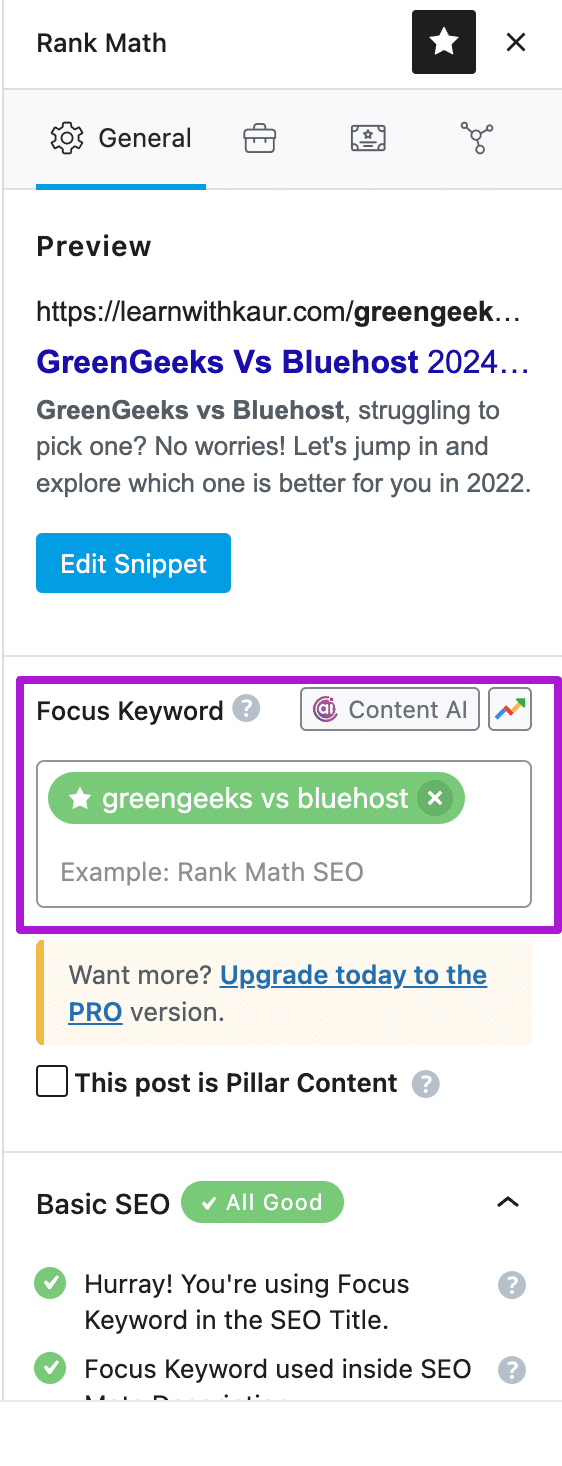
Next, you can look at the recommendations for improving the on-page SEO of your page or post.
If you’re a beginner and don’t know how to optimize your content for SEO, then this is a goldmine for you. It provides a quick SEO checklist just inside your WordPress editor, and based on this checklist, you can start optimizing your content for SEO.
The Rank Math SEO Checklist is divided into 4 categories.
Basic: Gives you recommendations for adding your focus keyword in the most important parts of your content, such as the Title, Meta description, URL, first paragraph, and content.

Additional: Rank Math gives you SEO recommendations for adding keywords in headings, images, and linking suggestions.
I think most of these things matter for SEO, but I don’t think that you need to use their “Content AI” Feature to rank well in the search engines. This is just a part of Rank Math’s marketing game to promote their Content AI Feature.

Next, Rank Math also provides recommendations for titles, which is good for writing SEO optimized titles.

Lastly, Rank Math provides some recommendations for content readability as you can see in the screenshot below. However, the suggestions for content readability are very limited compared to Yoast SEO’s content readability analysis.

The other thing that I liked about Rank Math’s on-page SEO analysis is, it gives you a real-time score out of 100. It means without even refreshing a page, you can check the score in real time while optimizing the content for SEO.
Keep in mind that the Rank Math or any other SEO plugin gives you a score based on its SEO checklist.
It does not mean you have to have a 100 score to properly optimize content for SEO. Because some of the things from the checklist may not be necessary from an SEO perspective.
For example, the Content AI recommendation. I never use Rank Math’s Content AI, and it’s not a must for optimizing your content for on-page SEO.
So, what I mean is you don’t need to worry about achieving 100 out of 100 from Rank Math’s on-page Score, because things like Content AI on the Checklist are not a must-do for optimizing your content for SEO.
Target Multiple Keywords
Rank Math allows you to optimize your content for up to 5 keywords, even with its free version. This is great because other plugins, like Yoast SEO, only allow you to optimize for multiple keywords with their premium version.

Usually, we have one primary keyword for which we want to mainly optimize the content. Along with this, we also have some secondary keywords to optimize our content. This SEO feature is quite helpful if you want to optimize your content for multiple keywords.
Preview & Edit Google & Social Snippet
Rank Math allows you to preview and edit the Google snippet for individual pages/posts.
Using the preview feature, I can easily see how my post snippet will appear in Google search results. Further, I can edit the title, permalink, and meta description for my posts to customize the Google snippet.
The following screenshot shows a Google snippet preview for one of my blog posts.
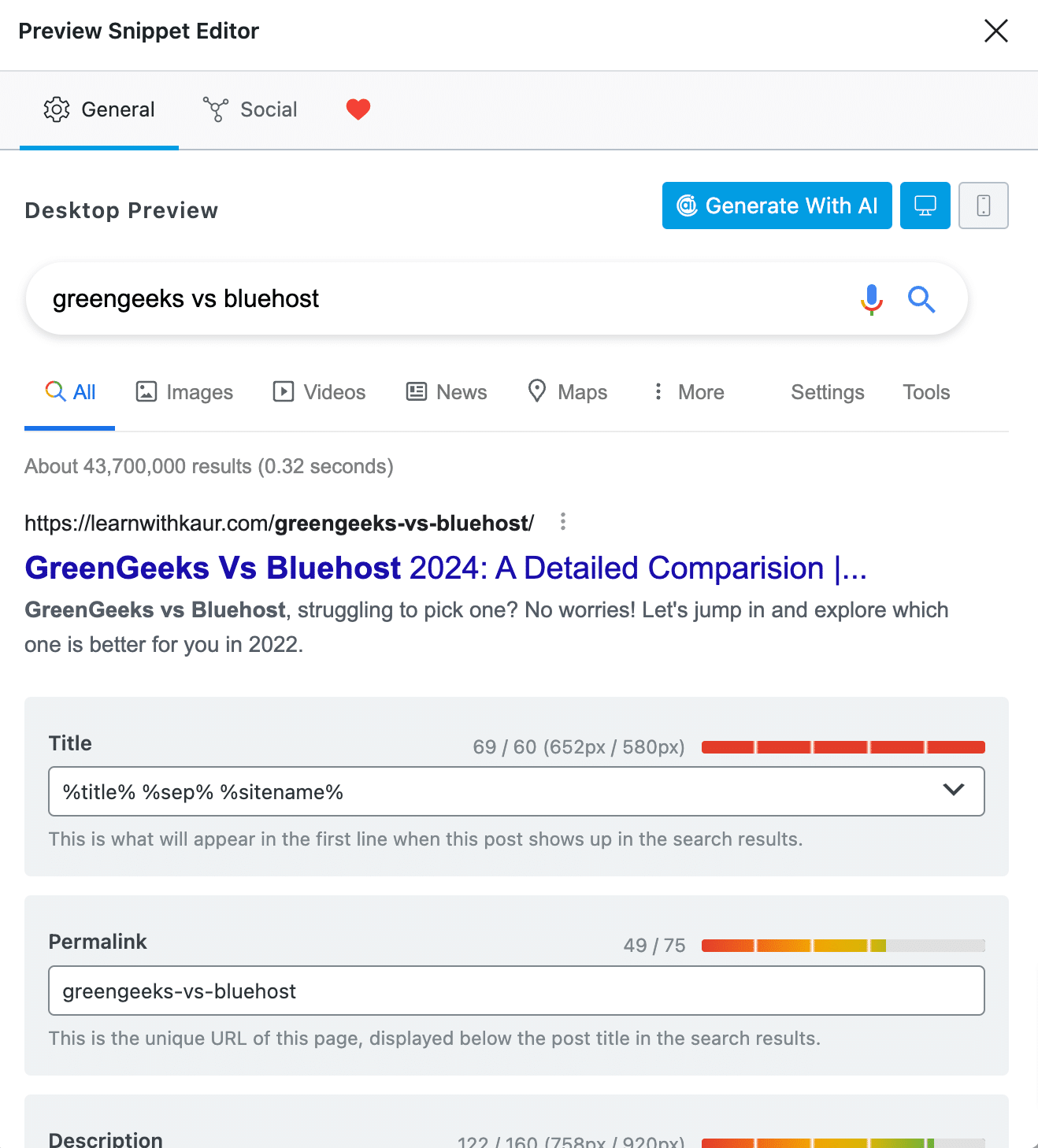
Additionally, you can also check the Google snippet preview for mobile devices as well and make edits for mobile users.
Note that using this feature, you will be able to preview and edit the Google snippet.
However, it does not mean that Google will only use this snippet while showing your post in Google search results. Because sometimes. Google auto-picks the snippet based on a search query for a better user experience.
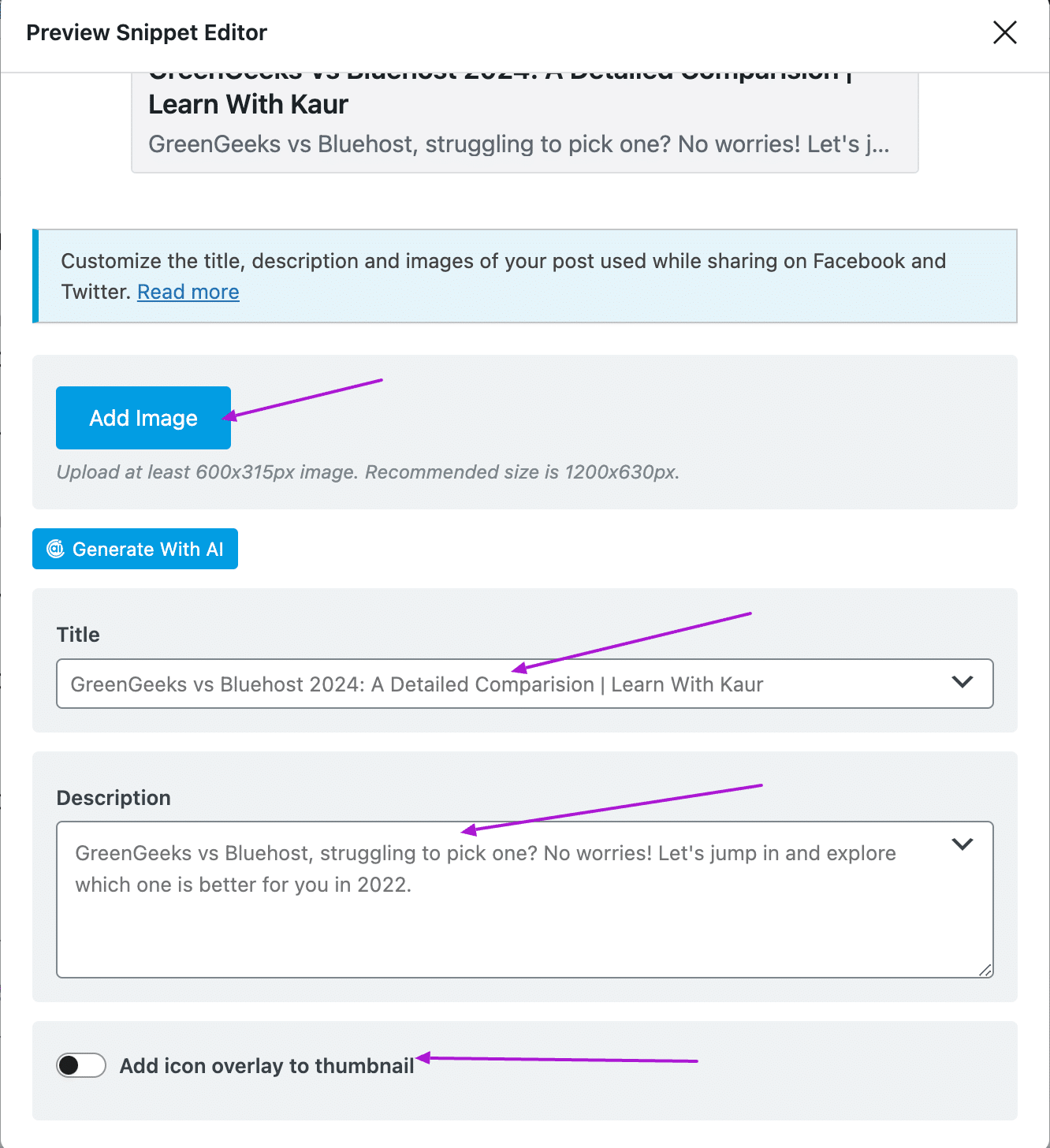
Similarly, Rank Math also allows you to preview & edit social snippets for Facebook and Twitter.
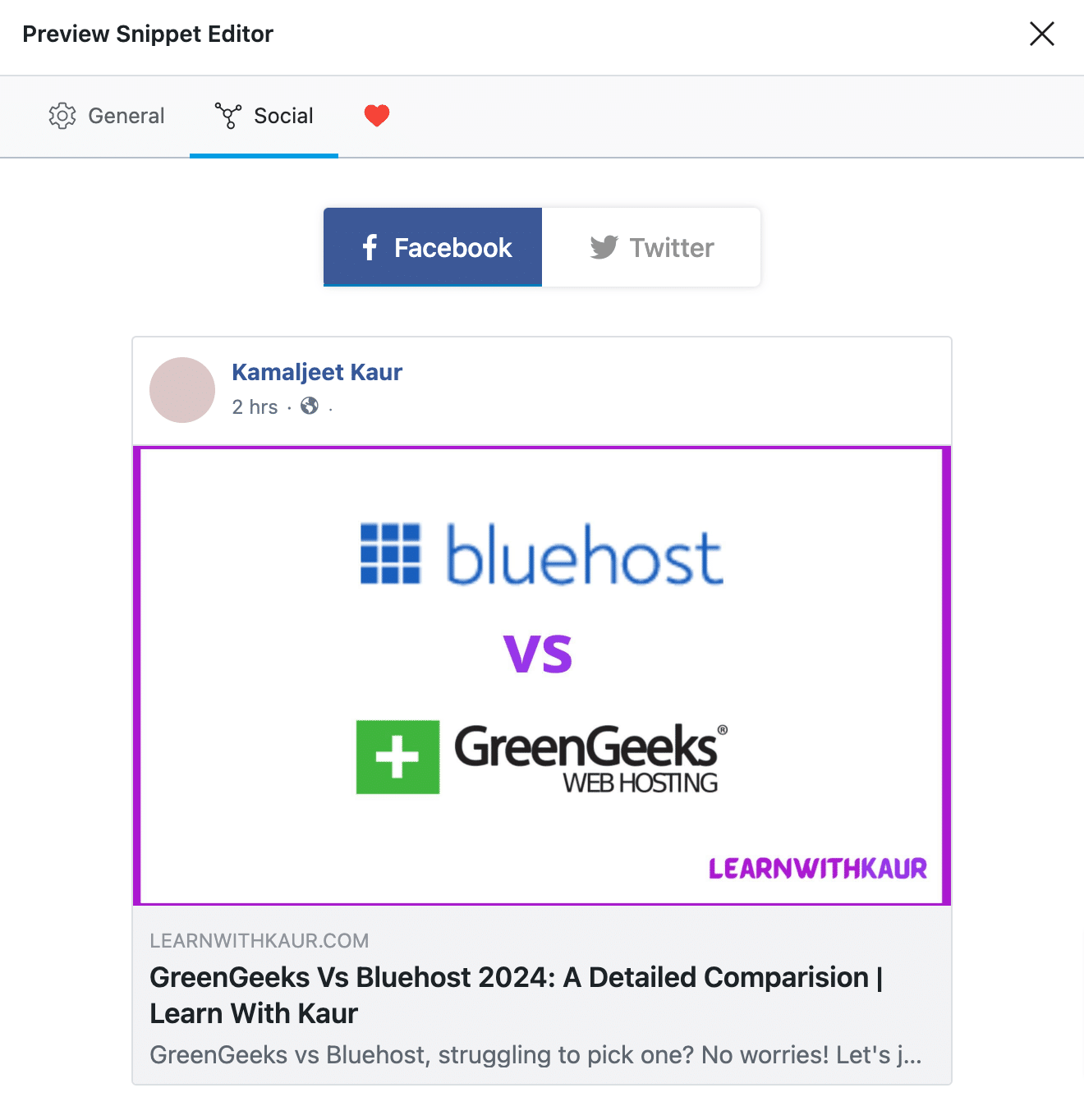
You can edit the title, description, and images of your posts while sharing your posts on Facebook and Twitter.
1-click Site SEO Audit
SEO is not just about optimizing your posts for target keywords; this is just a part of SEO that is called on-page SEO. The overall SEO of your website also includes off-page and technical SEO factors such as page speed.
So, how will you analyze the overall SEO of your site? And how do you know what to optimize to improve the overall SEO of your site?
Well, there are many SEO audit tools to analyze the SEO score of your website.
But with Rank Math, you don’t need to get a separate SEO analyzer tool. Because it comes with an Integrated SEO Analyzer tool, even in the free version of Rank Math.
With Rank Math SEO analyzer, you can conduct an SEO audit of your site, and it will give you a score out of 100 based on 29 factors.
The best thing is that it will also give you a detailed analysis, which includes passed tests, warnings, and failed tests. Along with this, you will also get guidance on what that particular factor is and how you can resolve that issue on your site.
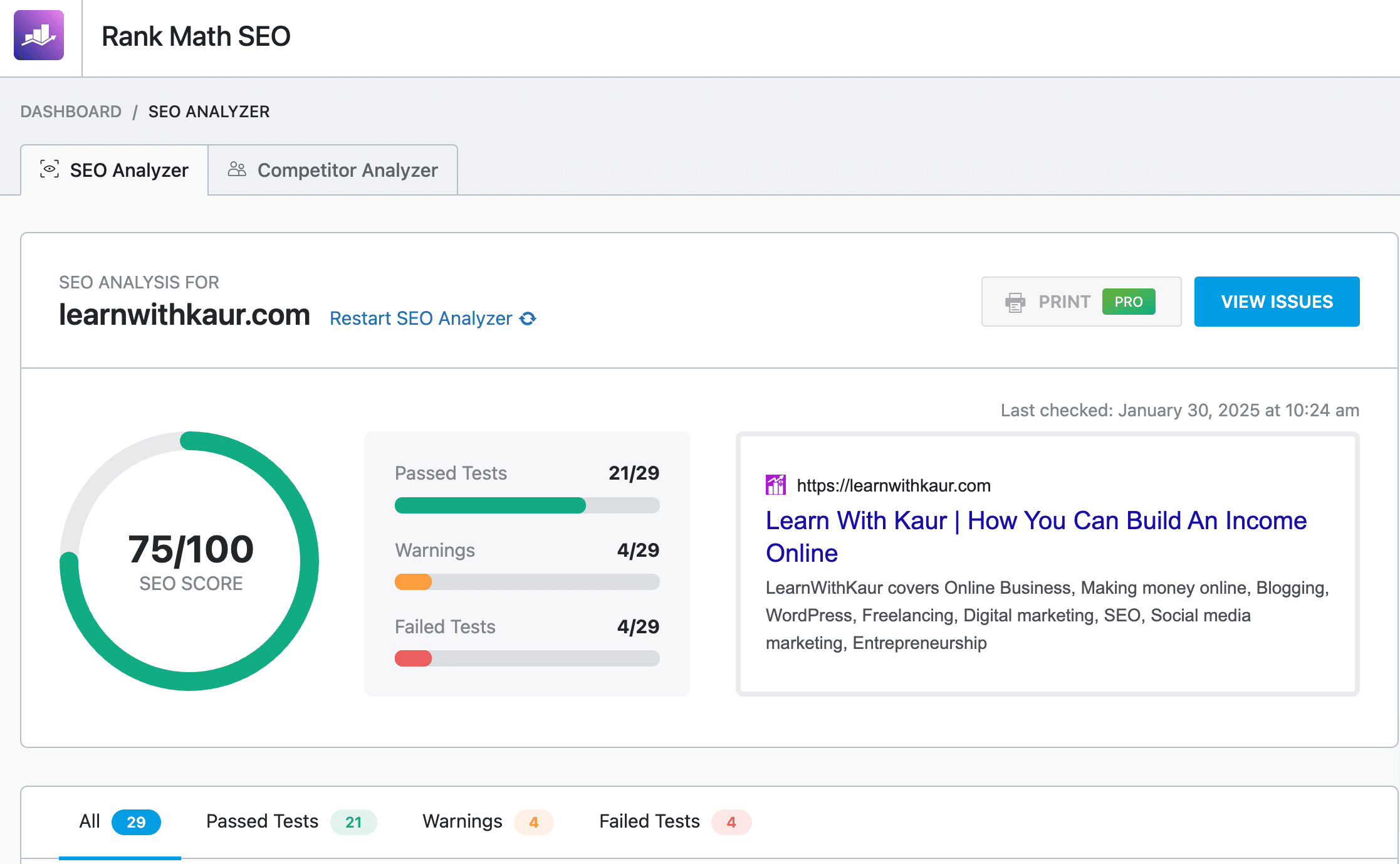
The above screenshot shows the SEO analysis for my website: learnwithkaur.com. As you can see, the overall SEO score of my website is 75/100, which is in green. That means my site has a good SEO score, but there are some areas of improvement as well.
The Rank Math conducted the SEO analysis based on 29 factors, out of which my site passed 21 SEO factors, 4 were warnings, and failed four tests.
Next, I can check how to resolve the warnings and issues to achieve a better SEO score.
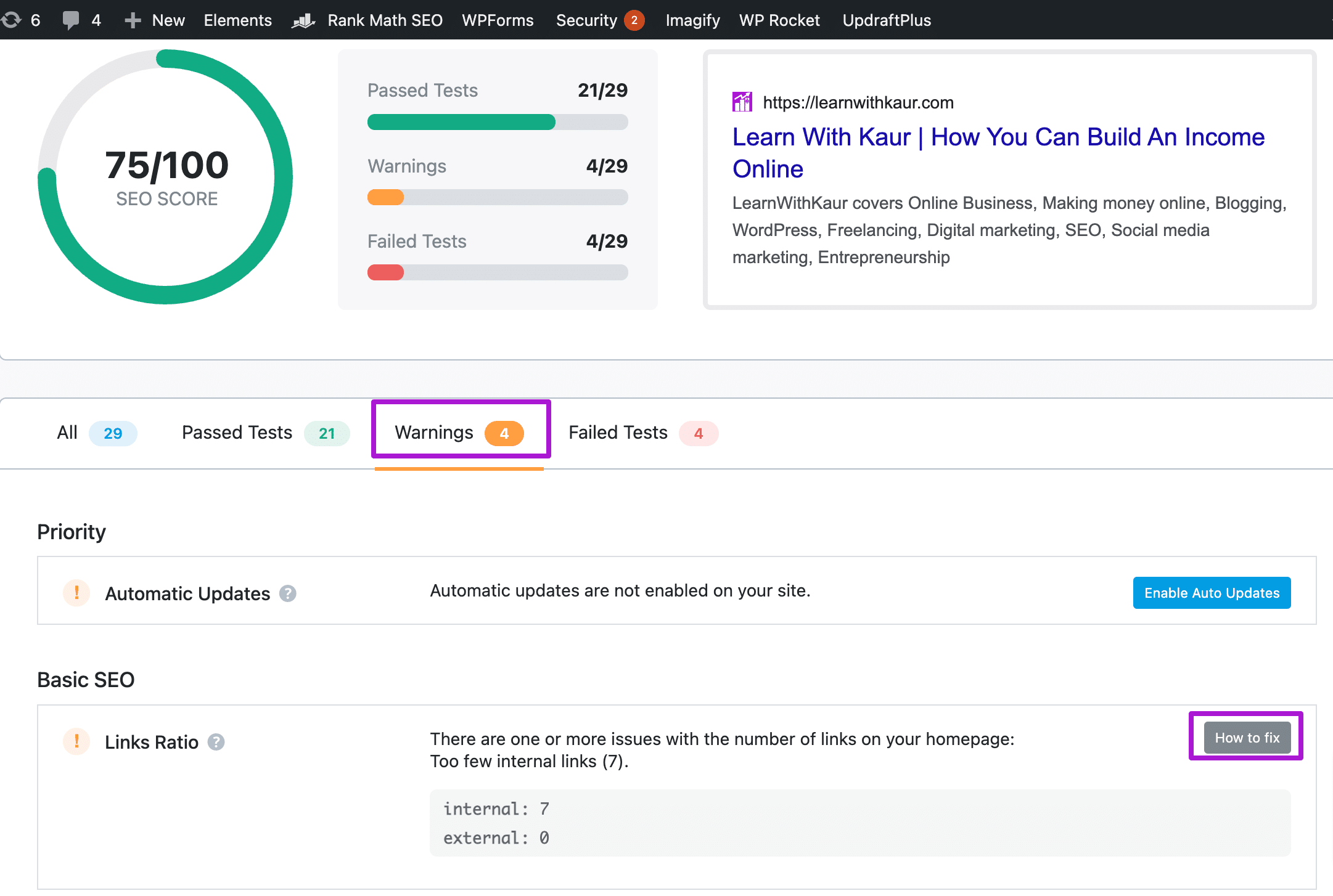
There is a warnings tab to know which SEO warnings your site has. To know how you can fix that warning, click on “how to fix” next to that warning.
The Rank Math will explain everything, and if you’re confident, you can go ahead and fix this on your own; otherwise, you can take the help of an SEO consultant.
Similarly, there is a failed tab to see which SEO things your site is unable to reach, along with how to resolve them to improve the overall score.
If you’re working with SEO clients, then this can be a helpful feature for generating quick SEO audits. With the Rank Math Pro version, you can also print the final report and send it directly to clients.
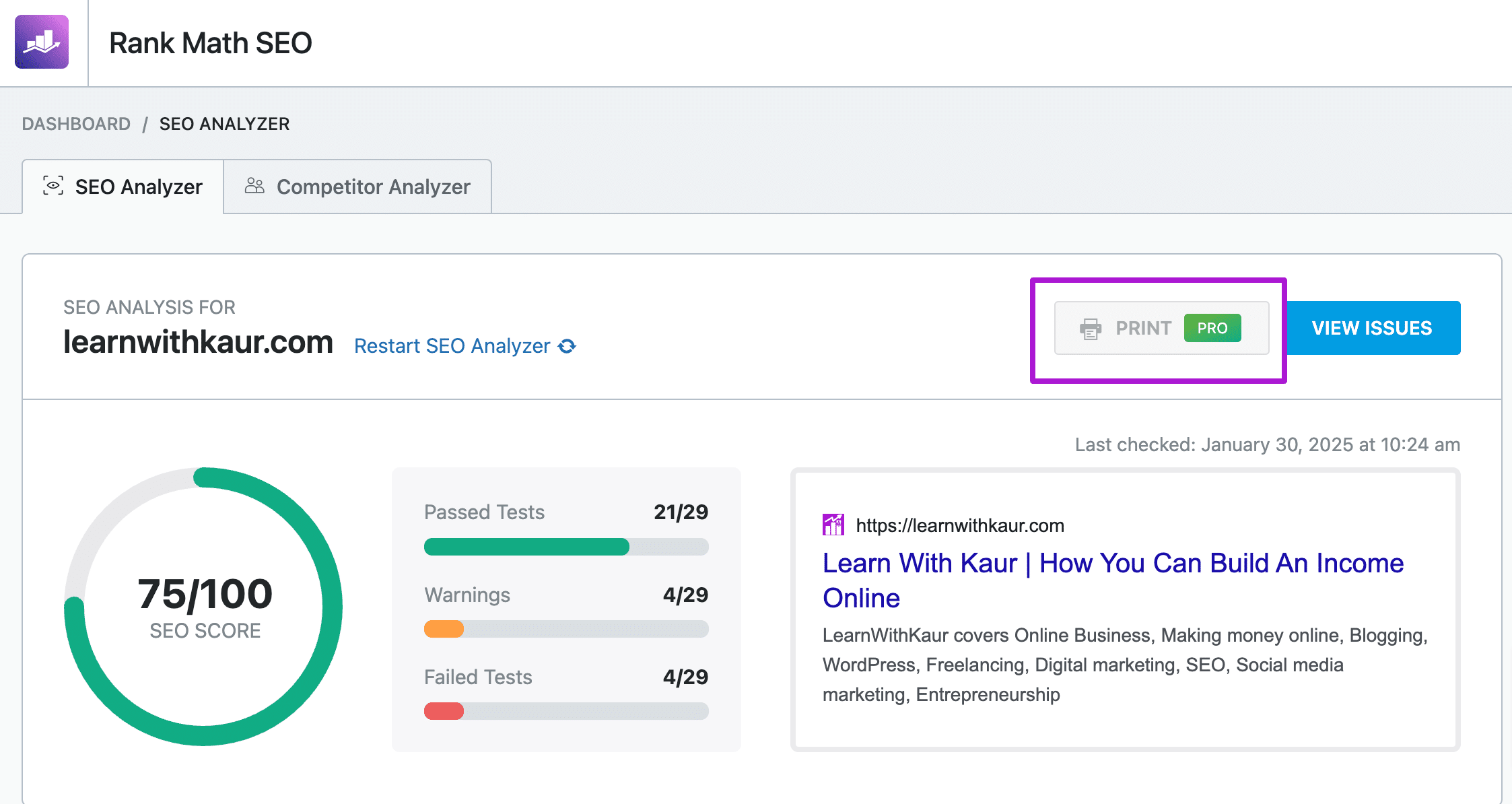
But with the free version, you can only analyze the report within the dashboard and can’t download it.
Migrate from Yoast SEO or All-in-One SEO Plugin.
If you’re already using an SEO plugin, then you might be worried about losing your current SEO settings.
But, with Rank Math, you don’t need to worry because it takes care of the migration of SEO settings from other SEO plugins such as Yoast SEO, All-in-One SEO, and SEOPress plugins.
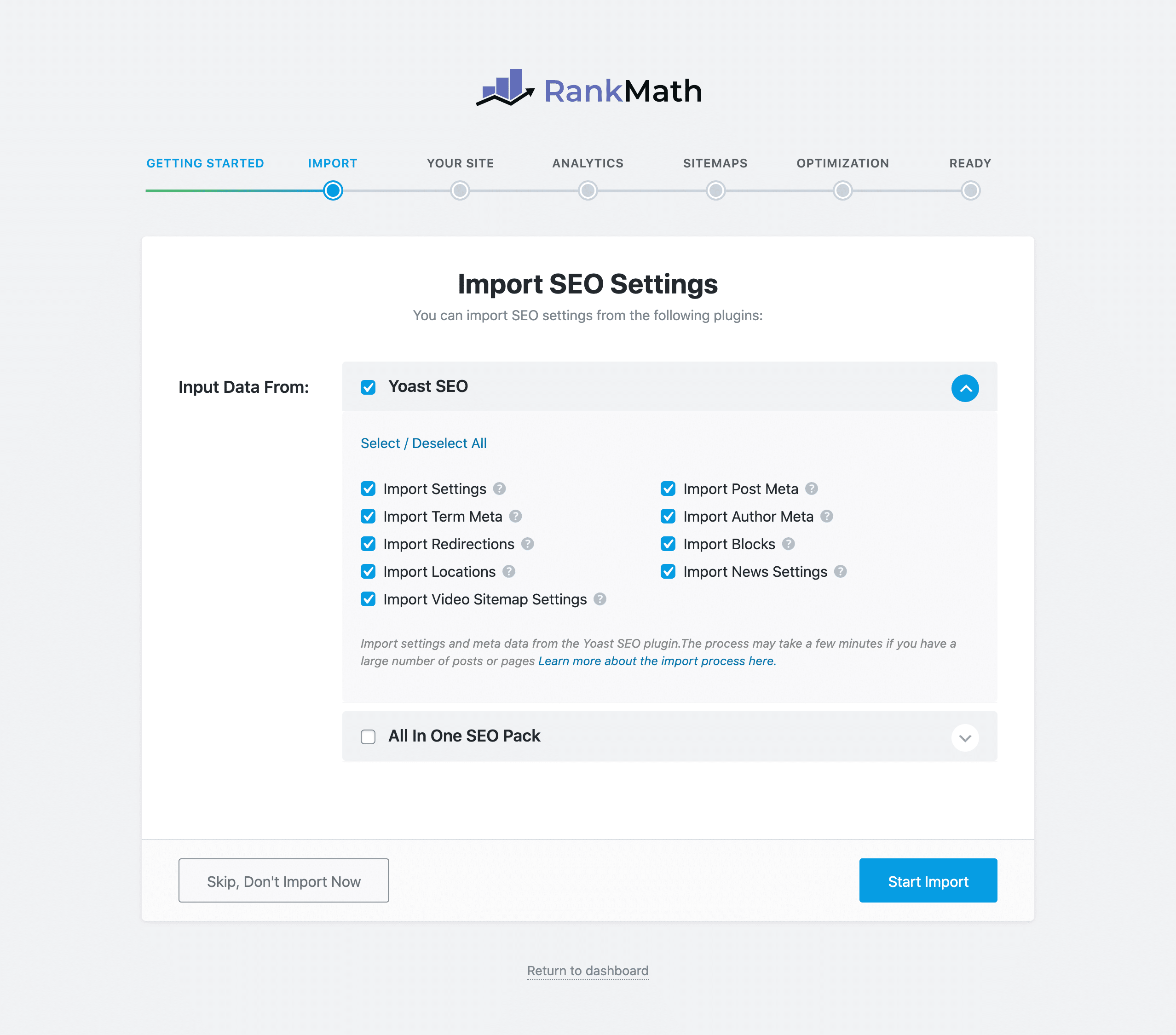
When you first install Rank Math, it will automatically go to a Quick setup wizard.
In the first step of the setup wizard, Rank Math will conduct the compatibility test. And, if you’re already using any other SEO plugin, it will right away give you the option to migrate your existing SEO settings to Rank Math.
That’s a very handy feature! You can migrate from the other popular SEO plugins, such as Yoast SEO, All-in-One Plugin, and SEOPress, with a single mouse click.
Role Manager
Do you have a team or freelancers to work on your WordPress? But don’t want to provide the full SEO settings access to everybody.
Then, this Role Manager feature of Rank Math can be quite a useful feature for you, and again, it’s available even in the free version.
Using this feature, you can control user access and customize which users can access which features of Rank Math.
Let’s suppose you hired an SEO content writer who is supposed to do only on-page SEO. So, in this case, you can provide access to only the On-page SEO settings and keep the other Rank Math SEO features restricted.
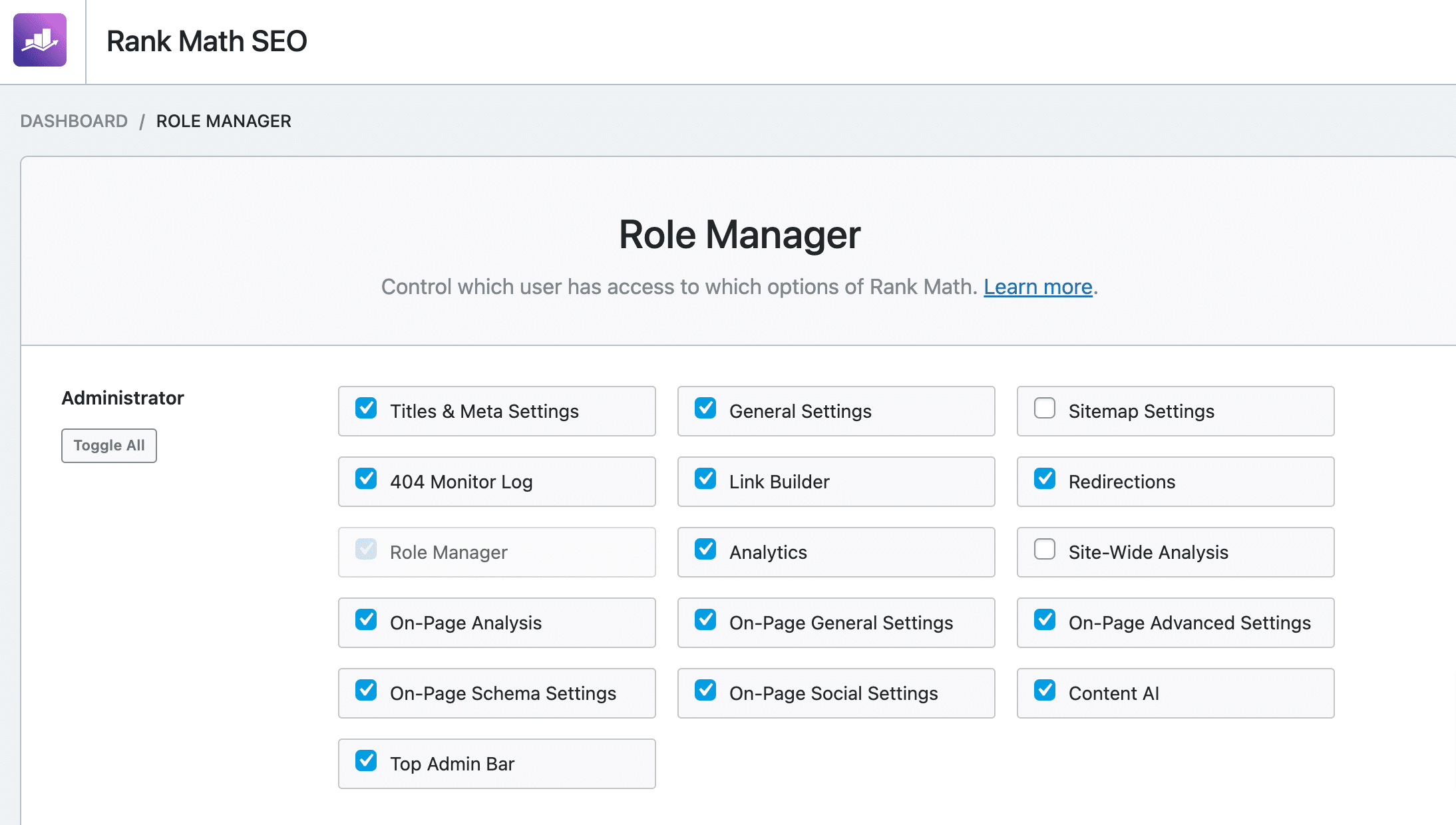
The best thing about the role manager is that you can even customize the administrator settings and control which Rank Math features the admin should access or not.
For example, if I don’t want to provide role manager, site-wide analysis, and sitemap settings access to Admin, then I can just uncheck those features.
For each role, you can select/deselect the rank math features based on how much access you want to give them. This is a pretty useful feature for companies that have teams or hire freelancers for a specific job.
Image and Media SEO Optimization Features
Optimizing your images and media files is a good SEO practice. Rank Math provides you with a couple of SEO settings, using which you can even automatically optimize your images and media files for SEO.
In the free version, Rank Math allows you to add missing alt tags and titles to the images. This is not the best SEO practice, but it’s better than nothing.
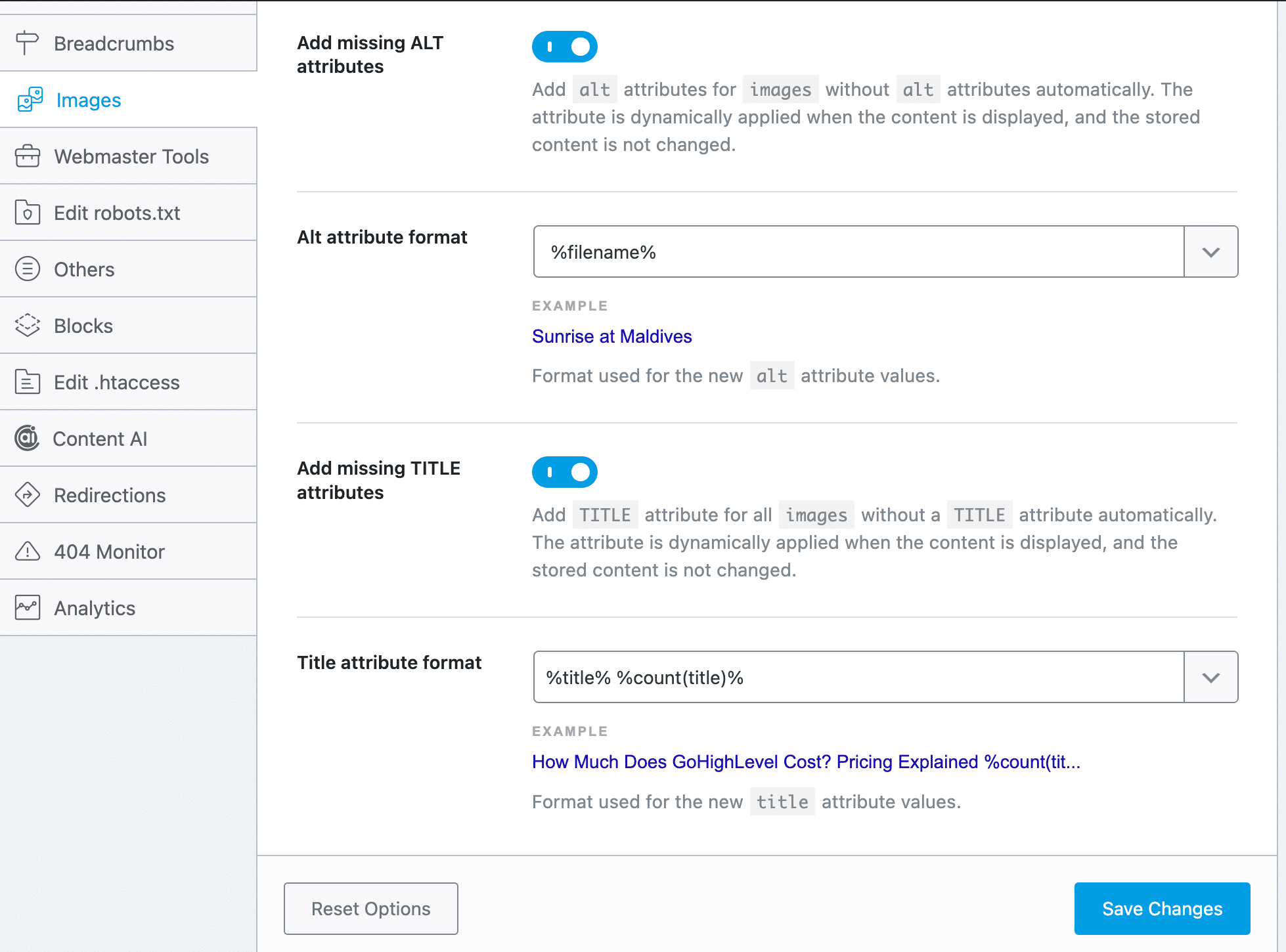
This feature is quite useful because sometimes we forget to add an alt tag and title to images, and if this feature is ON, then Rank Math will automatically add your image’s file name as the alt tag and title of that image.
With the Rank Math Pro version, you will get a few more SEO options for images, such as:
- Automatically add missing image captions.
- Automatically add missing image descriptions.
- Choose Capitalisation settings for image title, alt tag, description, and caption.
- Add an alt tag to Avtar(profile picture of commenters). In this case, Rank Math adds the commenter’s user name as an alt tag for their profile picture.
- Replace characters/words in the alt, title, or caption of images.
Most people only care about adding an alt tag to the images, so the free version can do that in case you forget to add the alt tag to any image.
The premium image seo options are not meant for every user, because only a few people or maybe big companies, might care more about captions, descriptions, and capitalizing things for branding. So, the pro image features are not normally used by most SEOs.
Customize Global Meta Settings
The purpose of optimizing the website for SEO is to drive free organic traffic from search engines. To do so, your first step should be allowing search engines to index your website pages/posts.
Most of the website content we want to index to appear in search results. Apart from a few pages, such as, you may not want to show your archive, categories, or some private pages to appear in search results.
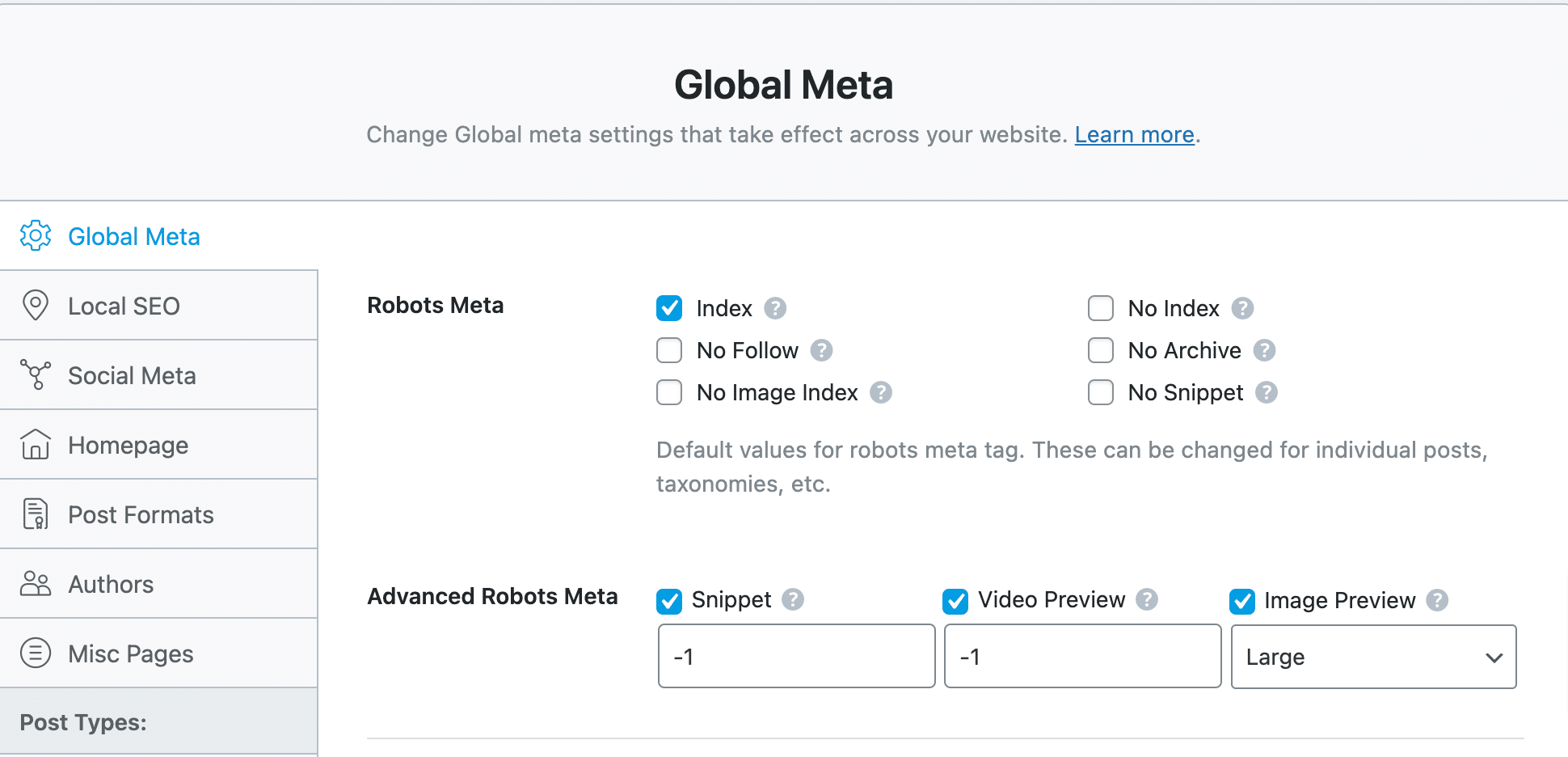
So, from global meta settings, you can select the index because most of the website content we want to index.
In case you don’t want to index a specific page/post, then you can change the no-index from the individual page/post’s WordPress editor settings.
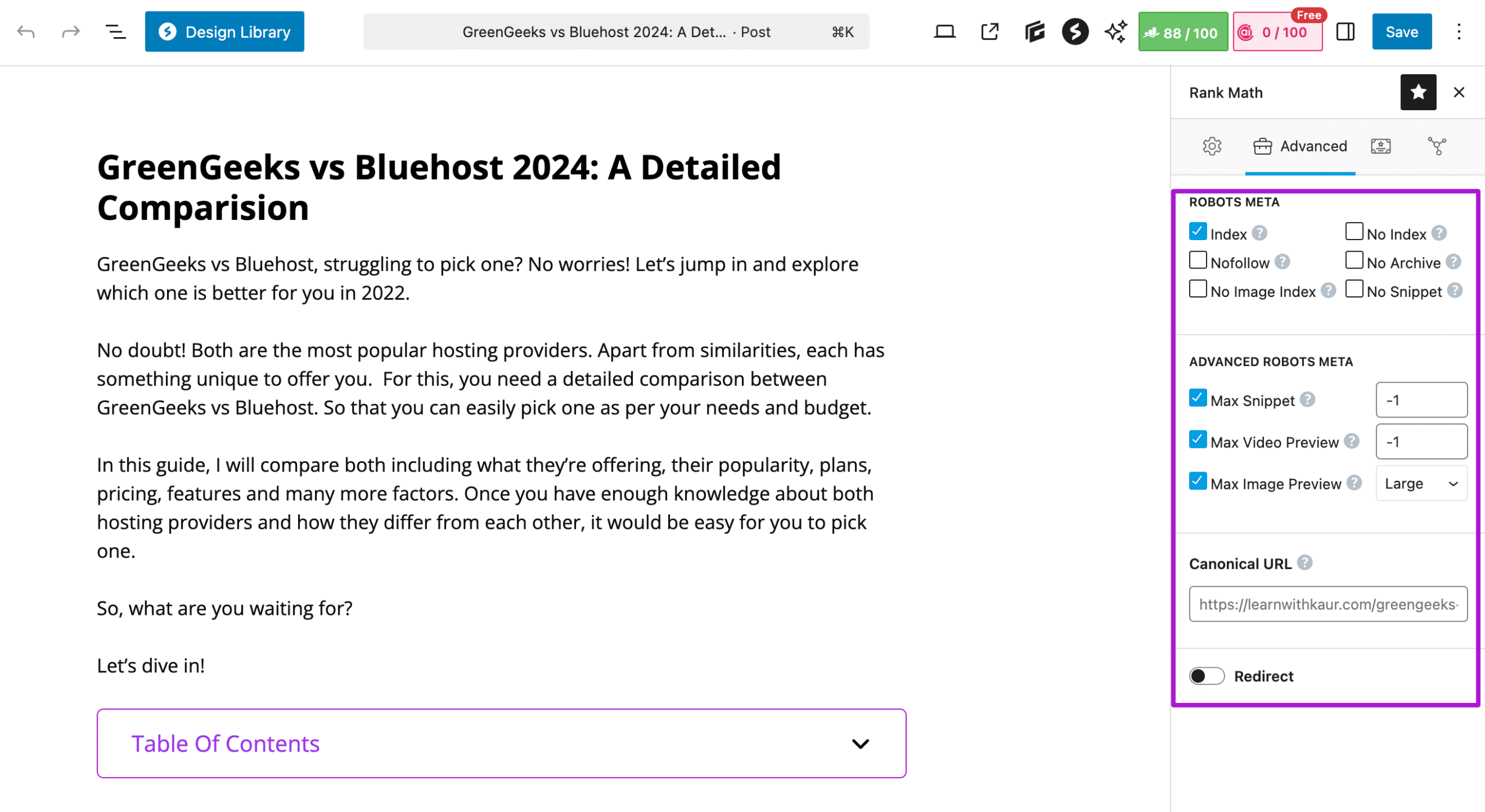
Additionally, with the Rank Math plugin, you will also get some advanced settings for robots meta to customize how your content appears as a snippet in search results. Using these, you can specify the maximum character length for your page’s content.
The default value 1 means Google can use any number of characters from your page’s content. With video preview, it allows you to set the maximum duration in seconds for animated video. And lastly, you can select the image preview size.
Globally No-index Empty Categories and Tags Archives Pages
With Rank Math, you can globally no-index empty categories and tag archives pages.

This is quite a helpful feature because when we create different categories and tags for organizing our posts, the category and tag archives pages are also created.
With this single click, you can no-index all the empty categories and tag archive pages because these are just thin or duplicate content pages.
Choose Your Separator Character
Choose a separator character for your post that will appear between the title of your post and the website name in the search results.
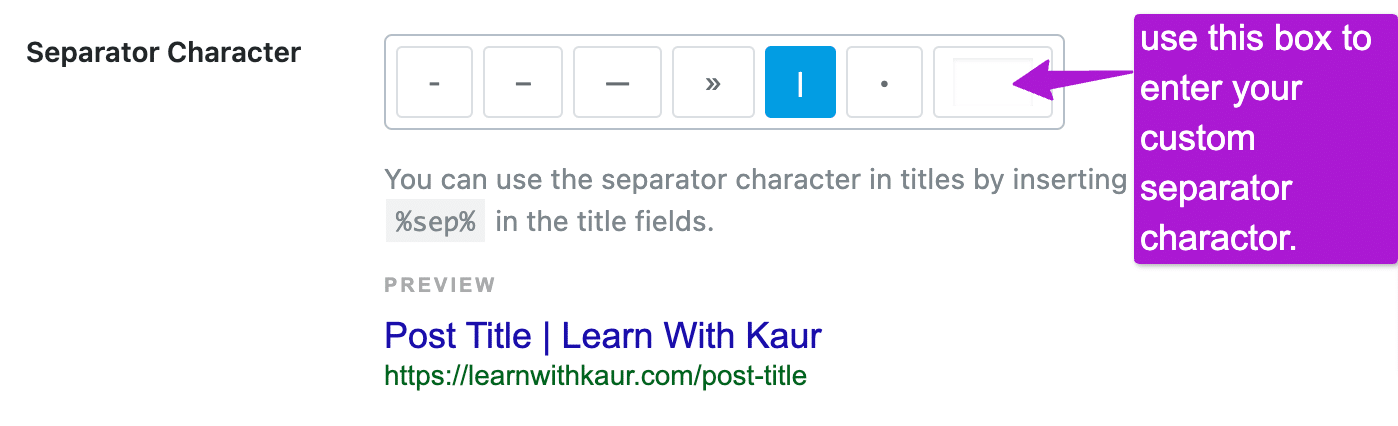
You can choose any of the given characters, plus you can also use the last field of this feature to enter your custom separator character.
Capitalize the Titles of Your Pages/Posts
Do you prefer to capitalize the titles of your pages/posts?
Then, in Rank Math, you have the option to capitalize all the titles with a single click. You can just type a title in any case, and it will automatically capitalize the first letter of each word in your title.

Upload OpenGraph Thumbnails
RankMath also allows you to upload an image for Open Graph thumbnails.
What does this mean?
Let’s suppose you forget to upload any featured image for your blog post, then, in that case, your open graph thumbnail image will be used as a fallback image for the featured image of your blog post.
XML and HTML Sitemaps
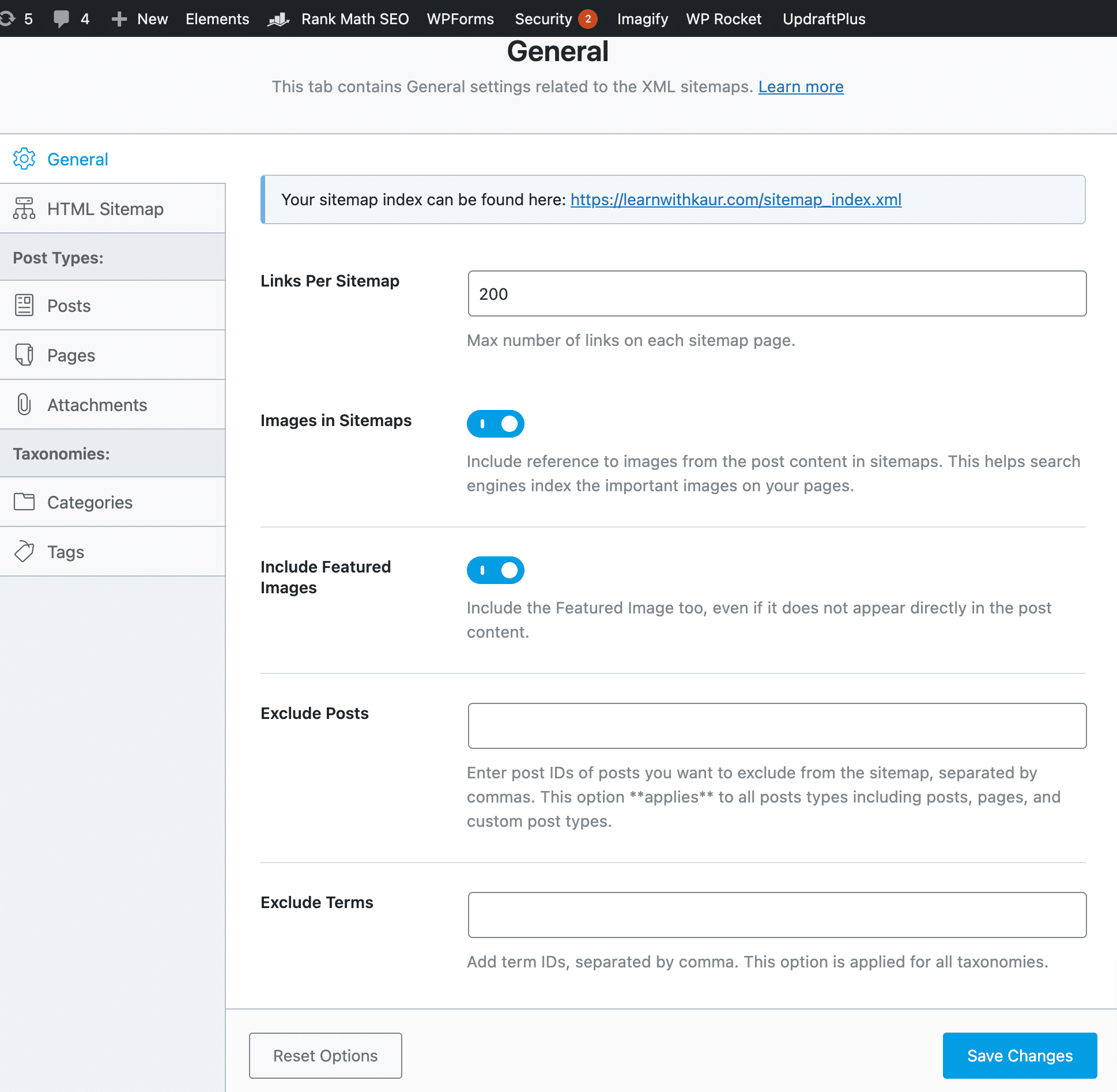
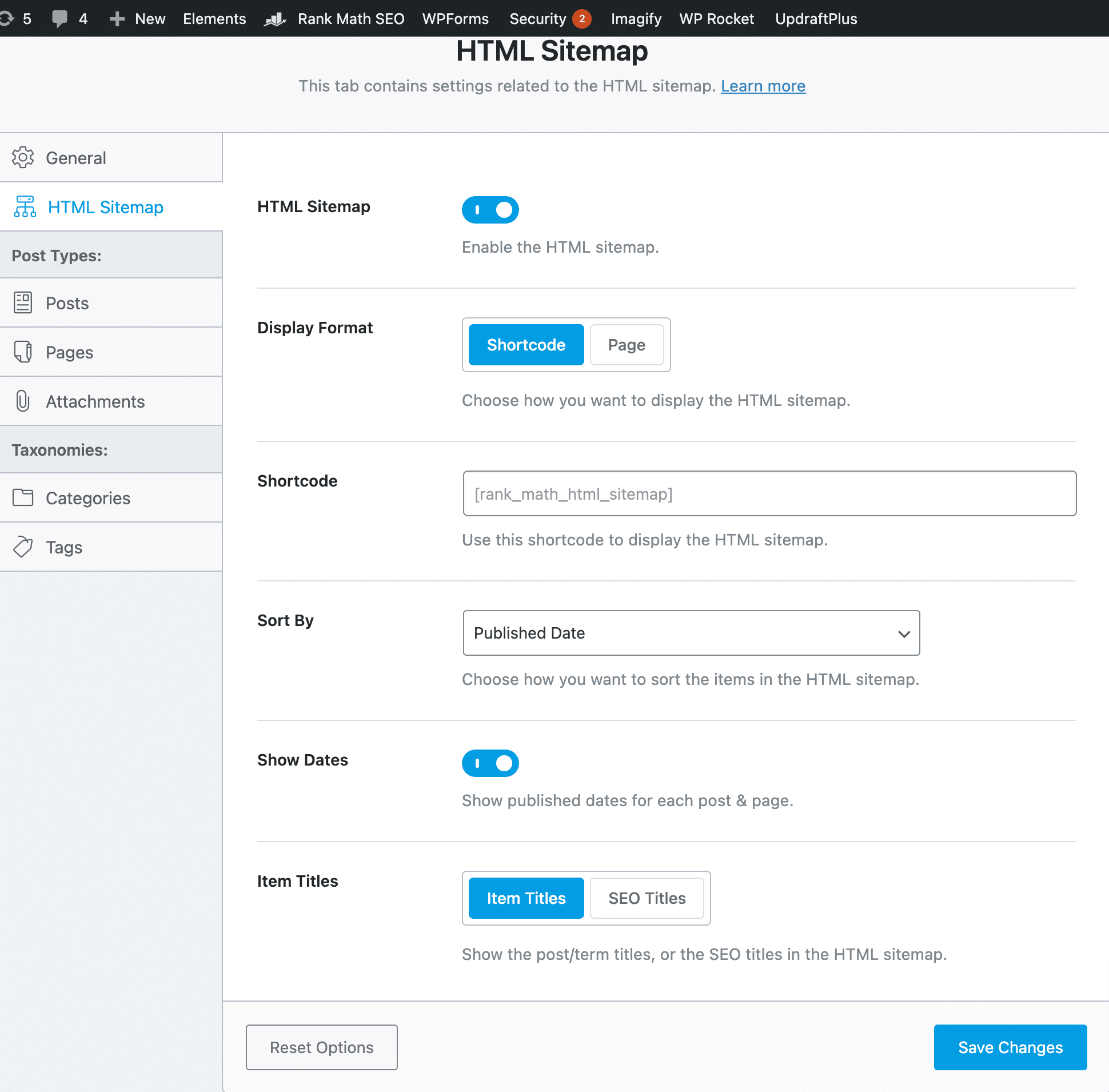
Rank Math allows you to create both XML and HTML sitemaps, even in its free version. Along with creating sitemaps, it allows you to customize the settings for sitemaps.
For example, for XML sitemaps, you can select how many links you want per sitemap and whether to include or exclude images and featured images.
Plus, you can also get the option to exclude some posts/terms in your sitemap.
If you want to create HTML sitemaps, firstly, you can turn this feature ON and then customize the settings for the HTML sitemaps, as shown in the screenshot below.
URL Redirections
Even in the free version of Rank Math, you will get a built-in redirection manager. This means you don’t need to use any additional plugins for setting up and managing the redirection.
The following screenshots show you the set of settings that you can customize for redirections in Rank Math.
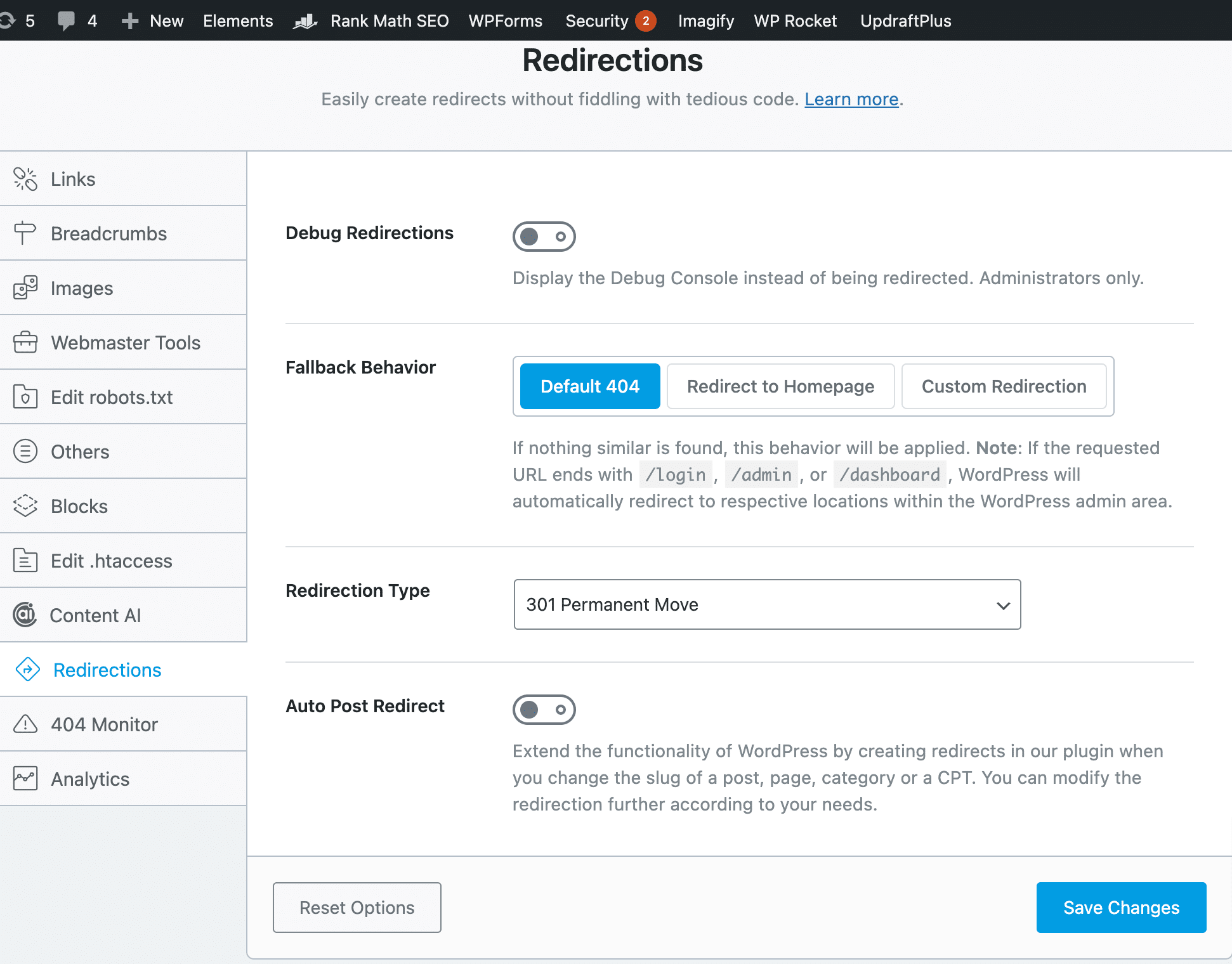
In Rank Math, you can set up a redirect, but in case the destination url is not found in the redirect. Then, you can select a fallback behavior to either go to a 404 page or a homepage to set up a custom redirection.
You can also select the redirect type based on your custom needs.
Plus, another cool feature of Rank Math is Auto Post redirection. This means if you change the slug of a post/page and if this feature is turned on, that url will be automatically redirected to the new one. This is quite a time-saving feature.
If you change the slug of the page/post, then we have to manually set a redirection from the old slug to the new one.
But if this feature is turned ON, whenever you change a slug, you don’t need to worry about redirection. Because with this feature, that old slug will be automatically redirected to the new one.
404 Manager
If you don’t have a 404 manager, then how could you find out on which pages your website is showing a 404 error? Well, with Rank Math, you don’t need to use another plugin for 404 management.
Because, even in the Rank Math free version, you will get a built-in feature for tracking and managing 404 errors.
With this feature, you can check the url slugs for which users are getting a 404 error. You can see how many times those errors are triggered for that particular page and the last access time.
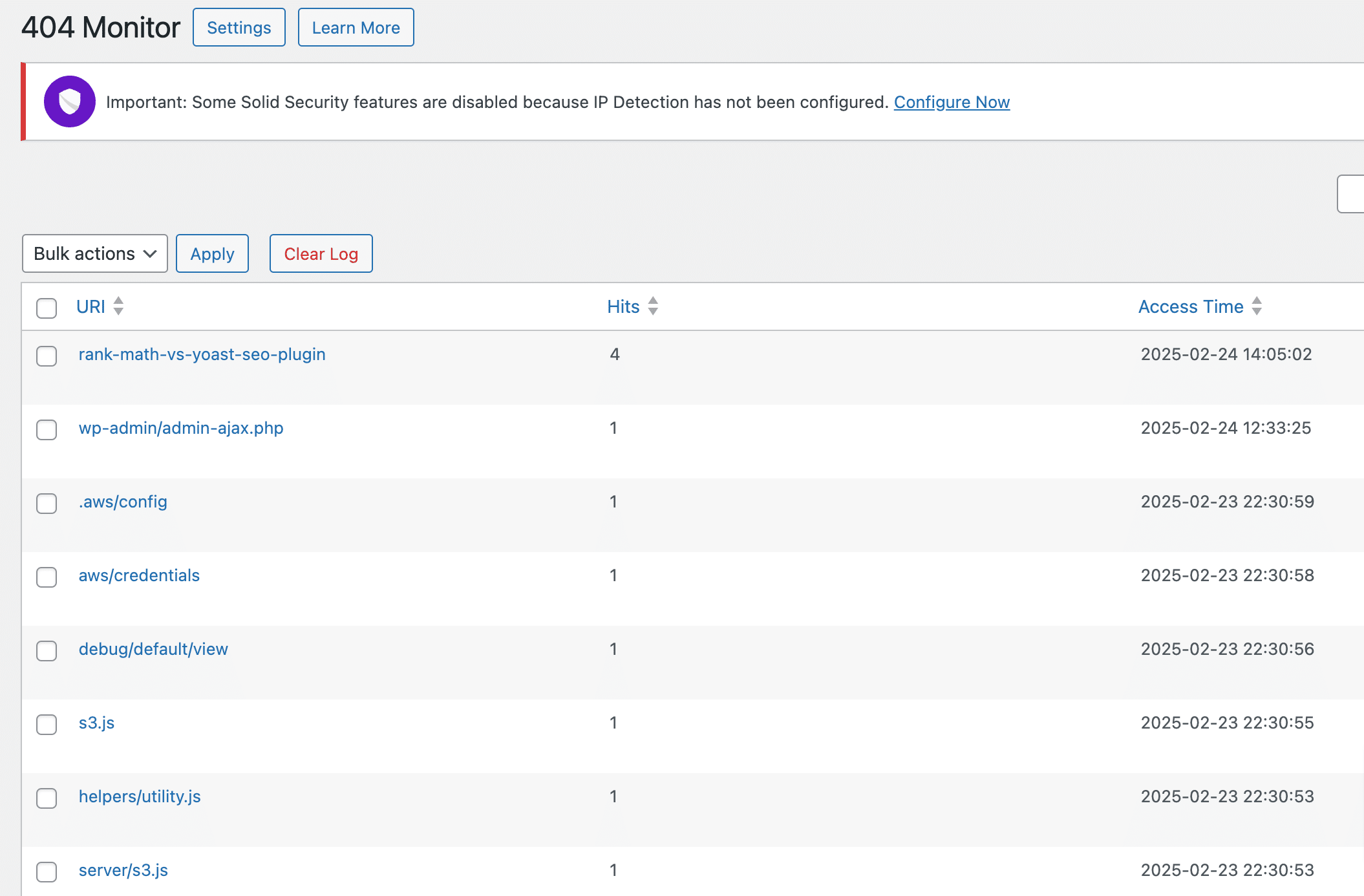
Further, you can redirect the url if you think it should be redirected. As some of the 404 errors are from spammers or bots, who are trying to use different characters to get into the admin, you can simply ignore these types of URLs.
Along with monitoring the 404 errors and resolving them, Rank Math also allows you to customize the settings for 404 monitoring, as shown in the screenshot below.
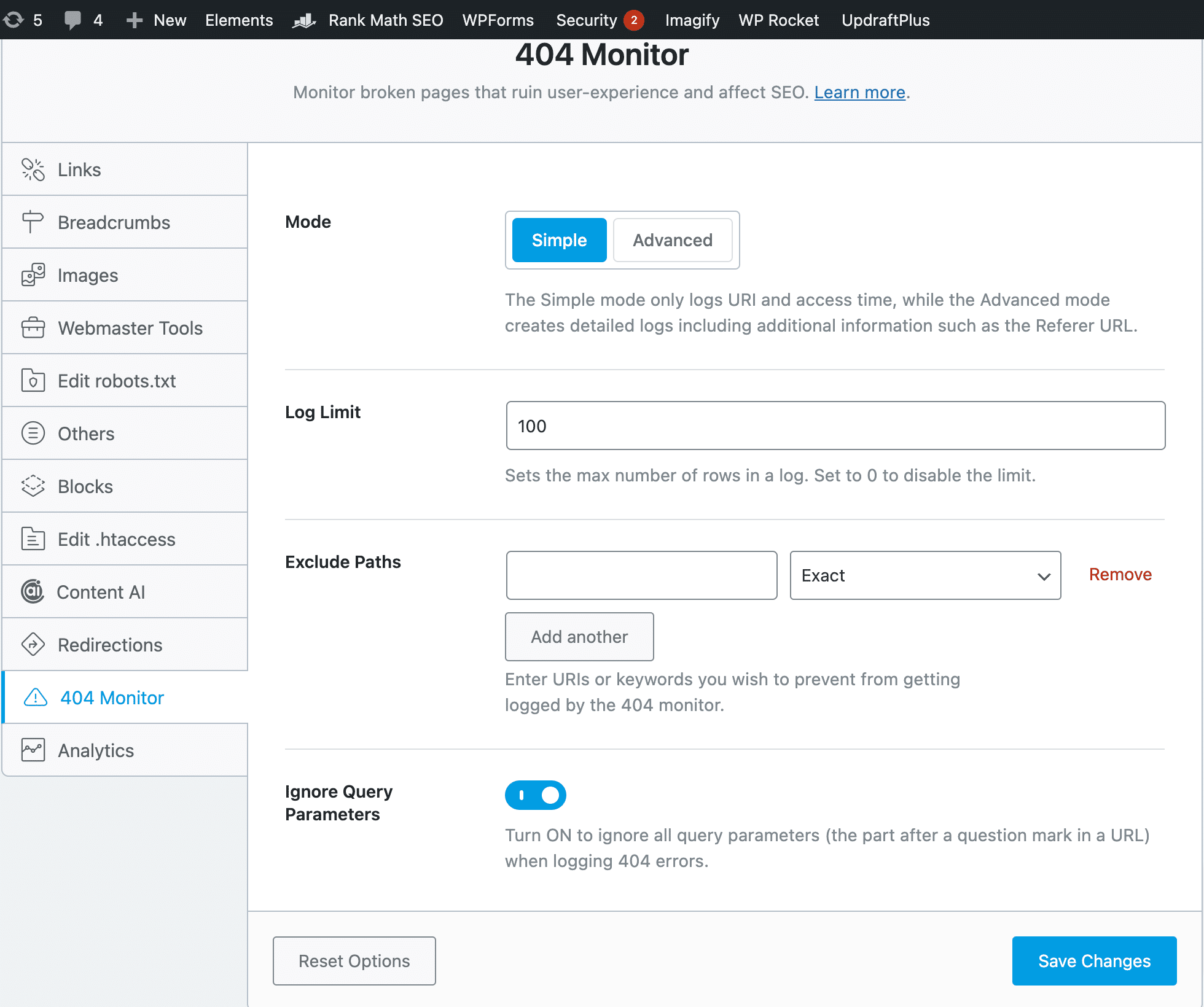
There are two modes for setting up 404 monitoring. The simple mode will track the log URLs and access time, but if you need more in-depth information about 404 errors, you can switch to the advanced mode.
You can also set the log limit for 404 monitoring. And, if you want to prevent some url slugs from being logged as a 404 error, then you can use the exclude path feature and set the condition to exclude it from 404 monitors.
Directly Optimize SEO in Elementor, Divi, and Many More Page Builders.
Rank Math is also compatible with most of the page builders, such as Elementor, Divi, and many more. That means you can optimize your page/post within the editor of a page builder.
For example, I’m using Elementor page builder for another site, and if I’m building a page in Elementor, then I don’t need to jump back and forth between Gutenberg and Elementor dashboards to optimize my page SEO.
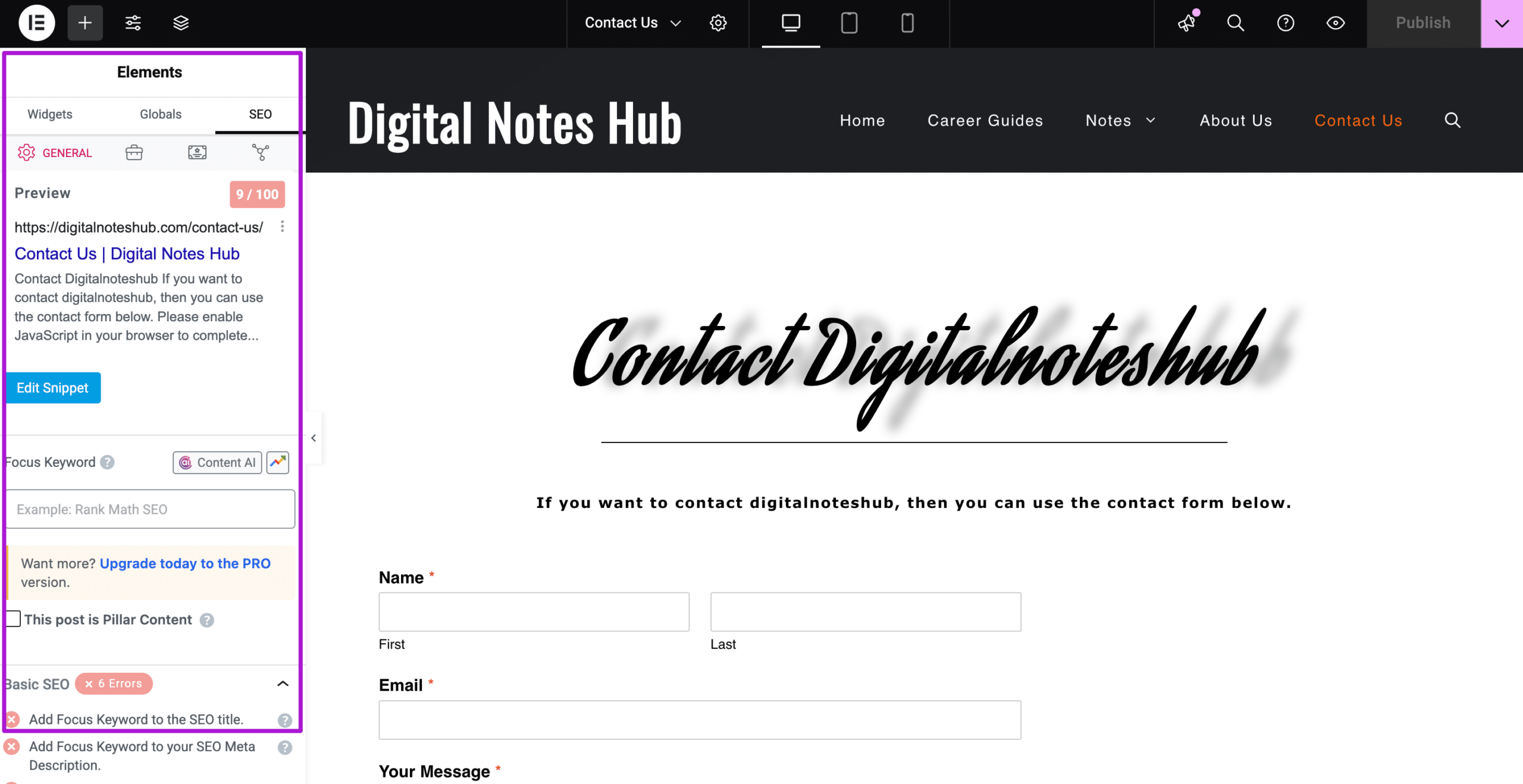
Because the Rank Math on-page SEO analysis is available in my page builder to optimize my page for SEO.
This is quite a handy feature because if your SEO plugin is not compatible with page builders, then you have to jump back and forth to optimize your page for SEO.
Setup Wizard to Set SEO Settings Without Much Hassle
When you first install Rank Math, it will automatically land you on the quick setup wizard to customize the most needed SEO settings. This will make your new SEO plugin installation much easier and save you lots of time.
Step 1: Choose Your SEO Mode
The first thing I liked most about Rank Math’s Setup wizard is that it allows you to choose a mode based on how much SEO control you need on your site.
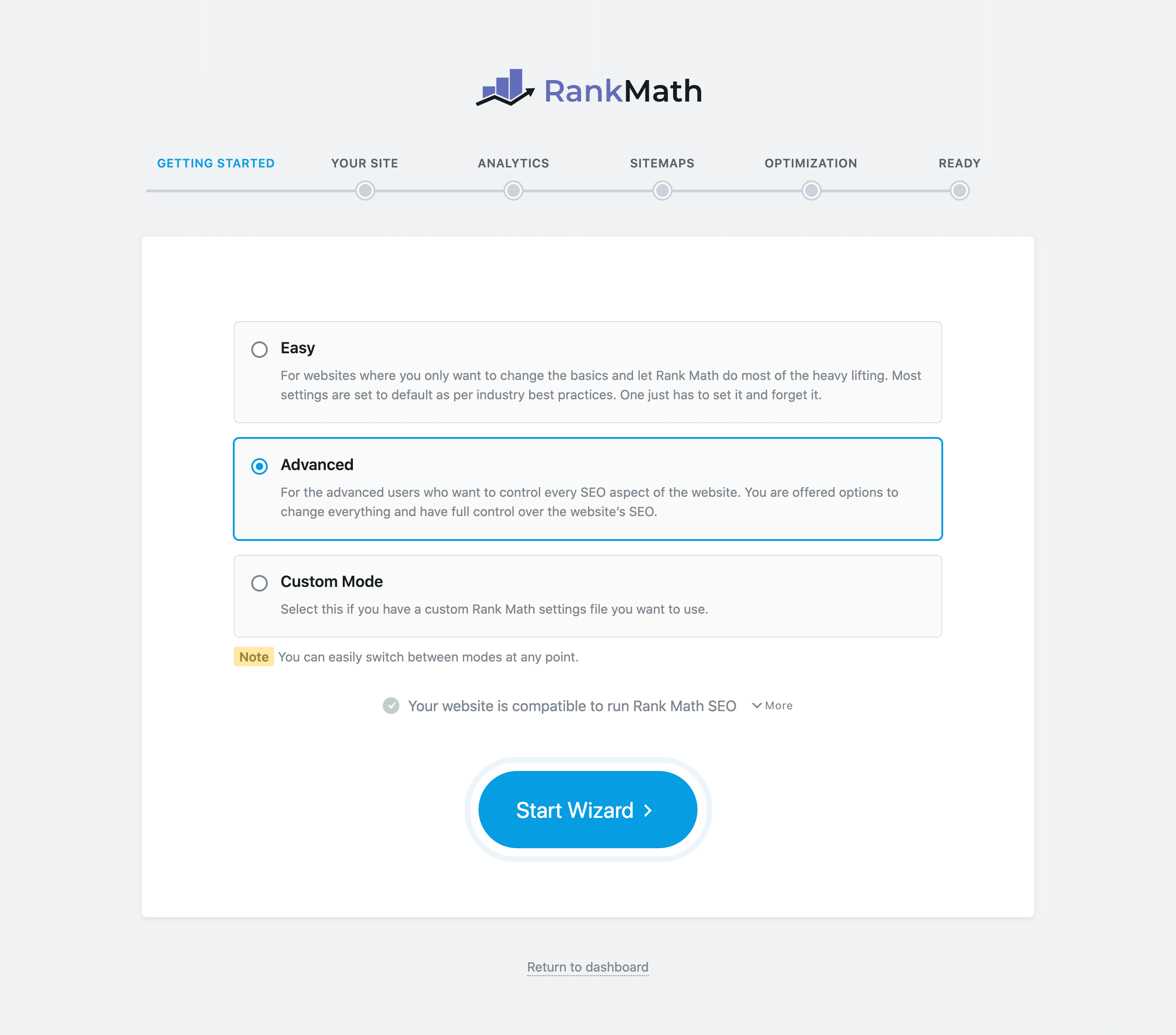
- Easy: This mode is for those who just want to customize the basic SEO settings and allows Rank Math to take care of the advanced SEO settings.
- Advanced: Want control over all the SEO settings? Perfect! You can choose the advanced mode and set every SEO setting on your own.
- Custom Mode: This is only available in the pro version and allows the upload of the Rank Math settings file.
The best thing about these modes is that you can switch anytime.
Rank Math also runs a compatibility test in this step and looks for an alternative SEO plugin. In case there is any other SEO plugin installed on your site, it will guide you to uninstall that SEO plugin. Because, at a time, you can only use one SEO plugin.
But Rank Math allows you to migrate the SEO settings from other SEO plugins such as Yoast and All-in-One SEO, as we discussed above.
Step 2: Basic SEO Settings
Here, you can optimize the basic SEO settings for your site. You can select the purpose of your site, whether it is a personal blog, personal portfolio, or business.
Enter the website name, alternative name, and the person/organization name. You can also upload the logo for Google and the default social share image.
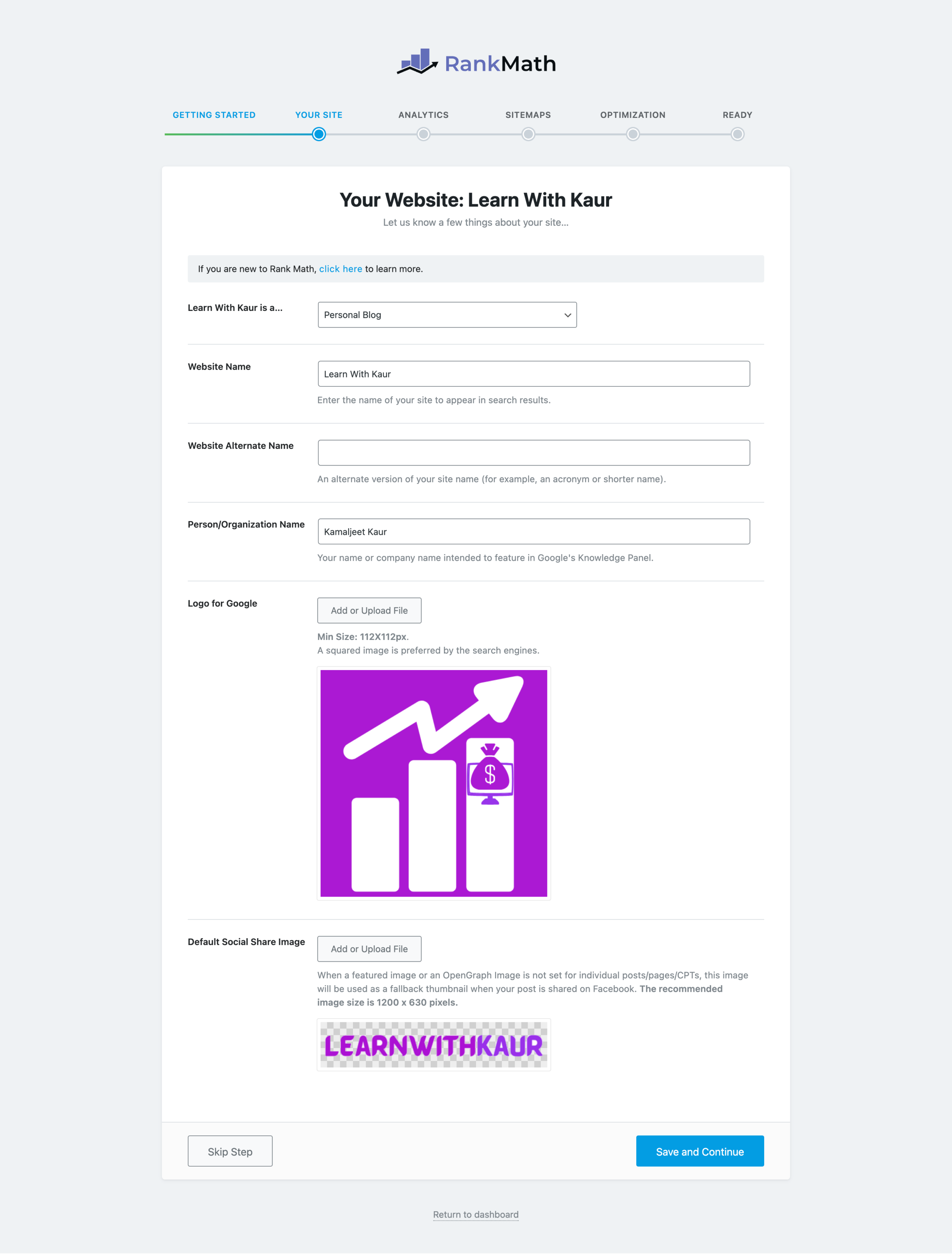
At any time, if you feel stuck, you can click to learn more to choose the best SEO settings for your site.
Setup 3: Connecting with Google Services
You can also connect your Google Search Console, Google Analytics 4, and Google AdSense with just a few mouse clicks during the setup wizard.
Once you successfully connect with the Google Search Console, it will verify your site. After successful verification, Rank Math will automatically submit a sitemap; you don’t need to worry about that.
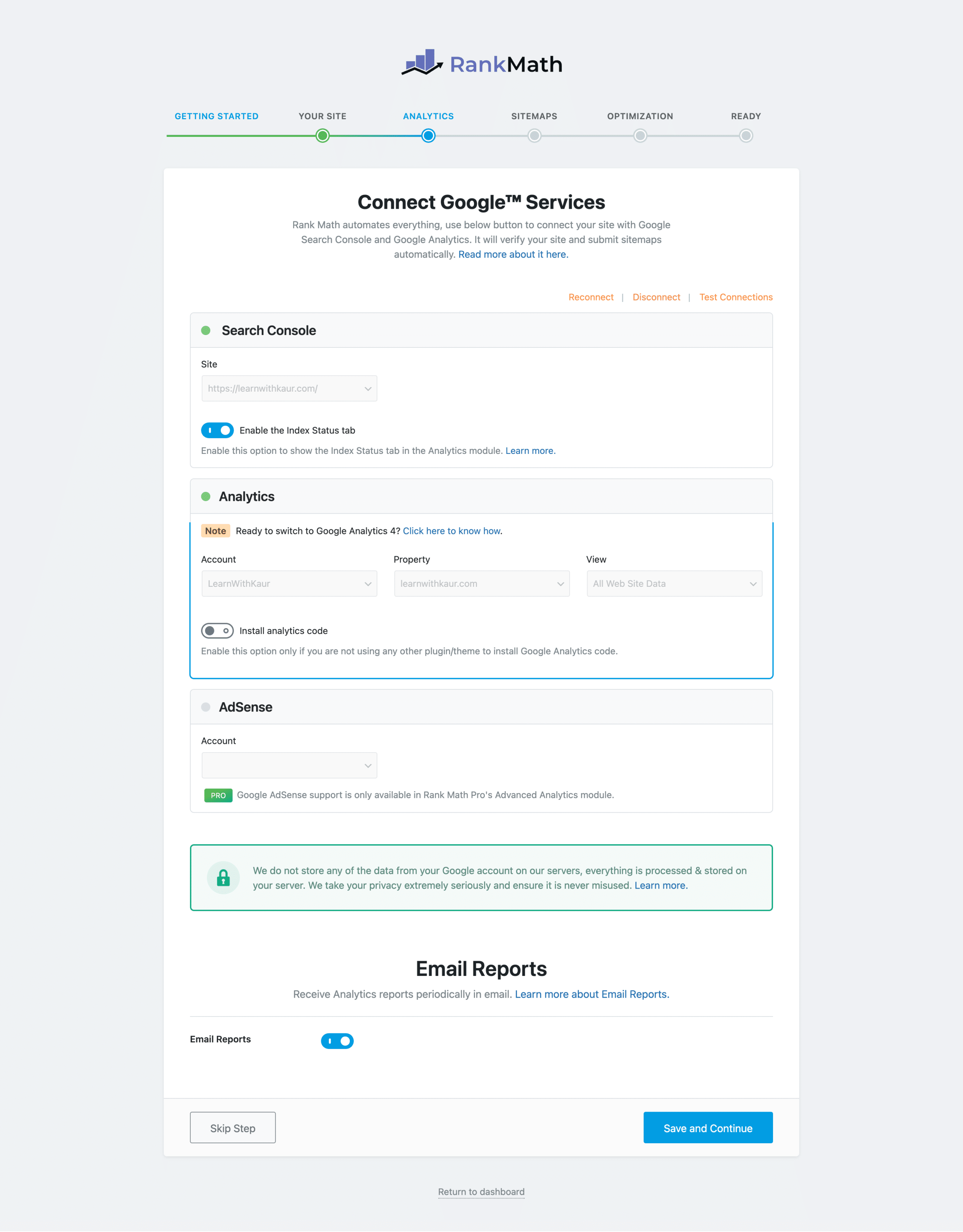
Underneath the Search console, you will get an option for enabling the Index status tab.
After turning this feature ON, you can check the index status of your posts/pages in the Analytics module of the Rank Math dashboard. It means every time, you don’t need to log in to the search console to check how many posts are indexed and crawled, you can just check right in the dashboard.
In the same way, you can also connect the GA4 to your Rank Math plugin. Plus, Rank Math also gives you an in-built option for installing analytics code. So, instead of using an extra plugin for GA4 code installation, you can simply use Rank Math to install your analytics code on your site.
With the Rank Math Pro, you can also connect with Google AdSense.
Last, you can turn ON the Email reports option if you want to receive the Rank Math analytics report directly into your mailbox.
Step 4: Configuring Sitemap Settings
In this step, RankMatah allows you to choose the configuration settings for your sitemap. You can choose to include or exclude images, posts, pages, and categories.
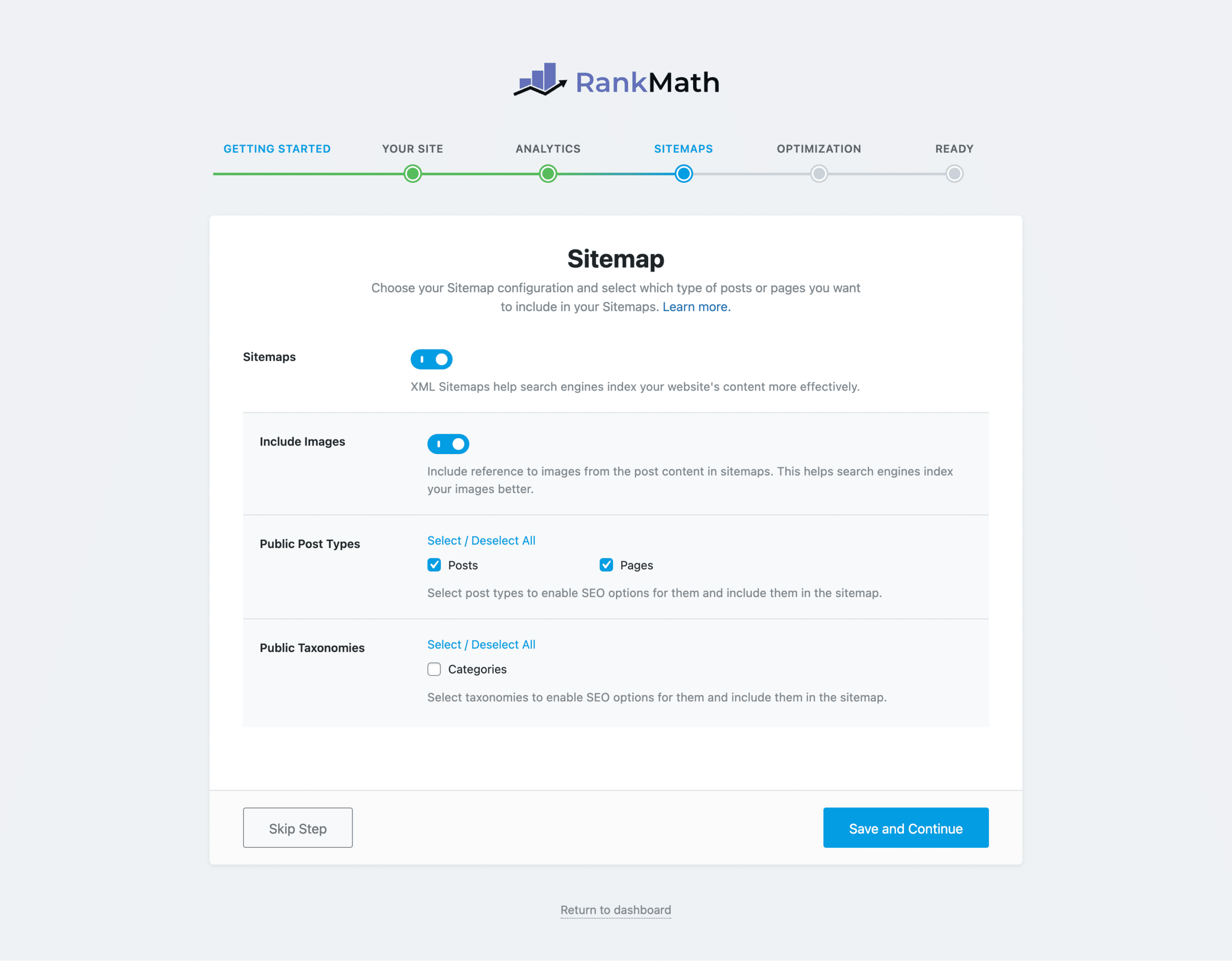
Step 5: Quick SEO Tweaks
During this step, Rank Math allows you to make some quick tweaks to your SEO settings, such as:
Automatically add Noindex to the empty category and tag archive pages: No-indexing for the empty category and tag archives page is good SEO practice because you can avoid the indexation of thin or duplicate content pages.
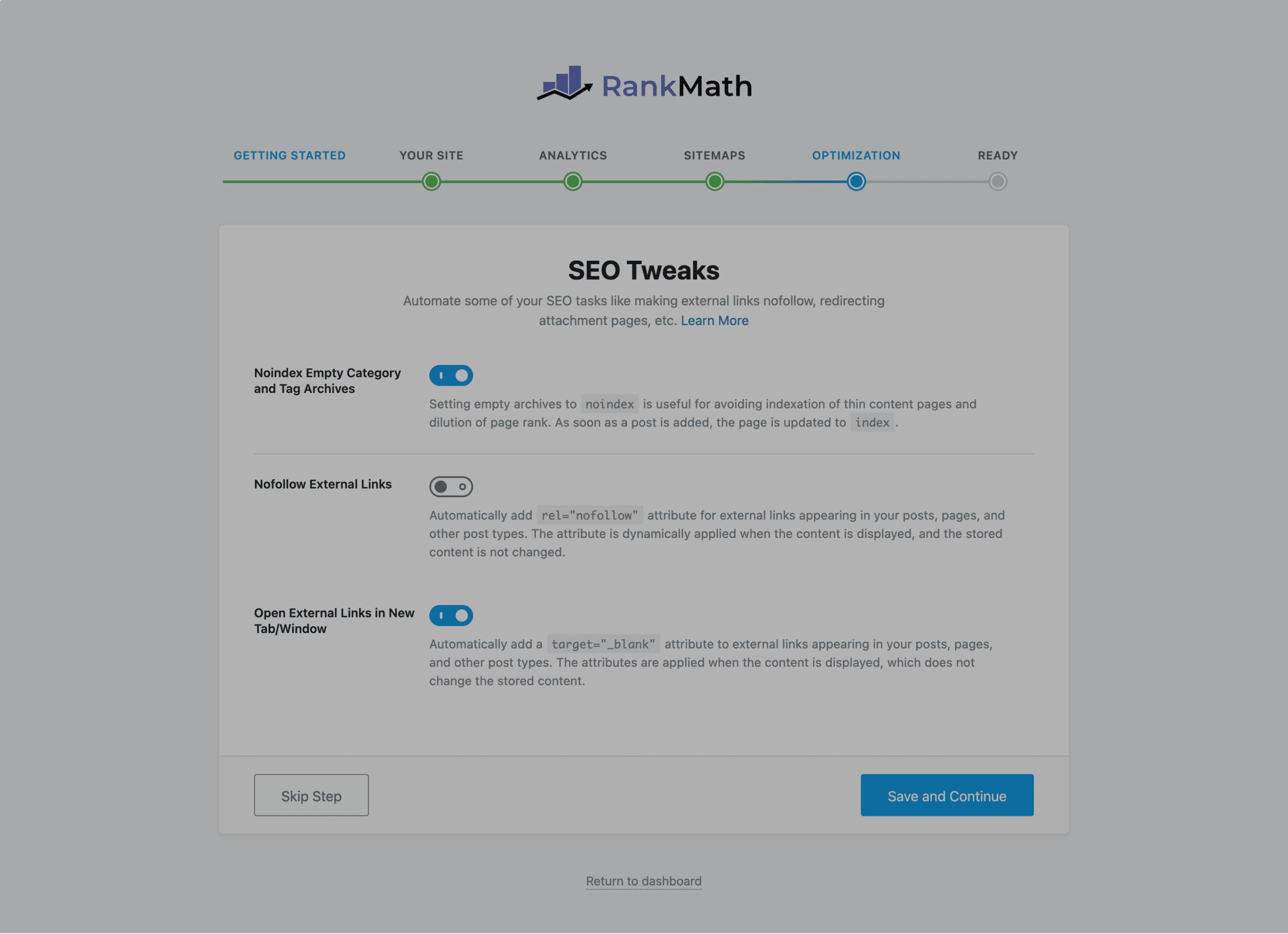
Automatically add a nofollow link to all the external links in your posts/pages. This is also quite a handy feature if you prefer adding a nofollow link to every external link.
Open External Links in New Tab/Window:
With this single click, all your external links will always be opened in a new tab/window. If you prefer opening external links in a new tab, then this is quite a time-saving feature. Instead of choosing the open link in a new tab for each link, you can automate this by turning ON this feature.
Step 6: Getting Ready
This is the last step of the setup wizard, where you can do settings like turning ON automatic updates for the Rank Math plugin and some quick links for learning.
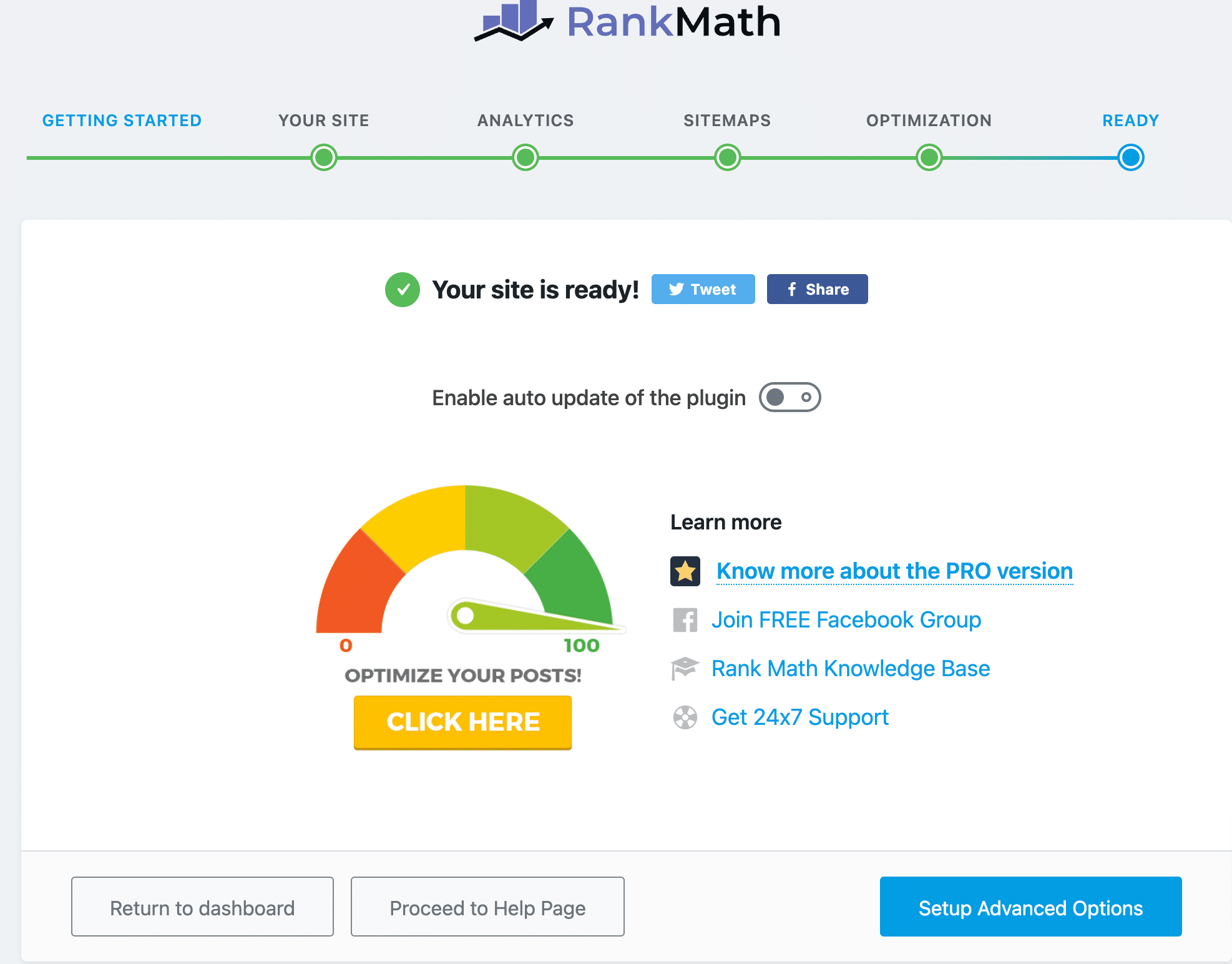
I usually prefer turning automatic updates OFF. Because, in case a plugin releases a major update, and sometimes major updates can lead to some compatibility issues, which may lead to some sort of website crash or data issue.
So, I prefer manually updating the plugin. And I can take a backup before updating. So, in case anything happens to my site, I can just roll my website back with a single mouse click.
Advanced Options
If you would like to customize more advanced settings in the quick wizard, then click “advanced options” at the last step.
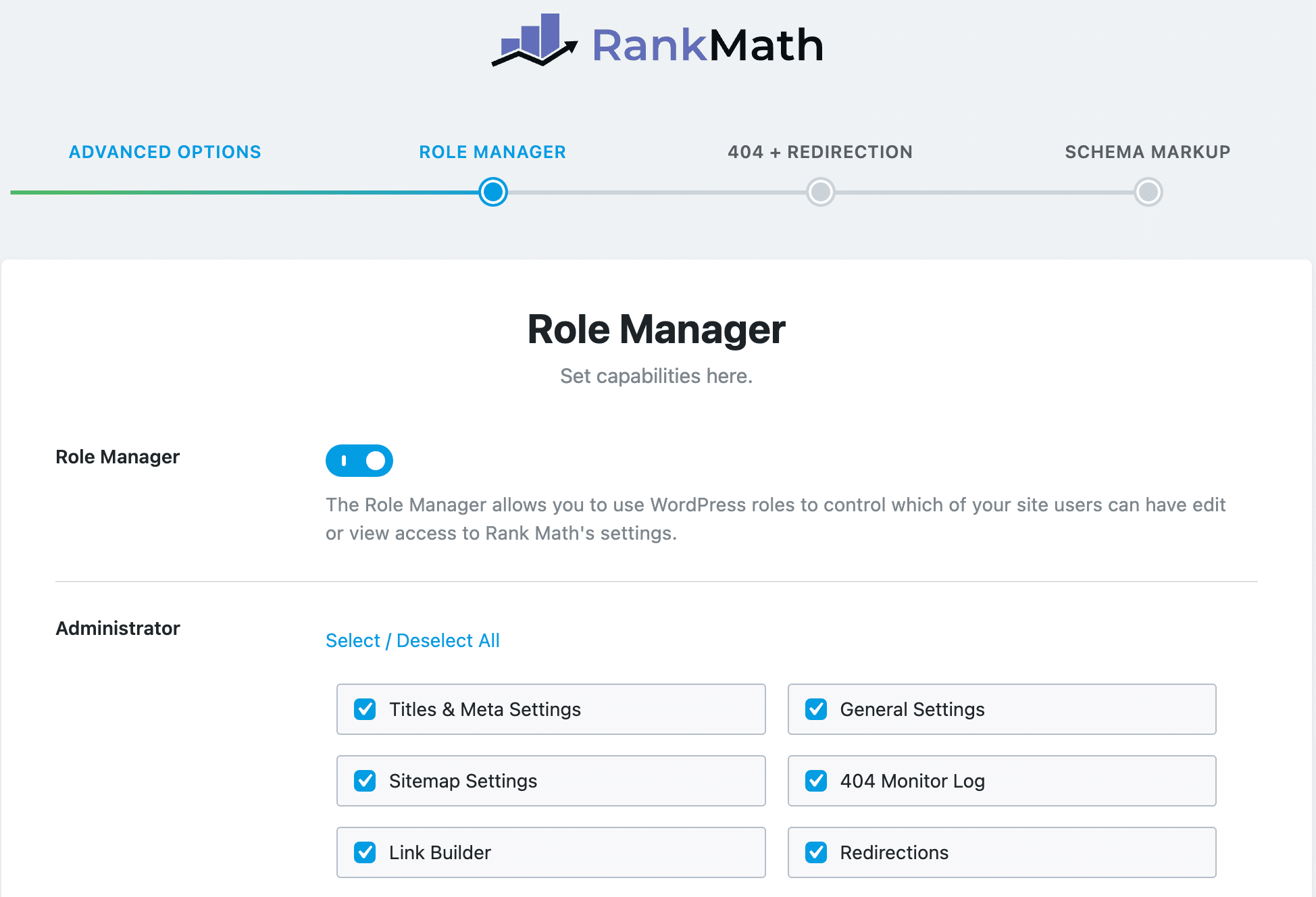
Now, you will see a couple of advanced settings, such as managing the settings for different roles, setting up 404, and redirects. Here you can also customize the schema settings based on your needs.
Rank Math Free v/s Pro
As you know, Rank Math comes in two versions: Free and Premium. So, Rank Math Pro will have a lot more features as compared to the free version.
So, let’s briefly compare the key features of Rank Math free vs pro.
| Automatically Add Alt Tags to Images | Rank Math Pro | |
|---|---|---|
| Multiple Keyword Targeting | Yes | Yes |
| On-Page SEO Analysis | Yes | Yes |
| Redirection Manager | Yes | Yes |
| 404 Monitor | Yes | Yes |
| Schema supports | Supports many schemas such as Articles, Books, Recipes, and many more. | It supports 840+ schema types. |
| Custom Schema Builder | No | Yes |
| Role Manager | Yes | Yes |
| Integration with Pages Builder like Elementor, Divi | Yes | Yes |
| Capitalize Titles | Yes | Yes |
| Automatically Add Alt tags to Images | Yes | Yes |
| Migrate from Other SEO plugins such as Yoast SEO, AioSEO, or SEOPress | Yes | Yes |
| Install Google Analytics Code | Yes | Yes |
| Client Management | No | Yes |
| XHL and HTML Sitemap | Yes | Yes |
| Google News & Video SEO SiteMap | No | Yes |
| Advanced Bulk Edit Options | No | Yes |
| Track SEO Performance of Individual Posts | No | Yes |
| Track Top 5 Winning & Losing Keywords | No | Yes |
| Track Top 5 Winning & Losing Posts | No | Yes |
| Try Free Version | Try Pro Version |
For a more detailed comparison between Rank Math Pro and the free version, you can also check out their official guide here.
Rank Math Pro Plans and Pricing
The Free version of Rank Math will not cost you even a penny, you can simply search Rank Math in your WordPress plugin directory and install it to start using it.
Otherwise, you can also download the free version of Rank Math from its official website. This is just your choice, you can choose any method that you want.
The Pro Version of Rank Math costs a subscription fee based on the plan you choose for the Rank Math Pro license.
As of now, Rank Math offers 3 pro plans, and here is a quick comparison between these plans:
| Pro | Business | Agency | |
|---|---|---|---|
| Best for | Bloggers, Individuals & Solopreneurs | Freelancers, Business, & Agency Owners | Agency Owners with a high volume of clients |
| Supports | Unlimited personal websites | 200 client websites | 750 client websites |
| Track keywords | 1,000 Keywords | 20,000 Keywords | 75,000 Keywords |
| Free Content AI Credits | 7.5K Credits | 18K Credits | 45K Credits |
| Support for Client Sites | No | 200 clients | 750 clients |
| Client Management | No | Yes | Yes |
| White Labelled Email Reports | No | Yes | Yes |
| Pricing (When paid yearly) | $7.99 per month + taxes | $24.99 per month + taxes | $59.99 per month + taxes |
Rank Math Pros and Cons
Now we have gone through a detailed review of the key features of Rank Math, and now it’s time to conclude the key pros and cons of Rank Math.
Rank Math Pros
1) Easy-to-Use Interface and Quick Onboarding:
The thing I like most about the Rank Math SEO plugin is its user interface. You can easily find features from their homepage as they are organized in a module format.
Plus, I can turn on or off the Rank Math features based on what I need or not. For example, I’m not using Video SEO or Local SEO, so I can turn this feature OFF to only see relevant settings in my user interface.
2) Many SEO Features, even in its Free Version
Rank Math is very well-known for the suite of SEO features that it comes with. Even with its free version, you will be surprised to see some of the premium features such as Redirection Manager, 404 Manager, and multiple keyword targeting.
As of now, I’m just using the Rank Math free version, but it is more than enough for me because all of the features that I need currently for optimizing my site for SEO are available in its free version.
3) No need for Additional Plugins
With Rank Math, you will no longer need any additional plugins. Such as for redirection, you don’t need to use any additional plugins anymore. Because even with Rank Math’s free version, you will get a built-in redirection manager.
So, instead of using multiple plugins for different features, you can use a single plugin for many features. I do not love using too many plugins for my website, because even a single plugin takes up space and affects the performance of speed.
So, Rank Math helps me to cut the need to use many other plugins, such as redirection manager and 404 manager.
4) Affordable
The Rank Math plugin is quite affordable. If you’re a beginner and just looking for a good SEO plugin at no cost, then Rank Math’s free version is worth checking.
Plus, the Rank Math Pro version is also quite affordable, the basic plan starts at
5) Offers Unlimited License for Personal Websites
With the Rank Math Pro plan, you can get licenses for unlimited personal websites. The pro plan costs $7.99 per month, and with this single license purchase, you can use it on your unlimited personal websites.
This is quite a cost-effective license for bloggers who have multiple blogging websites, and instead of paying for a license for each website, you can use Rank Math’s pro plan and use it on any multiple personal websites.
Rank Math Cons
1) Not having a separate readability Analysis
If you’re using or have used Yoast SEO in the past, then you might already know that Yoast SEO comes with very detailed readability analysis features along with the on-page SEO analysis.
But in Rank Math, you will not get a separate and very detailed readability analysis to improve the overall readability of your content. With Rank Math, you will only be getting a few content analysis things from the SEO perspective, but detailed readability analysis like Yoast SEO is missing in Rank Math.
2) Unlimited License is Not Available For Client Websites
Rank Math only offers unlimited license features for personal websites. But if you’re an agency, then for your client’s website, there is now an unlimited license available for you.
Either you get a business plan, which costs $24.99 for 200 client websites, or an agency plan costs $49.99 for 750 client websites.
The price is quite economical for getting a Rank Math license for multiple client websites. However, there are no unlimited licenses for client websites.